
Google Smart Bidding Update: What PPC Marketers Must Rethink

Tuba
August 19, 2026
Table of Contents
- Key takeaways
- Google's Smart Bidding Update is Here: What PPC Marketers Need to Rethink
- What Actually Changed on August 17
- How the Update Rolled Out, And What Google Clarified
- Which Campaigns Are Affected
- The Four Paths in the Bid Target Adjustment Tool
- What PPC Marketers Need to Rethink
- Why Efficiency Matters More Right Now
- How to Audit Your Account This Week
- Frequently Asked Questions
Key takeaways #
From August 17, 2026, budget-limited campaigns on Target CPA, Target ROAS, or Demand Gen Target CPC deliver toward the target you typed in, not the better number Smart Bidding was quietly finding. Google will not change your targets or budgets for you. If a campaign has been beating its target, rewrite the target to match recent actuals or a margin-based number, then wait one to two conversion cycles before judging the result.
Google's Smart Bidding Update is Here: What PPC Marketers Need to Rethink #
For years, a quiet win sat inside many Google Ads accounts. You set a Target CPA of $10, the campaign hit its daily budget cap most days, and Smart Bidding delivered conversions at $5. Nobody complained, and few people wrote the $5 down anywhere.
That win is gone. On August 17, 2026, Google began rolling out a change to how target-based bid strategies behave when a campaign is limited by budget. Ads Product Liaison Ginny Marvin announced it on June 15 as one of three bidding updates shipped together, alongside a wider rollout of Smart Bidding Exploration and a Promotion mode beta. It is the one with a hard date, and it is the one PPC management teams have argued about most.
This post covers what changed, who it affects, what Google clarified in the weeks before the rollout, and what to rethink about the way you set targets, budgets, and reporting windows.
What Actually Changed on August 17 #
Google's Help Center page describes the change plainly. Before the update, a campaign with a Limited by budget status using a target-based strategy could overperform its target and see performance swing when the budget changed. After August 17, budget-limited campaigns that use Target CPA, Target ROAS, or Target CPC on Demand Gen more consistently perform toward the bid target, including when you change the budget.
Google's own example is the one everyone repeats: a campaign with a $10 Target CPA that has recently delivered a $5 actual CPA will deliver closer to $10 once the change takes hold. The rollout runs over a few weeks rather than flipping on overnight; there is no opt-out, and Google will not adjust your targets or budgets for you. The auction itself does not change. This is a bidding change only.
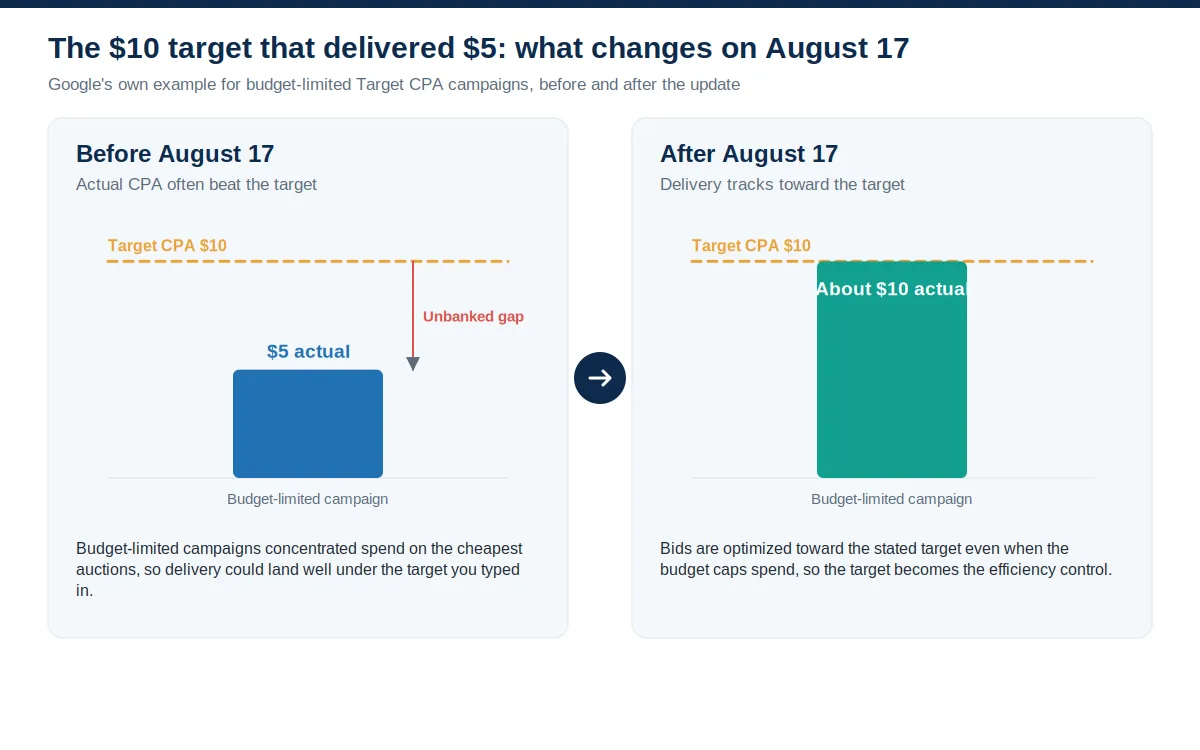
Why could a campaign beat its target in the first place? A budget-limited campaign has two instructions: don't spend more than the budget, and hit the CPA or ROAS target. When the budget runs out first, the system rations spend and naturally favors the auctions with the best expected return per dollar. The result is an actual CPA below target or an actual ROAS above it. The target was not doing the work; the budget was. After the update, the target controls efficiency and the budget only caps spend. That is the whole shift, and it is why stale targets suddenly matter.
How the Update Rolled Out, And What Google Clarified #
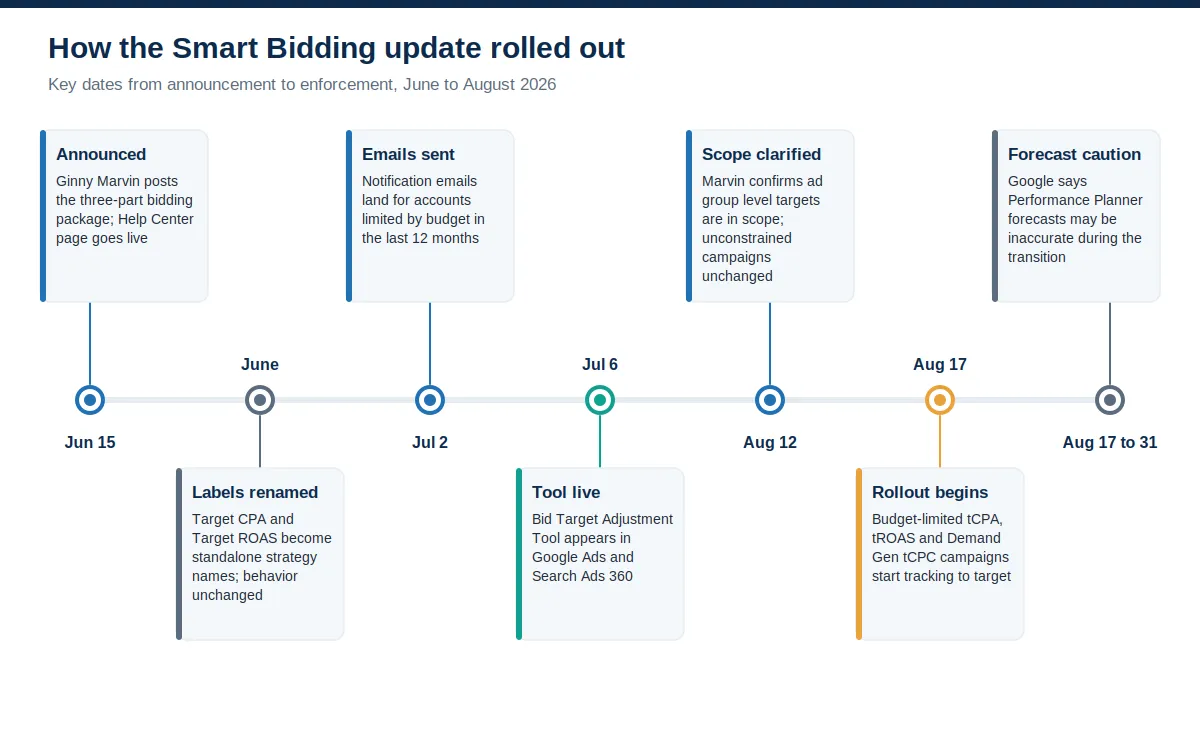
The June 15 announcement on the Accelerate with Google blog bundled three items: a global expansion of Smart Bidding Exploration to Performance Max campaigns without a product feed (plus a beta for Shopping and feed-based Performance Max), a Promotion mode beta for scheduling temporary ROAS tolerance and budget boosts around peak periods, and the bidding target change. Google's stated reason for the third item was predictability. Budget-limited campaigns fluctuated unexpectedly when advertisers raised budgets, which made it hard to scale with confidence.
The label change that landed in the same month added confusion. Google renamed the strategies so that Maximize conversions with a Target CPA now shows as Target CPA and Maximize conversion value with a Target ROAS shows as Target ROAS. That is a cosmetic change with no effect on bidding, but it arrived alongside a real behavioral change, and plenty of advertisers conflated the two.
Notification emails went out on July 2, and the Bid Target Adjustment Tool went live on July 6 for any account with a campaign that was limited by budget in the prior 12 months on an affected strategy. As pushback grew, Marvin answered questions in public. On LinkedIn, she rejected the reading that the change advised spending more, and she pushed back on the idea that it would route campaigns to lower-quality traffic. In an interview released on August 12, she confirmed that targets set at the ad group level sit inside the change, and repeated that nothing changes for campaigns not limited by budget. Optmyzr's write-up of the LinkedIn exchange captured her summary: the target will control your ROI more precisely.
Which Campaigns Are Affected #
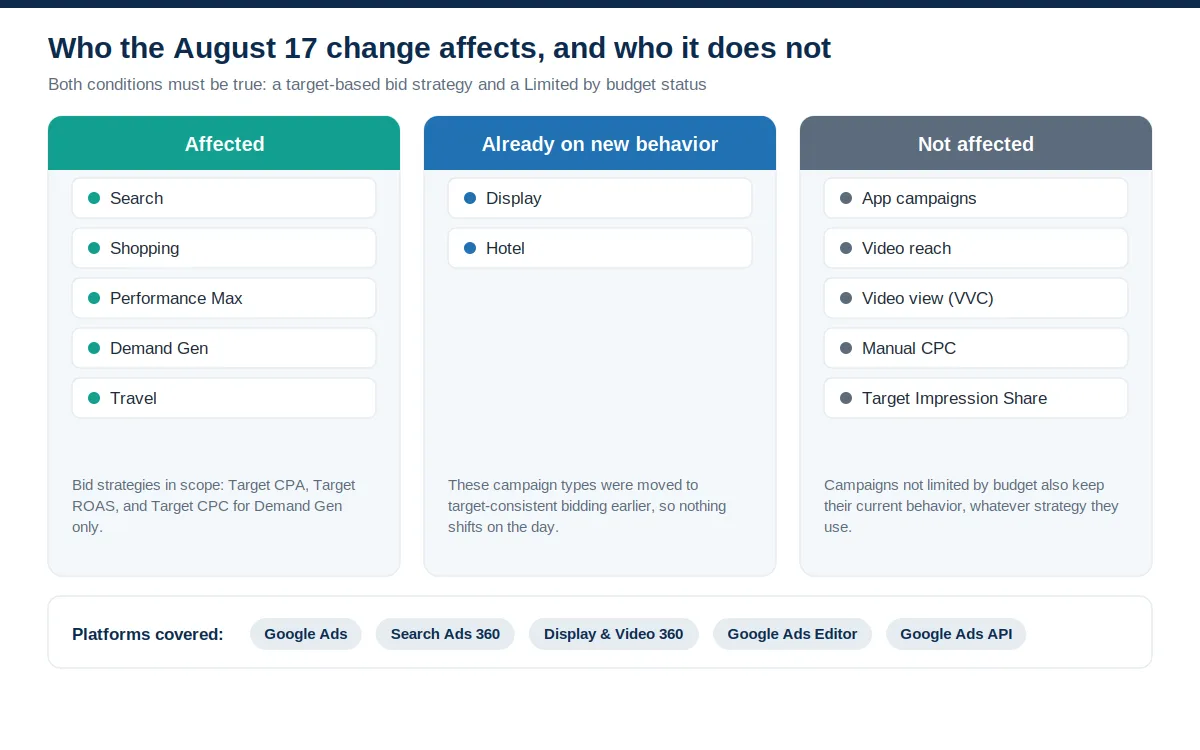
Two conditions must both be true. The campaign uses a target-based strategy (Target CPA, Target ROAS, or Target CPC on Demand Gen) and has a Limited by budget status. Google's FAQ lists Search, Shopping, Performance Max, Demand Gen, and Travel as the affected campaign types across Google Ads, Search Ads 360, Display & Video 360 for Demand Gen, Google Ads Editor, and the API. Display and Hotel already use the new behavior. App campaigns, Video reach, and Video view campaigns keep their old behavior. Manual CPC and Target Impression Share are untouched.
A few FAQ details matter more than they look. The change applies to every conversion type and source, including offline and view-through conversions. Portfolio bid strategies and shared budgets are in scope, but you must make any target change at the portfolio or shared-budget level; in a constrained shared budget, the effect is spread evenly across the group. Campaigns using a campaign total budget behave as before. Google also doesn't generate a recommended target for campaigns with fewer than seven conversions, so thin campaigns need a manual decision.
Shopping and Performance Max deserve a specific look. Feed-based campaigns are exactly where budget caps and generous ROAS targets tend to coexist, and Google warns that multi-channel campaigns may see spend redistribute across channels after the update. If you run ecommerce marketing at scale, pull channel-level Performance Max reports before and after the change so you can distinguish a bidding shift from a mix shift.
The Four Paths in the Bid Target Adjustment Tool #
The tool sits behind the Review your campaign targets banner and under each campaign's bidding settings. Google's guidance gives four choices for a campaign that has been beating its target: keep the target and accept that delivery moves toward it, apply a target that matches recent performance, enter a custom number that reflects your margins, or switch to Maximize conversions or Maximize conversion value and drop the target constraint. A fifth option runs alongside all of them: raise the budget, since Google says performance should now hold to the target as budgets increase.
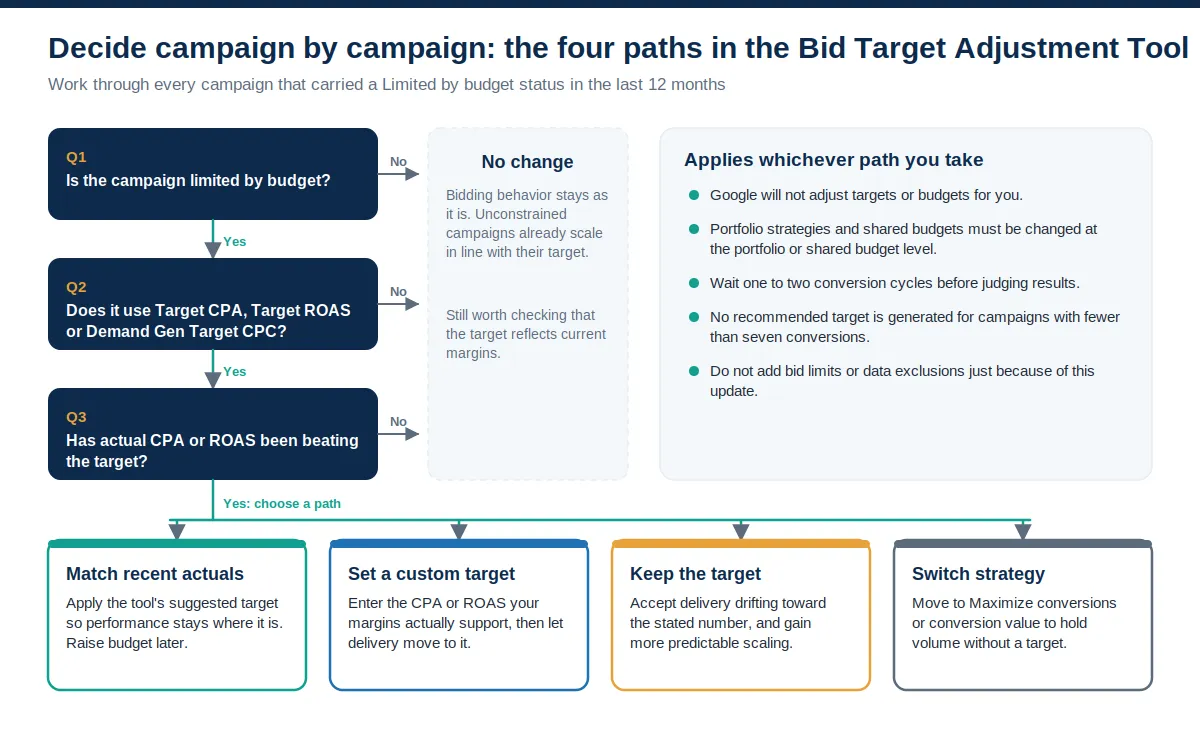
The right path depends on why the gap existed. If the target was a placeholder from a previous quarter and the campaign has been printing conversions at half of it, matching recent actuals keeps that efficiency and leaves you free to add budget later. If finance signed off on a specific CPA or ROAS, a custom target is the honest choice, even if it means giving some efficiency back for volume. If the target already reflects the business, keep it and enjoy steadier scaling. Switching to a maximize strategy is the volume play; it keeps conversions within a fixed budget but sacrifices predictability whenever the budget changes.
What PPC Marketers Need to Rethink #
1. The target is now the efficiency lever #
For budget-limited campaigns, the target used to be a loose suggestion, and the budget did the real steering. That has flipped. The target now controls ROI and the budget only controls spend. A good target becomes more useful, and a bad one costs more. If you set targets to satisfy a stakeholder rather than the P&L, this is the moment to rebuild them from margin and close rate.
2. Beating the target was never a strategy #
Plenty of accounts have been quietly banking efficiency without ever recording it. Under the old behavior, that was harmless. Under the new one, unrecorded efficiency is efficiency you lose. Pull actual CPA or ROAS over a stable window (30 days for anything with volume, 60 to 90 days for thinner campaigns) and treat that number as the real target. Write it into the account, and write the reasoning into your change log.
3. Budget buffers change meaning #
Google advises keeping a daily budget comfortably above average daily spend, so the target steers and the campaign captures all profitable demand at that target. That works for advertisers who can flex spend. For teams on fixed budgets, the same advice reads as pressure to spend more, and several practitioners said so loudly. There is a middle path: set a genuine target, give what buffer you can, and if the budget cannot move, consider whether some of it belongs in paid social or another channel where a capped budget behaves the way you expect.
4. Portfolios, shared budgets, and channel mix #
If you consolidated campaigns under portfolio strategies to pool data, remember that target changes now happen at the portfolio level, and a constrained shared budget spreads the update's effect across every campaign in the group. For Performance Max and Demand Gen, watch the channel distribution report as closely as the CPA line. A shift toward or away from Search inventory inside a Performance Max campaign is a signal, not noise.
5. Reporting windows and reflexes #
Google asks for one to two conversion cycles before judging any change, and it flags that Performance Planner and budget recommendations may be inaccurate from August 17 to August 31 while the new behavior settles. It also warns against adding bid limits or data exclusions purely in reaction to the update. One older reflex can go: the rule of thumb about never moving a target more than 20% at a time. Google now says Smart Bidding reacts to large and small target changes in real time. Move once, deliberately, and then measure.
Why Efficiency Matters More Right Now #
The update landed in a market where paid search is still growing and getting slightly more efficient. Alphabet's second-quarter 2026 results, released July 22, 2026, put Google Search and other revenue at $63.3 billion, up 17% year over year. Demand for the auction is not softening. On the advertiser side, WordStream by LocaliQ's 2026 benchmarks, published May 19, 2026, from more than 13,000 US search campaigns, showed average CPC edging up to $5.42 while conversion rate rose to 8.18% and cost per lead fell to $66.69, the first decline WordStream has recorded in five years.
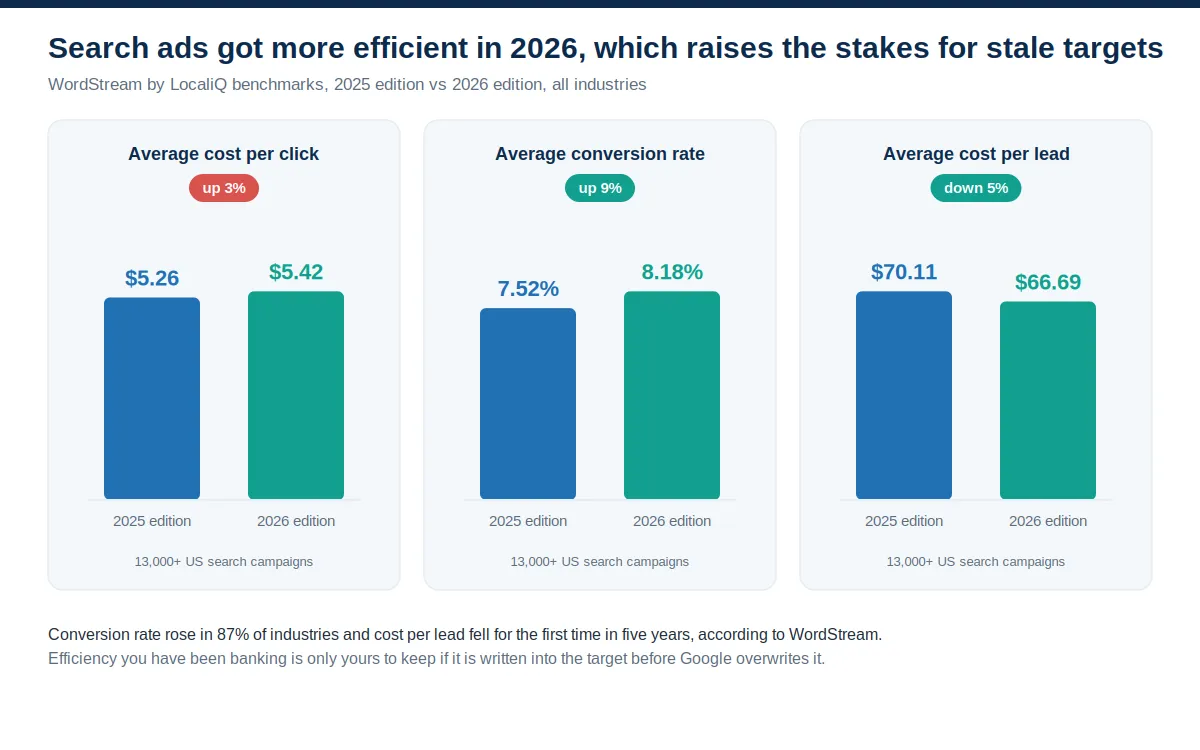
Efficiency is also unevenly distributed. Optmyzr's Q1 2026 benchmark report, published May 14, 2026, across 21,000 accounts, found accounts spending $10,000 to $50,000 a month delivered 566% ROAS, while accounts spending $50,000 or more delivered 377%. The same team's earlier research across more than 14,000 accounts found Smart Bidding tends to beat manual and auto bidding once a campaign feeds it 50 or more conversions a month. Put together, the picture is simple: the algorithm works, conversion quality is improving, and the gains are yours to keep only if the target says so.
That is also why the work does not stop at the bid strategy. Better conversion rates come from conversion rate optimization on the pages the ads send people to, and from clean conversion tracking that feeds Smart Bidding real value rather than form-fill counts. And if paid efficiency slips for a quarter while targets settle, organic search keeps the pipeline moving without an auction price attached.
How to Audit Your Account This Week #
The change is live, but the rollout runs for weeks, and Google says targets can be adjusted at any point, before or after. That leaves room to do this properly. Work through the following in order.
Pull every campaign that carried a Limited by budget status in the last 12 months. Google's notification uses that window, and a campaign that capped out during Q4 peak may still be running with a target set for that constraint.
Keep only Target CPA, Target ROAS, and Demand Gen Target CPC campaigns. Drop everything else from the list, including Maximize strategies without a target and anything on manual CPC.
Put actual next to target over a stable window: 30 days for real volume, 60 to 90 days for thinner campaigns and long conversion delays. Note where the target sits at the ad group level, since those are in scope too.
Rank by money at stake, not by gap size. Multiply monthly spend by the share of efficiency above target. A 20% gap on $80,000 a month outranks a 50% gap on $400 a month every time.
Choose a path per campaign in the Bid Target Adjustment Tool: match recent actuals, set a margin-based custom target, keep the target, or switch to a maximize strategy. Log the reason.
For portfolios and shared budgets, make the change at the portfolio or shared budget level. For Performance Max and Demand Gen, snapshot channel distribution before you touch anything.
Wait one to two conversion cycles, then read the bid strategy report. Do not add bid limits or data exclusions in the meantime, and treat any Performance Planner forecast from the second half of August as directional at best.
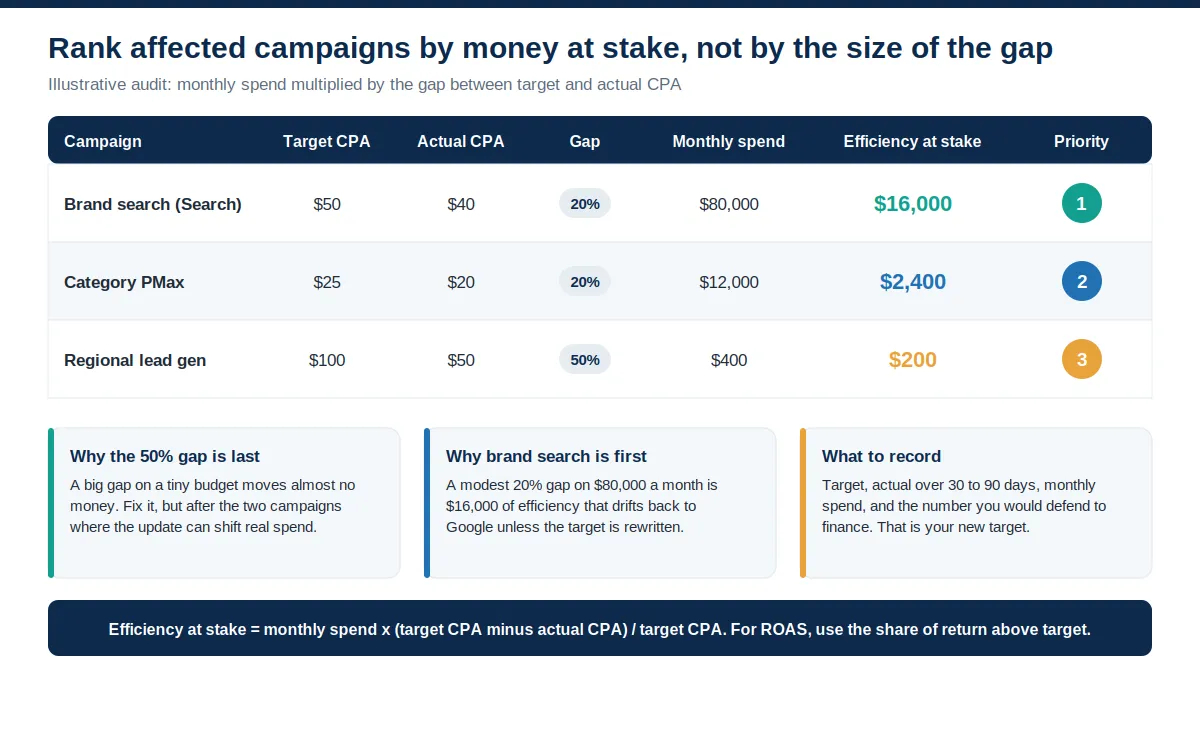
Prioritize the audit by money at stake, using spend multiplied by the gap.
The last question in the audit is the one Google cannot answer for you: was the over-delivery a deliberate strategy or a number nobody updated? If it was strategy, write it down as the target. If it was drift, this update just handed you a reason to fix it. Either way, the accounts that come out ahead are the ones where the target finally means what the business means. If you would rather have a second pair of eyes on the numbers before you commit, our paid search team runs this audit as a matter of course, and it usually takes an afternoon.
Frequently Asked Questions #
What is Google's Smart Bidding update?
It changes how target-based bid strategies behave when a campaign is limited by budget. From August 17, 2026, budget-limited campaigns using Target CPA, Target ROAS, or Demand Gen Target CPC are optimized more consistently toward the target the advertiser set, including when budgets change. Campaigns that had been beating their target will drift toward it unless the target is updated.
When did the Smart Bidding update take effect?
Google announced the change on June 15, 2026, and began rolling it out on August 17, 2026. The rollout continues over a few weeks, and Google says forecasts in tools such as Performance Planner may be less accurate between August 17 and August 31 while systems adjust.
Which campaigns are affected by the August 17 bidding change?
Search, Shopping, Performance Max, Demand Gen, and Travel campaigns that use Target CPA, Target ROAS, or Demand Gen Target CPC and carry a Limited by budget status. Display and Hotel campaigns already use the new behavior. App campaigns, Video reach, and Video view campaigns keep their previous behavior.
Does the update affect campaigns that are not limited by budget?
No. Google states that Target CPA and Target ROAS campaigns with unconstrained budgets already scale to their stated target and will continue to behave that way. The change brings budget-limited campaigns into line with them.
Will the Smart Bidding update increase my spend?
Google says no. Daily and monthly budget limits are still respected. What can change is efficiency: a campaign that was delivering a $5 CPA against a $10 target may now deliver closer to $10 within the same budget, which means fewer conversions for the same spend if the target is left alone.
What is the Bid Target Adjustment Tool?
It is a review tool inside Google Ads and Search Ads 360 that went live on July 6, 2026. It lists campaigns that were limited by budget over the last 12 months on an affected strategy, shows recent performance against the target, and lets you keep the target, apply a target based on recent performance, or enter a custom number.
Should I change my targets now that the update is live?
Review every affected campaign and decide one by one. If recent actuals were better than the target and you want to keep that efficiency, move the target to recent actuals or to a margin-based number. Google says Smart Bidding responds to both large and small target changes in real time, then wait one to two conversion cycles before judging results.
Does the change apply to Performance Max and Demand Gen?
Yes. Both are in scope when they use a target and are limited by budget. Google notes that multi-channel campaigns such as Performance Max and Demand Gen may also see spend shift between channels after the update, so channel-level reports are worth watching.
Is Smart Bidding Exploration affected?
Generally not. Google says Smart Bidding Exploration works best with unconstrained budgets, while the August 17 change targets budget-limited campaigns. Google separately expanded Exploration in June 2026 to all Performance Max campaigns without a product feed, with a beta for Shopping and feed-based Performance Max.
How long should I wait before judging performance after changing a target?
Google recommends waiting one to two conversion cycles before evaluating results in the bid strategy report. It also advises against adding bid limits or data exclusions purely in response to the update, since those can cause fluctuations of their own.