How to Measure AI Search Traffic in GA4: Track ChatGPT, Gemini and Perplexity (2026)
SEO Specialist · July 24, 2026
Table of Contents
- Key Takeaway
- AI Search Traffic Is Hiding in Your GA4 Reports. Here Is How to Find It
- What Counts As AI Search Traffic, and How Big it Really Is
- Why GA4 Buries These Visitors By Default
- The Native AI Assistant Channel: What Changed in May 2026
- Build a Custom Channel Group for Complete Tracking
- Know the Referrer Domains Behind Each Platform
- Verify the Setup and See Which Pages AI Actually Cites
- Add Search Console for the Zero-Click Side
- What Good Numbers Look Like in 2026
- Frequently Asked Questions
- What is AI search traffic?
- Does GA4 track ChatGPT traffic automatically?
- Why does Perplexity traffic still show up as Referral?
- What is dark AI traffic?
- Is GA4's AI Assistant channel retroactive?
- Do custom channel groups apply to historical data?
- How do I see which pages AI visitors land on?
- How much traffic should AI search send in 2026?
- Do AI search visitors convert better than organic visitors?
- How often should I update my AI tracking regex?
Key Takeaway #
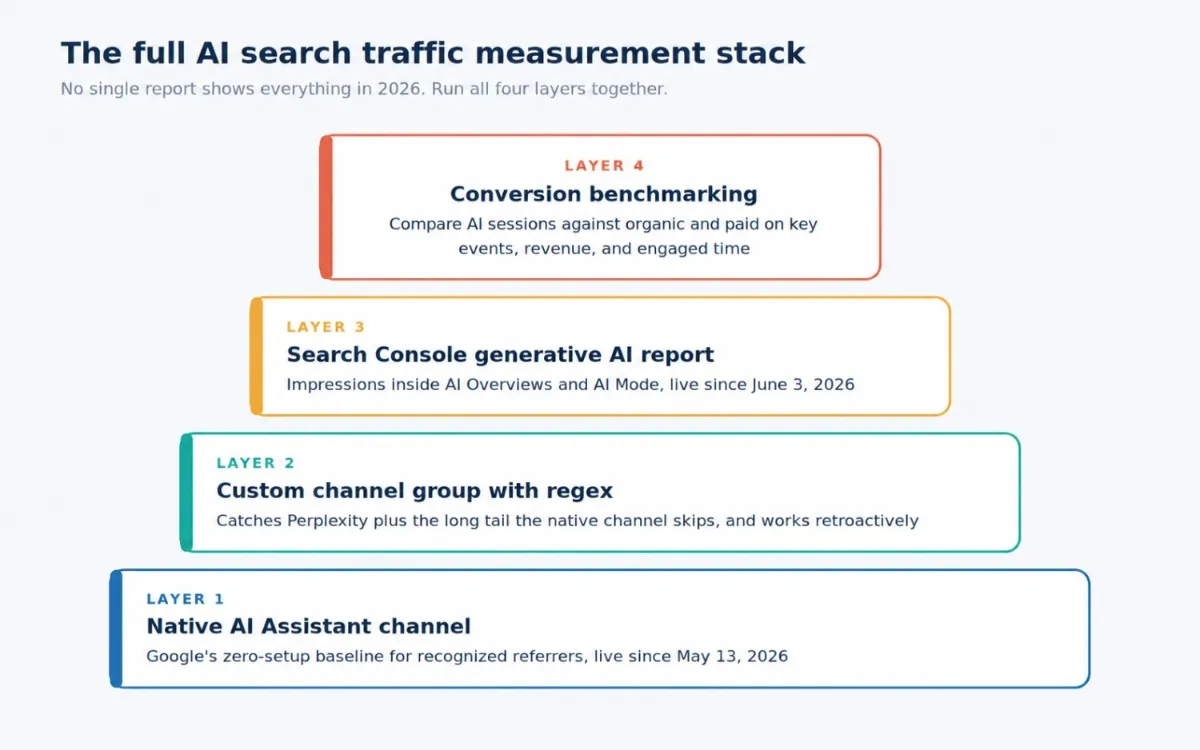
AI search traffic stopped being a curiosity somewhere in 2025 and became a channel in 2026, one that Google now acknowledges inside GA4 itself. The setup that captures it properly is modest: accept the native AI Assistant channel as your baseline, add a custom channel group with a maintained regex to capture everything it misses, monitor the zero-click side in Search Console, and judge the results by conversion quality rather than session counts. Do that once, review it quarterly, and you will have answers ready the next time someone asks what ChatGPT is sending you. If you would rather have a partner who watches this data shift every week and turns it into pipeline, that is exactly the kind of help you should bring in before the channel gets crowded.
AI Search Traffic Is Hiding in Your GA4 Reports. Here Is How to Find It #
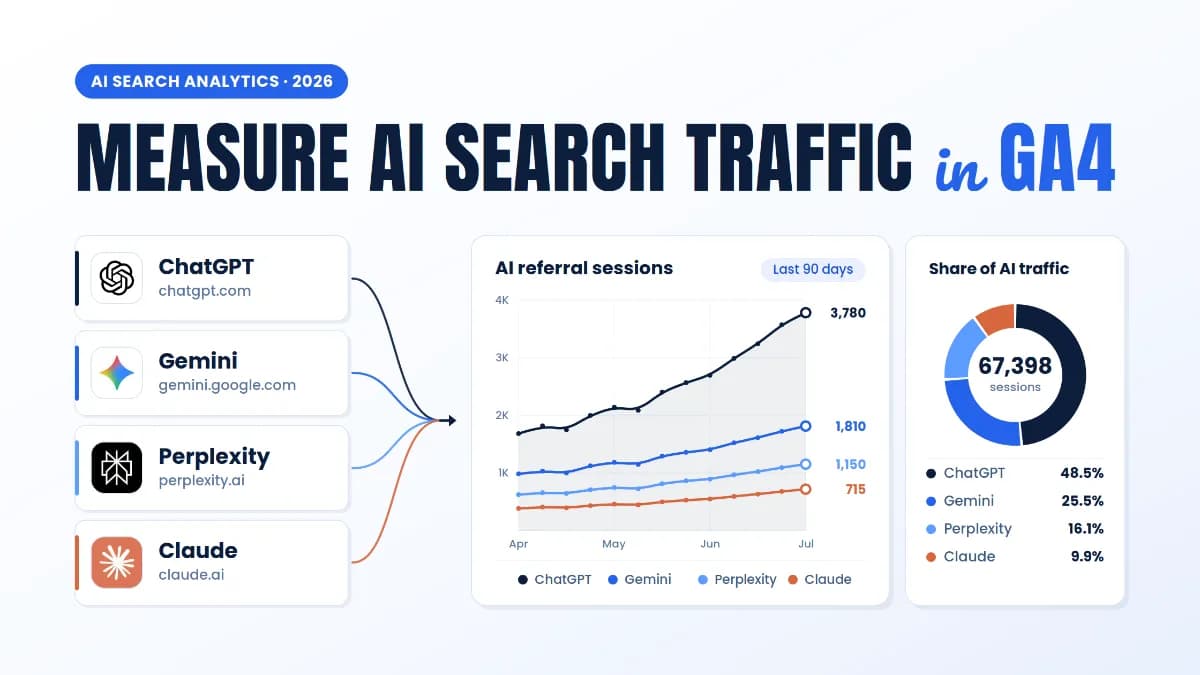
Open your GA4 property and search the channel list for ChatGPT. Until May 2026, nothing came up. Visitors clicking through from ChatGPT, Gemini, and Perplexity were real, and their numbers were climbing every month, but Google Analytics filed them under Referral or Direct, where nobody thought to look.
Google finally shipped a native fix, and it helps. It also misses more than most teams realize. This guide walks through the whole setup: what the new AI Assistant channel catches on its own, the ten-minute custom channel group that fills its gaps, the exact regex to paste in, and the 2026 benchmarks that tell you whether your numbers are actually good.
What Counts As AI Search Traffic, and How Big it Really Is #
AI search traffic is the stream of sessions that start when someone clicks a link inside an AI assistant's answer. Someone asks ChatGPT for the best project management tool for a small agency. The answer cites your comparison page; when they click, they land on your site. That click is AI search traffic. Clicks on Google's AI Overviews are related but separate, and we will get to why that distinction matters.
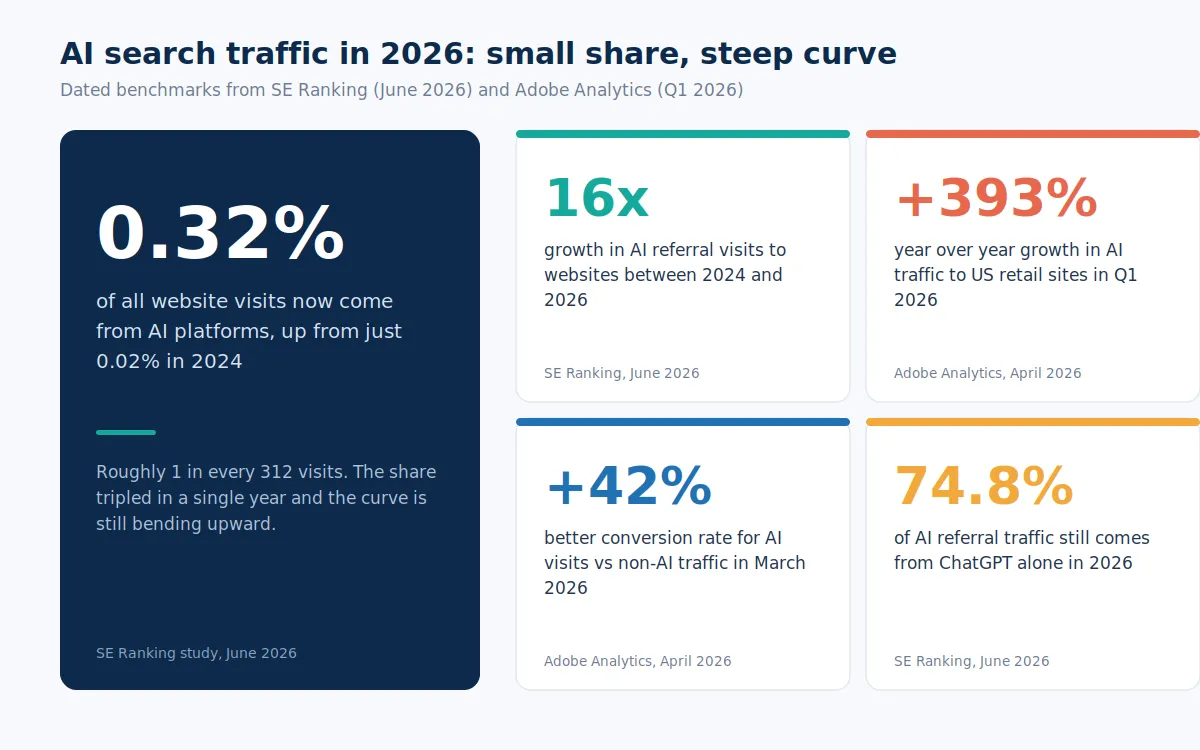
The volume is small, and the trajectory is not. SE Ranking's June 2026 study put AI platforms at 0.32 percent of all website visits in 2026, up from 0.24 percent in 2025 and just 0.02 percent in 2024. That is a 16x jump in two years, roughly one in every 312 visits. The same study found that ChatGPT still drove 74.8 percent of all AI referrals, with Gemini growing 231 percent year over year to claim second place, and Perplexity's US share slipping from 11.4 to 6.9 percent.
Commerce data is steeper still. Adobe's Q1 2026 analysis, drawn from over one trillion visits to US retail sites, measured AI traffic up 393 percent year over year in the first quarter, on top of a 693 percent surge during the November and December 2025 holiday season. If your generative engine optimization work is starting to earn citations, these are the visitors it produces, and right now most of them are invisible in your reports.
Why GA4 Buries These Visitors By Default #
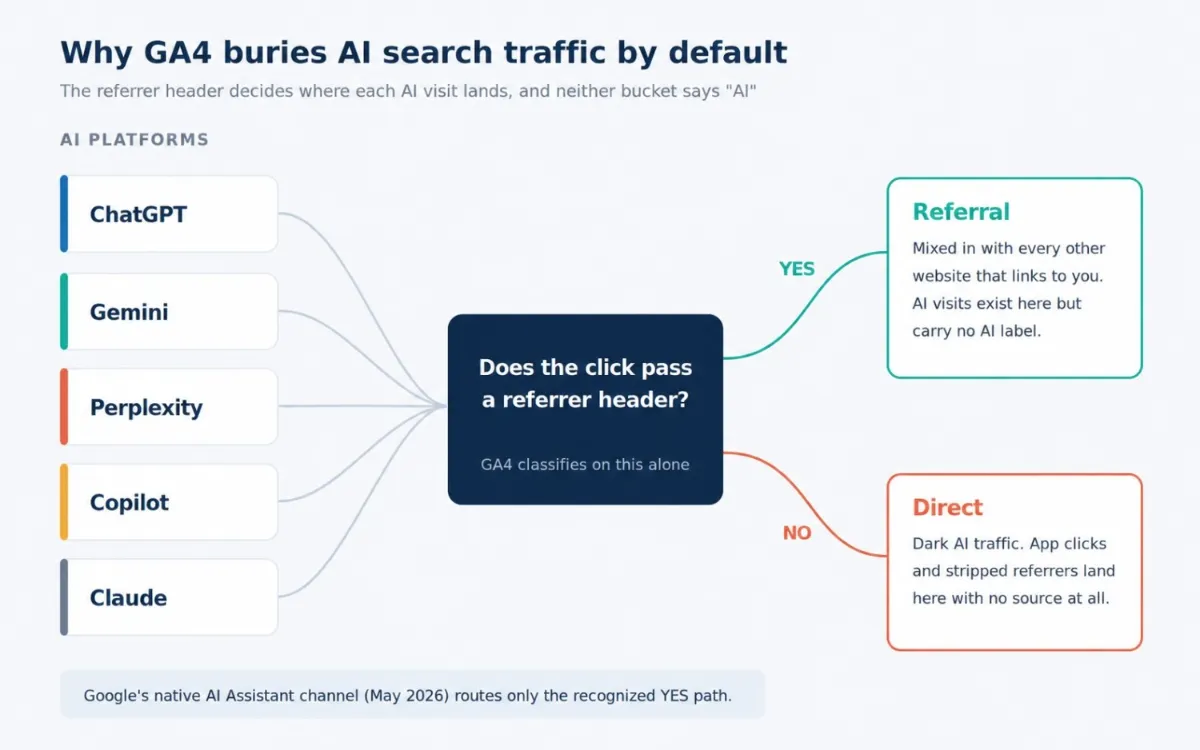
GA4 never asks whether a visit came from an AI assistant. It asks one narrower question: did the click arrive with a referrer header, and does that header match anything GA4 can classify? For years, the answer for AI platforms was no, so every AI visit fell into one of two unlabeled buckets.
Referral. When the click passes a referrer like chatgpt.com, GA4 files the session under Referral, mixed in with every other website that happens to link to you. The visit exists in your data. It just doesn't carry an AI label, so it never shows up when someone asks what ChatGPT is sending.
Direct. When the click passes no referrer at all, the session lands in Direct with no source information. This happens constantly with AI platforms: native mobile apps strip referrers, in-app browsers drop them, and plenty of people copy a cited link and paste it into a new tab. Practitioners call this "dark AI traffic," meaning that whatever number you measure is a floor, not a ceiling.
The Native AI Assistant Channel: What Changed in May 2026 #
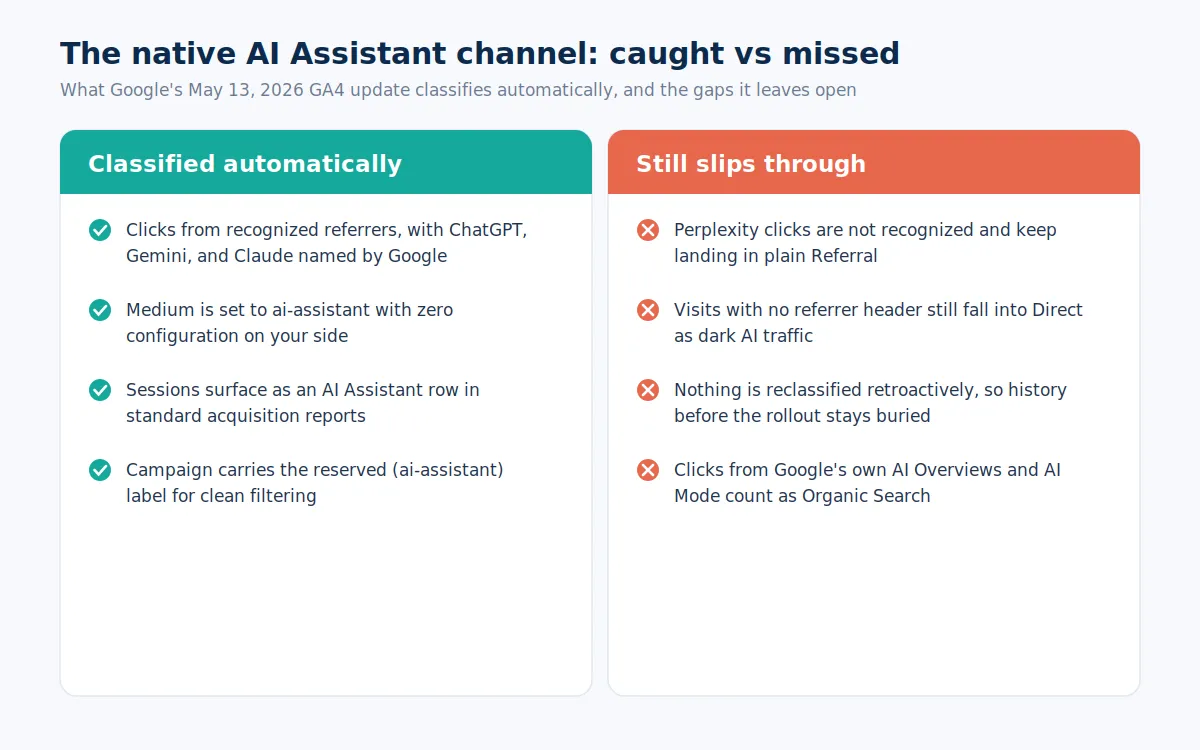
On May 13, 2026, Google added an AI Assistant channel to GA4's Default Channel Group, confirmed in the Analytics Help Center release notes. When GA4 detects a referrer matching a recognized AI assistant, three things now happen automatically: the medium is set to ai-assistant, the session is grouped under the new AI Assistant channel, and the campaign receives the reserved (ai-assistant) label. Google named ChatGPT, Gemini, and Claude as examples of recognized sources. No configuration is required, and the rollout reached most properties by early June 2026.
To see it, open Reports, then Acquisition, then Traffic acquisition, and set the primary dimension to Session default channel group. If your site has received a qualifying click since the rollout, AI Assistant appears as its own row next to Organic Search and Referral. Add Session source as a secondary dimension to split the row by platform.
That is genuine progress, and it is not the full picture. Four gaps remain, and each one hides traffic you probably want counted:
Perplexity is not on Google's recognized list, so its clicks keep landing in plain Referral.
The channel is forward-only. Nothing before the rollout gets reclassified, so your history stays buried in Referral and Direct.
Dark AI traffic is untouched. A session with no referrer still falls into Direct, native channel or not.
Clicks from Google's own AI Overviews and AI Mode are counted as Organic Search, not as AI traffic.
Default channel groups also cannot be edited, so you cannot add Perplexity to Google's list yourself. Teams that treat the native channel as the complete answer are reporting only a fraction of their actual footprint, which quietly undersells the AI SEO work that earned those citations in the first place. The fix is to run a custom channel group alongside it.
Build a Custom Channel Group for Complete Tracking #
A custom channel group sits next to the default one rather than replacing it, and it fixes the two biggest gaps at once: it catches platforms Google skips, and it applies retroactively, because custom groups are computed at reporting time rather than stamped on sessions as they arrive. You need Editor or Administrator access, and the whole build takes about ten minutes.
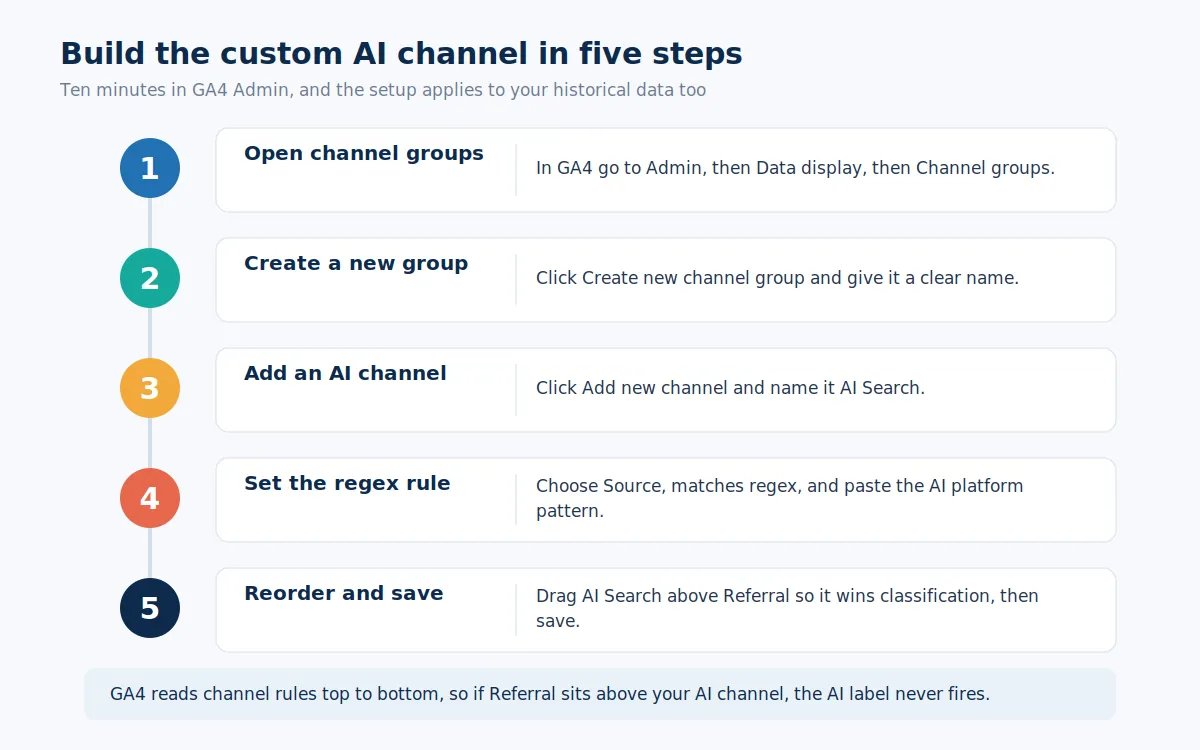
Open channel groups. In GA4, go to Admin> Data display> Channel groups.
Create a new group. Click Create new channel group. GA4 copies the default channels as your starting point, so everything else keeps working.
Add an AI channel. Click Add new channel and name it AI Search.
Set the rule. Add a condition on Source, choose Matches regex, and paste the pattern below.
Reorder and save. Drag AI Search above Referral, then save. GA4 evaluates channel rules top to bottom, so if Referral sits higher, it claims every AI session first and your new channel stays empty.
Here is a working pattern covering the platforms that send measurable traffic in 2026:
chatgpt\.com|chat\.openai\.com|gemini\.google\.com|perplexity\.ai|copilot\.microsoft
\.com|edgeservices|claude\.ai|grok\.com|deepseek\.com|meta\.ai|you\.com|phind\.com
Two practical notes. GA4 regex matching is case-sensitive, so if your source report shows both ChatGPT and chatgpt, cover the variants you actually see. And resist the urge to delete the native channel's work: keep both, and treat the custom group as the wider net.
Know the Referrer Domains Behind Each Platform #
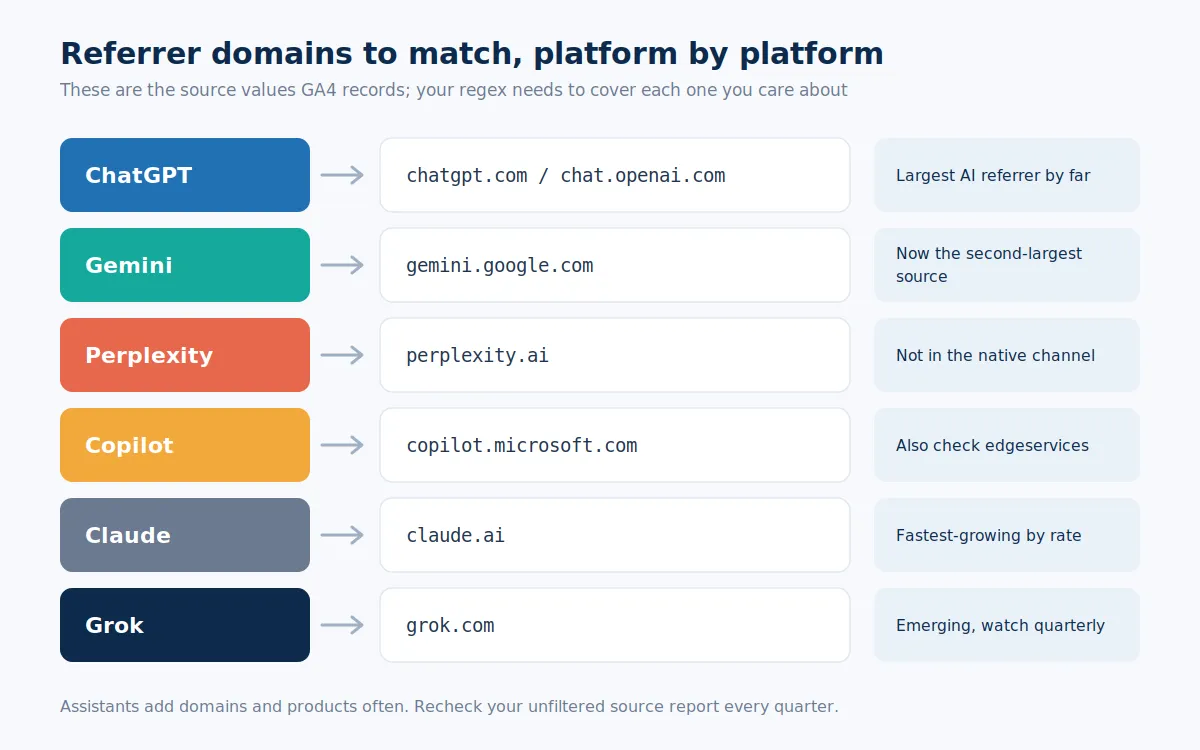
The regex is only as good as the domain list it contains, and that list is not static. ChatGPT traffic arrives from chatgpt.com and the older chat.openai.com. Gemini sends from gemini.google.com. Perplexity uses perplexity.ai; Copilot arrives from copilot.microsoft.com with some sessions tagged to edgeservices; Claude sends from claude.ai; and Grok from grok.com.
To find anything you are missing, open Traffic acquisition, switch the dimension to Session source/medium, and scan the unfiltered table for names you recognize. Any AI source that appears there but is absent from your pattern goes into the next revision. Put a quarterly reminder on it: assistants launch new products and domains often enough that a set-and-forget pattern goes stale within a couple of quarters.
Verify the Setup and See Which Pages AI Actually Cites #
Give the new channel group a day to populate, then check it two ways. First, open Traffic acquisition, switch the primary dimension to your custom group, and confirm AI Search shows sessions. Second, compare it against the native AI Assistant row. Your custom channel should be at least as large, since it covers everything the native list does, plus Perplexity and the long tail. If it is smaller, your rule order is wrong, or the regex has a typo.
Then go one level deeper, because the real prize is knowing which pages earn citations. Build a free-form report in Explore: filter Session source by your AI regex, set Landing page as the row dimension, and add Sessions, Engaged sessions, and Key events as metrics. The pages that surface are the ones assistants already trust. That list should directly steer your content-writing priorities, since expanding and updating already-cited pages is the shortest path to greater AI visibility.
Add Search Console for the Zero-Click Side #
GA4 only sees people who click. Most AI answers end without one, so pair your click data with visibility data. On June 3, 2026, Google launched Search generative AI performance reports in Search Console, with dedicated views that show how often your pages appear in AI Overviews, AI Mode, and generative features in Discover. The first version reports impressions by page, country, and device, but no clicks yet, and access is still expanding across properties.
Read together, the two tools answer different halves of one question. Search Console shows how visible you are inside Google's AI layer; GA4 shows what happens when visibility turns into a visit. A page with heavy AI impressions and thin AI sessions is being read and summarized without being clicked, which is a signal to strengthen what only your site can offer, a job for your broader SEO strategy rather than your analytics.
What Good Numbers Look Like in 2026 #
Once the data flows, judge it on quality before volume. Across most industries, AI referrals in 2026 are between a few tenths of a percent and about 1% of total sessions, so this is a small share. The visitors themselves are another story. Adobe's March 2026 retail data showed AI traffic converting 42 percent better than non-AI traffic, a complete reversal from a year earlier when it converted 38 percent worse, with AI visitors also spending 48 percent more time on site and viewing 13 percent more pages. Similarweb's clickstream data from April and May 2026 found ChatGPT referrals converting at 7.1 percent, second only to paid search at 7.8 percent and ahead of organic, email, and social.
So benchmark your AI Search channel against your paid search and organic rows on conversion rate, engaged time, and revenue per session, not on raw sessions. If AI visitors convert well but land on weak pages, that is a conversion rate optimization problem worth solving early, because these arrive pre-qualified: they already asked their question, read a synthesized answer, and chose you from it.
Frequently Asked Questions #
What is AI search traffic? #
AI search traffic is the set of website sessions that begin when someone clicks a link inside an AI assistant's answer, from platforms like ChatGPT, Gemini, Perplexity, Copilot, and Claude.
Does GA4 track ChatGPT traffic automatically? #
Yes, since May 13, 2026. GA4 assigns recognized AI referrers, including ChatGPT, to a native AI Assistant channel with the medium ai-assistant, with no setup required.
Why does Perplexity traffic still show up as Referral? #
Perplexity is not on Google's list of recognized AI assistants, so GA4's native channel ignores it. A custom channel group with a source regex including perplexity.ai fixes this.
What is dark AI traffic? #
Dark AI traffic is AI-referred visits that arrive without a referrer header, usually from mobile apps or copied links. GA4 files them under Direct, so measured AI traffic is always an undercount.
Is GA4's AI Assistant channel retroactive? #
No. It only classifies sessions collected after the rollout reached your property. Historical AI visits stay in Referral and Direct.
Do custom channel groups apply to historical data? #
Yes. Custom channel groups are computed when reports run, so a new AI Search channel reclassifies your existing data immediately.
How do I see which pages AI visitors land on? #
Build a free-form Explore report, filter the Session source using your AI regex, and use Landing page as the dimension, with Sessions and Key events as metrics.
How much traffic should AI search send in 2026? #
Benchmarks indicate AI referrals account for roughly 0.3 to 1 percent of total sessions for most sites in 2026. Small share, fast growth: SE Ranking measured a 16x increase from 2024 to 2026.
Do AI search visitors convert better than organic visitors? #
Often, yes. Adobe's March 2026 data showed AI traffic converting 42 percent better than non-AI traffic, and Similarweb measured ChatGPT referrals at a 7.1 percent conversion rate, just behind paid search.
How often should I update my AI tracking regex? #
Quarterly. AI platforms add new domains and products regularly, so scan an unfiltered source report every quarter and add anything new to your pattern.
Written by