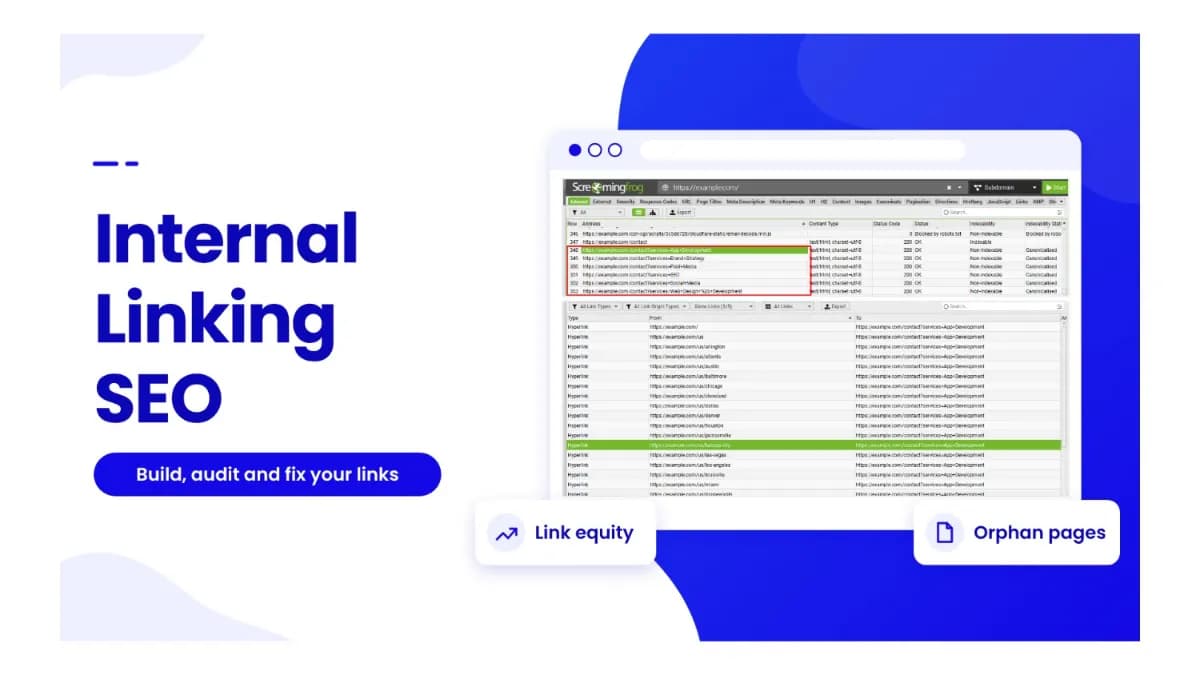
Internal Linking SEO: Strategy, Audit & Best Practices
SEO Specialist · November 6, 2026
Table of Contents
- Key Takeaways
- What Is Internal Linking in SEO?
- Why Is Internal Linking Important for SEO?
- How Do Internal Links Affect SEO Rankings?
- How to Improve Internal Link Structure
- SEO Internal Linking Best Practices
- Five Ways Internal Links Decay
- 1. Broken Internal Links
- 2. Redirect Chains
- 3. Orphan Pages SEO Problems
- 5. Anchor Text Drift
- How to Audit Internal Links on a Website
- How to Run an Internal Link Analysis
- How to Find Broken Internal Links
- How to Fix Broken Internal Links
- Preventing Link Decay at the Point of Publishing
- Frequently Asked Questions
- What is the difference between internal and external links?
- How many internal links should a page have?
- Can internal links replace backlinks?
- How do you find internal linking opportunities?
- Which tools work best for internal link analysis?
- Can orphan pages still get indexed?
- How often should you run an internal link audit?
- Do internal links help AI search visibility?
- Start With One Crawl
Key Takeaways #
Internal linking SEO means intentionally linking your own pages so people and search engines can find them and see which matter most.
Google says every page you care about needs a link from at least one other page on your site.
Good structure keeps priority pages close to the homepage, with clear anchors and links from related content.
Links decay. A quarterly five-step audit finds the damage and recovers equity without a single new backlink.
Every marketing team watches its backlinks. Hardly anyone watches what happens to internal links after publish day. Yet every retired page, URL change, and redesign quietly rewires how authority moves through your site.
This guide covers internal linking SEO from the ground up: what internal links do, how to structure them, why they decay, and how to audit them.
What Is Internal Linking in SEO? #
An internal link is a link from one page on your site to another page on the same site. SEO internal linking is the practice of placing those links on purpose, so readers and search engines can move through your content.
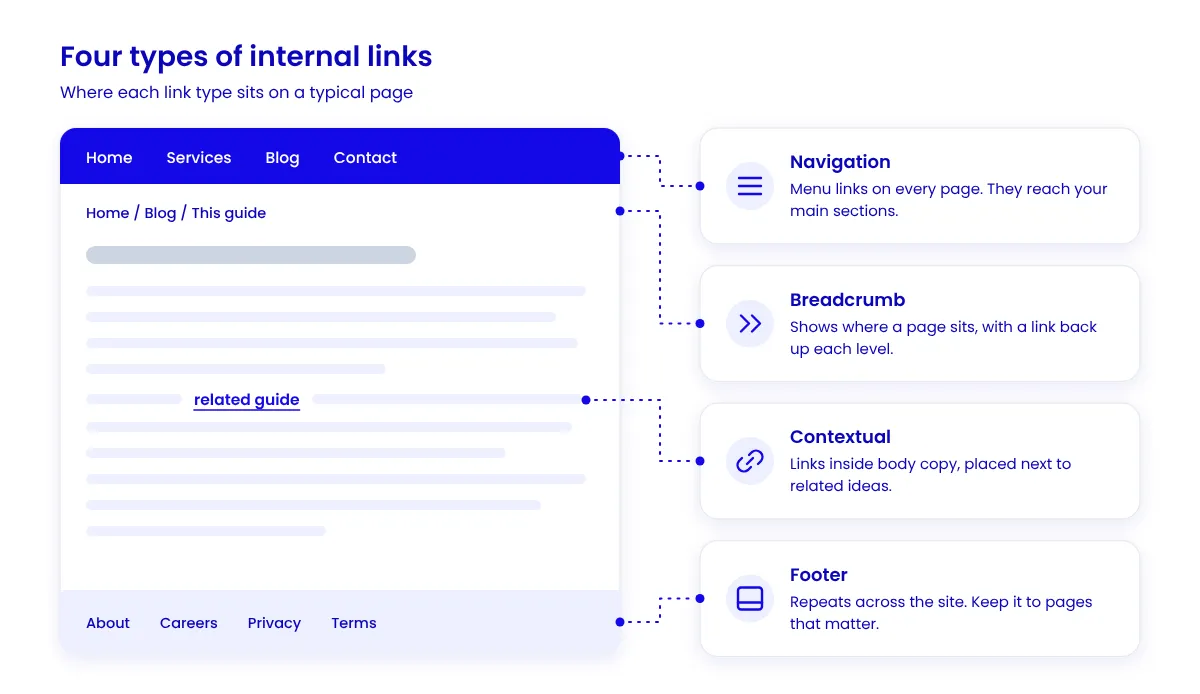
Most sites use four types: navigation links in the menu, breadcrumb links that show where a page sits, contextual links inside body copy, and footer links.
Why Is Internal Linking Important for SEO? #
Internal linking for SEO does three jobs at once.
It helps search engines find pages. Google says it uses links "to find new pages to crawl."
It explains what pages are about. Anchor text, the clickable words in a link, tells readers and Google what the next page covers.
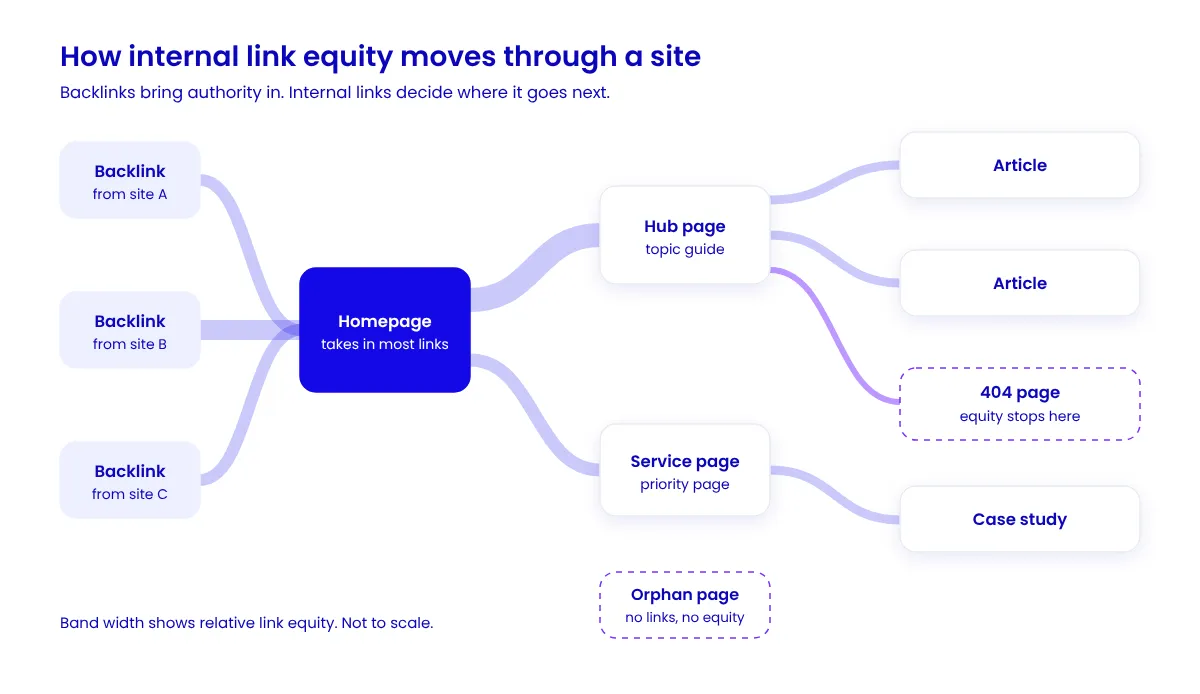
It spreads authority. Internal link equity is the ranking value a page can pass to the pages it links to. Backlinks bring that value in, and internal links decide where it goes next.
How Do Internal Links Affect SEO Rankings? #
Google says its systems study how pages link to each other to work out what they are about, and that PageRank "continues to be part of our core ranking systems."
The data agrees, with limits. Zyppy's study of 23 million internal links (2022, updated February 2026) found that URLs with 40 to 44 internal links earned four times the Google clicks of URLs with 0 to 4. After about 45 to 50 links, the trend reversed. Ahrefs' January 2025 study found a weak correlation between incoming internal links and rankings: 0.117, against 0.255 for referring domains.
Both studies show correlation, not cause, so treat them as direction, not proof.
How to Improve Internal Link Structure #
Internal link structure is the pattern your links form across the site. A sound SEO internal linking strategy comes down to four decisions.
Pick priority pages. List the pages that earn leads or revenue. These get links first.
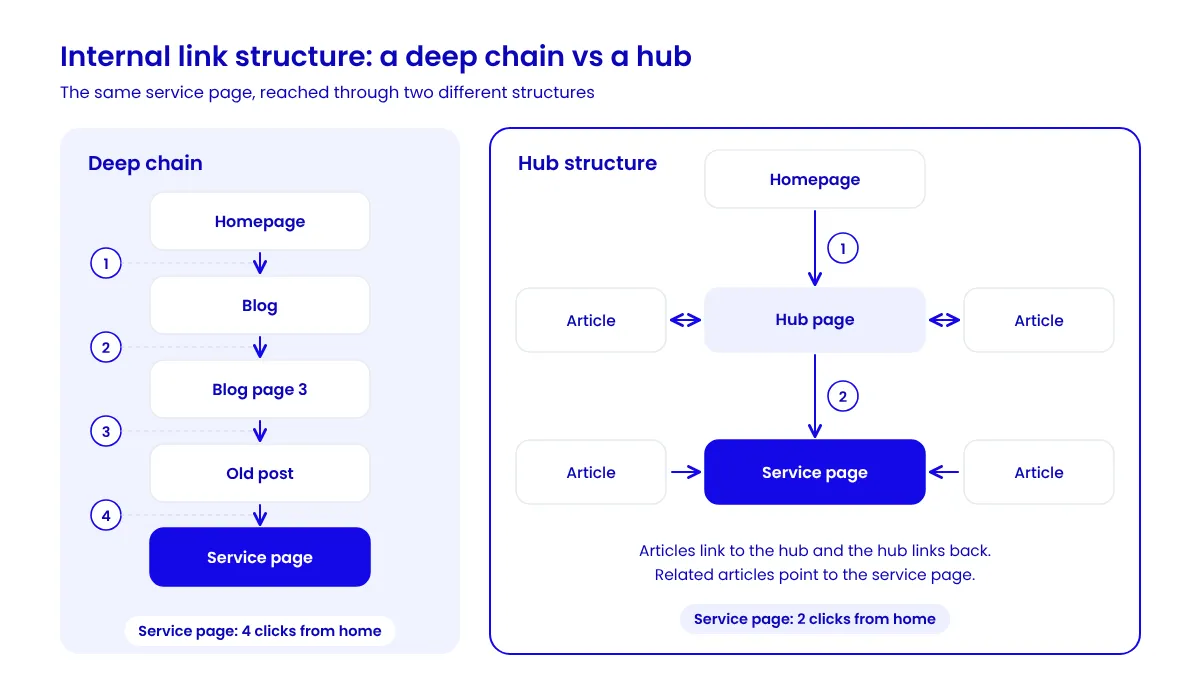
Build hubs. Group related articles around one hub page, and link each article to the hub and back. This also supports topical authority.
Keep pages shallow. As a rule of thumb, keep priority pages within three clicks of the homepage. That is a guide, not a Google rule.
Link from your strongest pages. Find the pages with the most backlinks in the Search Console Links report, then link from them to priority pages.
SEO Internal Linking Best Practices #
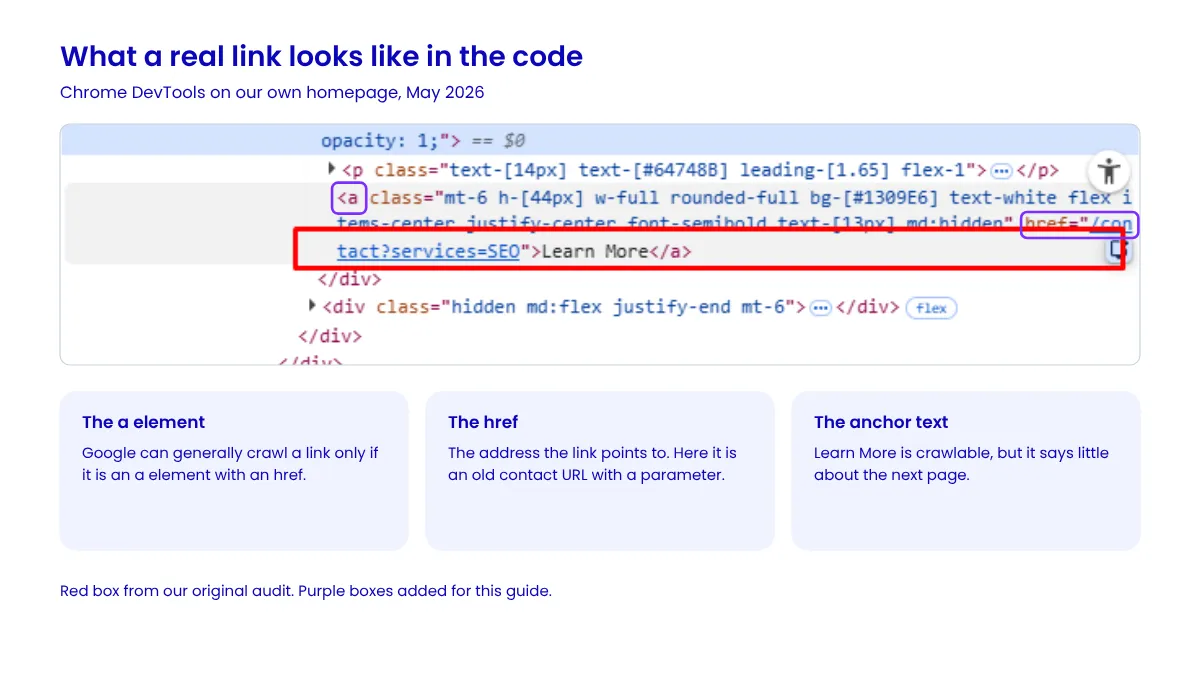
Write clear anchors. Google asks for anchor text that is "descriptive, reasonably concise, and relevant to the page that it's on." A button reading "Learn More" says little about the next page.
Vary the wording. Zyppy found that URLs with more anchor variations earned more search traffic. Keep it natural, since keyword stuffing breaks Google's spam policies.
Use real links. Google can generally crawl a link only if it is an <a> element with an href attribute. Our free Fetch & Render tool shows what a crawler gets from your page, and Chrome DevTools shows the link itself.
Link where it helps. Google says there is "no magical ideal number of links," but "if you think it's too much, then it probably is."
Five Ways Internal Links Decay #
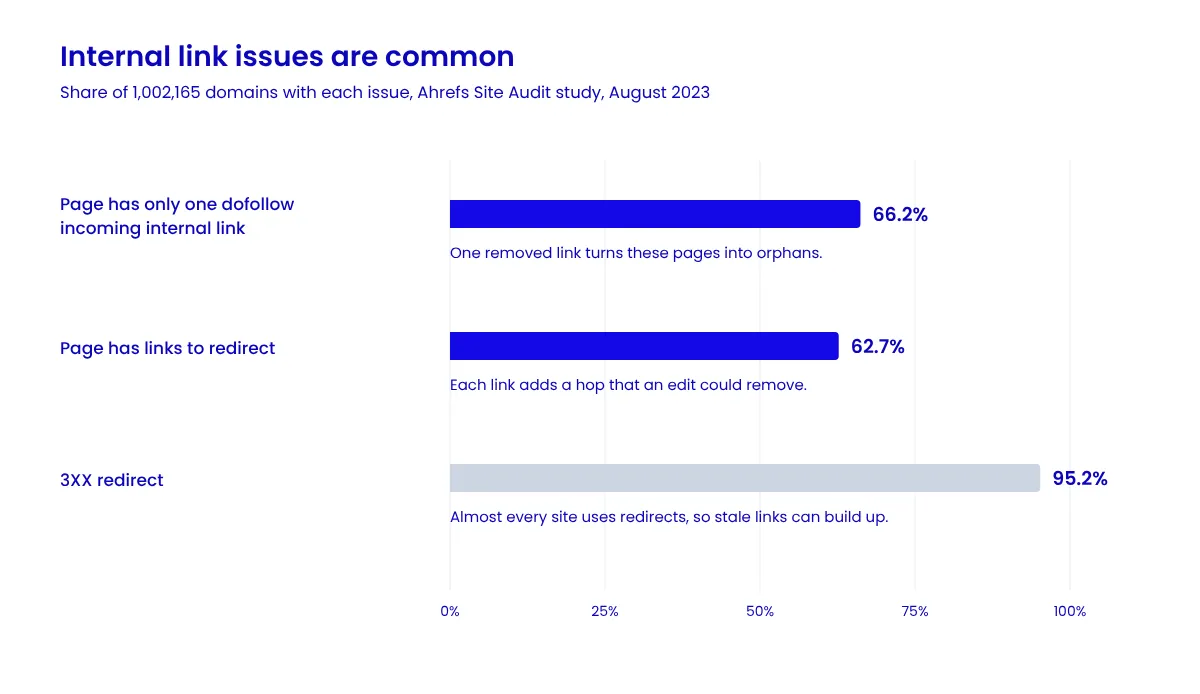
Internal linking is not a one-time job. Pages move and die, and the links pointing at them stay behind. That slow loss is internal link decay. It never triggers an alert. In Ahrefs' August 2023 study of 1,002,165 domains, 66.2 percent of sites had pages with only one dofollow internal link, and 62.7 percent had pages linking to redirects.
1. Broken Internal Links #
Links that resolve to 404s pass nothing. They build up through deletions, typos, and migrations that missed a redirect, leaving readers at a dead end.
2. Redirect Chains #
One hop is not a crisis. Google's Gary Illyes said in July 2016 that 30x redirects "don't lose PageRank anymore." Chains are the real problem. Google's crawlers follow up to 10 redirect hops, and Google warns that long chains have "a negative effect on crawling." On large sites, that wastes crawl budget.
3. Orphan Pages SEO Problems #
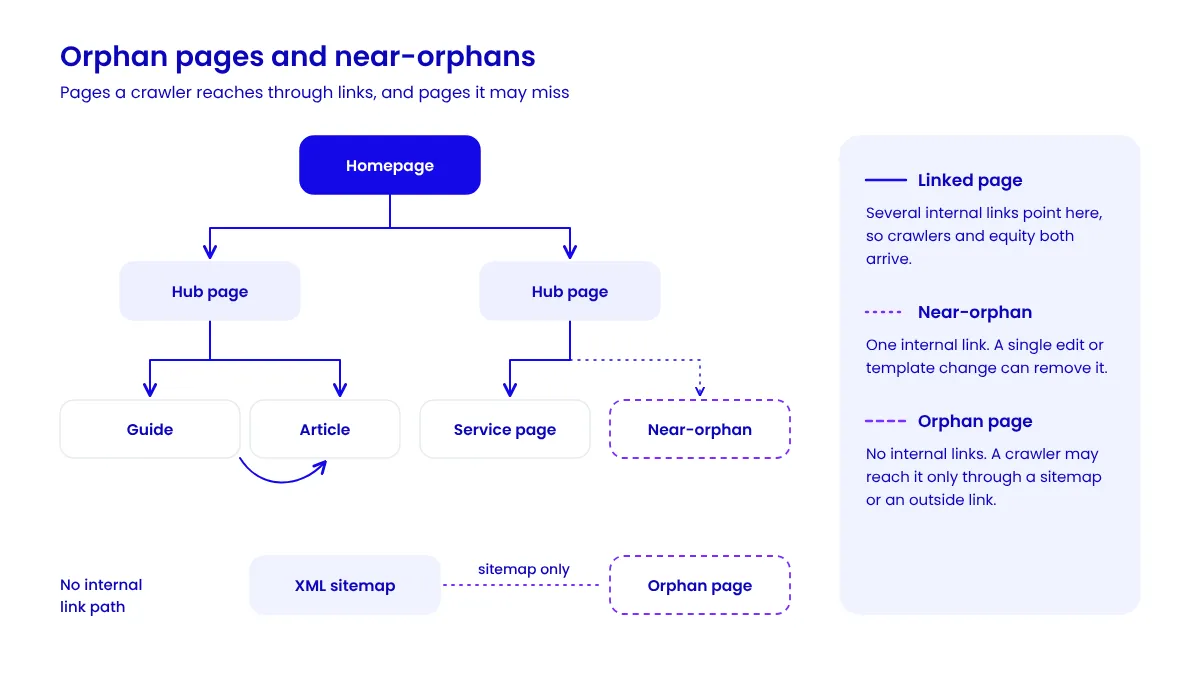
A page with no incoming internal links gets no internal equity, and crawlers may reach it only through a sitemap or an outside link. A near-orphan with one link is a single edit away from the same fate.
4. Navigation Changes and Redesigns
Header and footer links are sitewide, so editing them changes thousands of links at once. A website redesign that drops a footer section can cut off whole branches of a site.
5. Anchor Text Drift #
Content evolves past the anchors that point at it. A guide expanded from a checklist into a playbook still gets called "the checklist," so readers and crawlers get a weaker signal.
How to Audit Internal Links on a Website #
Run this internal link audit each quarter, alongside your technical SEO checks:
Crawl and export. Use Screaming Frog, Ahrefs Site Audit, or Semrush Site Audit. Export every internal link with its status code, plus incoming link counts.
Fix broken targets. Update or remove every link that resolves to a 404 or other error.
Flatten redirects. Point every link that hits a 301 or 302 straight at the final URL.
Reconnect orphans. Compare the crawl with your sitemap and Search Console. Link the valuable pages from relevant hubs, merge the redundant ones, and retire the rest.
Rebalance. Run an internal link analysis. If legal pages collect thousands of sitewide links while service pages collect a handful, change the templates and add contextual links.
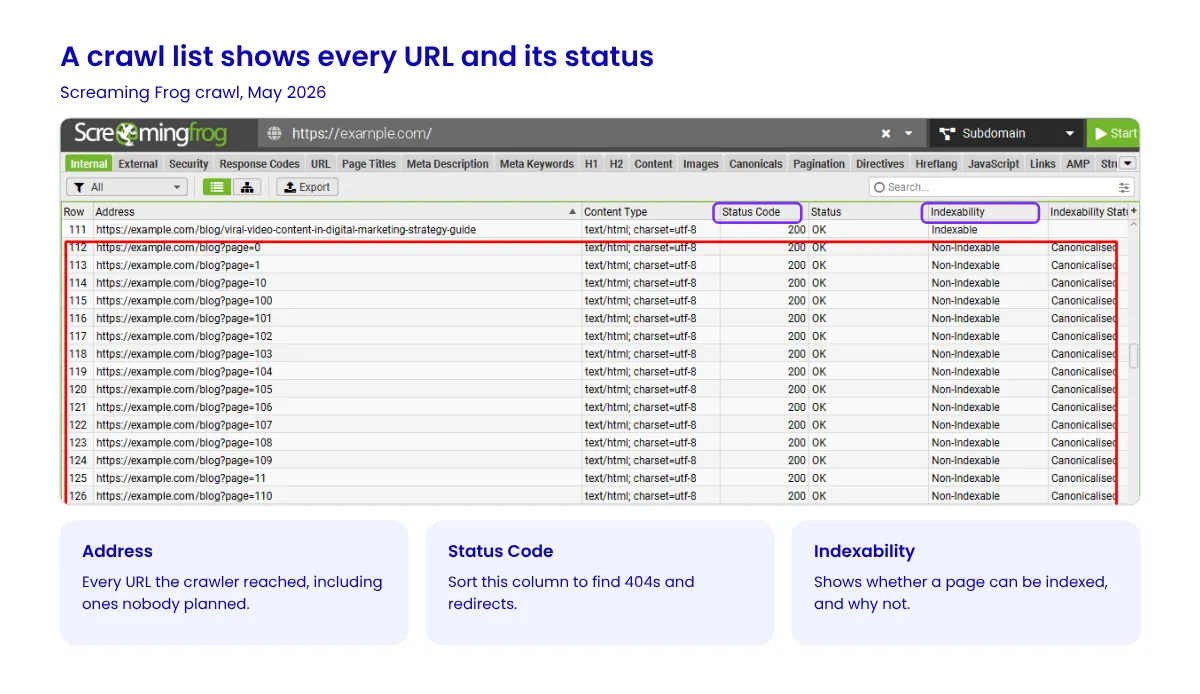
Read the crawl list before you change anything. One May 2026 crawl surfaced blog pagination URLs running past page=200, which no reader needed.
How to Run an Internal Link Analysis #
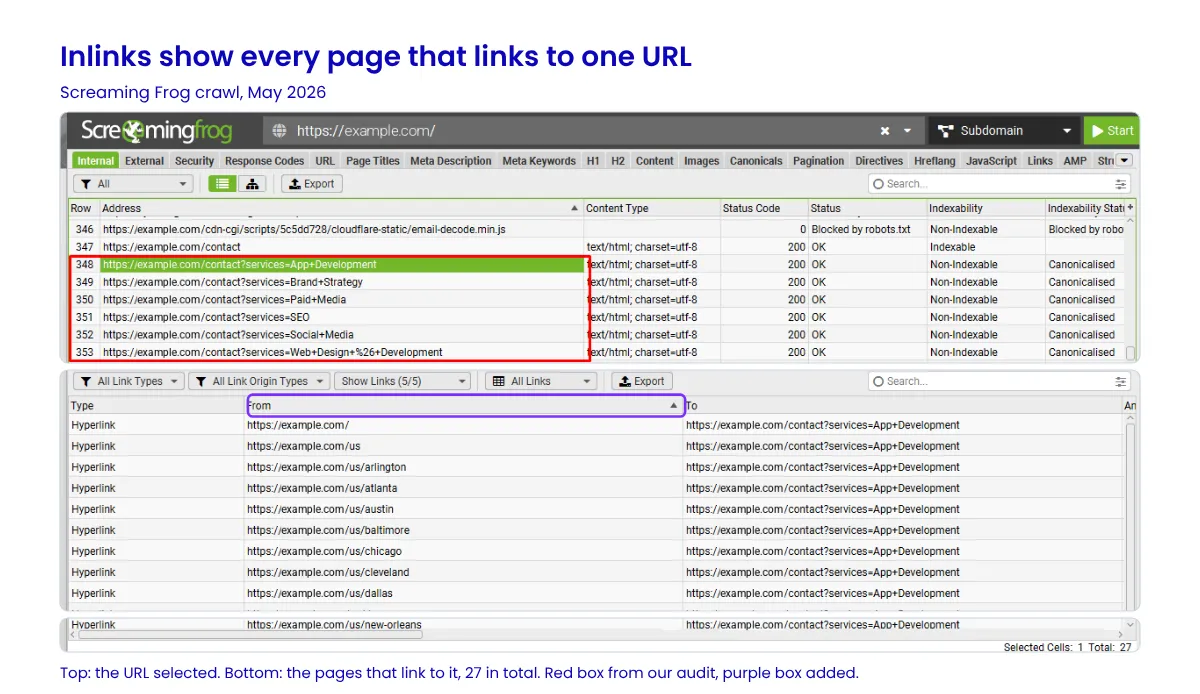
A crawl list shows what exists. Internal link analysis shows how pages connect. Pick a URL in your crawler and read its inlinks: which pages link to it, and with what anchor. In the same crawl, one old contact URL had 27 internal links, spread across the homepage, a US page, and 25 city pages. That pattern usually points to a template, so one fix can clear them all.
How to Find Broken Internal Links #
In Screaming Frog, open the Response Codes tab and select the Client Error (4xx) filter. Click a URL, then open the Inlinks tab to see every page that links to it. The free version crawls up to 500 URLs.
How to Fix Broken Internal Links #
Edit the source link, not just the dead URL. If the page moved, link to its new address. If it is gone for good, link to the closest relevant page or remove the link. On large sites, this is a find-and-replace job for developers.
Preventing Link Decay at the Point of Publishing #
Prevention is a process change, not a tooling change. Add two questions to every content brief: which priority pages should this article link to, and which existing articles should now link back to it? Most teams skip the second question.
Then route clusters through hub pages, and treat every redesign and migration as a linking event with its own link map and redirect plan.
Frequently Asked Questions #
What is the difference between internal and external links? #
An internal link points to another page on the same site. An external link points to a different site. A backlink is an external link pointing at you. You control internal links, so they are the fastest to change.
How many internal links should a page have? #
There is no fixed number. Add links where they help the reader, and cut any that do not. Zyppy's author ties the drop after 45 to 50 links mainly to sitewide navigation.
Can internal links replace backlinks? #
No. Internal links move the authority your site already has. Backlinks bring in new authority from other sites, so pages that compete for hard keywords usually need both.
How do you find internal linking opportunities? #
Search Google for site:yourdomain.com "your topic" to list pages that mention a topic, then link them to your main page on it. The Internal link opportunities report in Ahrefs Site Audit does this at scale and suggests the exact passage.
Which tools work best for internal link analysis? #
Start with the Search Console Links report. It is free, though it shows only a sample of links. For a full picture, add a crawler like Screaming Frog.
Can orphan pages still get indexed? #
Yes. A sitemap helps search engines discover URLs, and backlinks can too. A sitemap does not guarantee indexing, though, and an orphan page still gets no internal equity.
How often should you run an internal link audit? #
Quarterly suits most sites. Run one after any migration, redesign, or navigation change.
Do internal links help AI search visibility? #
Indirectly. Google's AI features guide says its generative AI models use publicly accessible, crawlable content, and links help crawlers find pages. A link does not guarantee a citation.
Start With One Crawl #
Internal linking SEO rewards steady upkeep more than clever tricks. Crawl your site this quarter, repair what the audit finds, and add the two linking questions to every brief. If you would rather have a team run the audit for you, our SEO specialists do exactly this work.
Written by