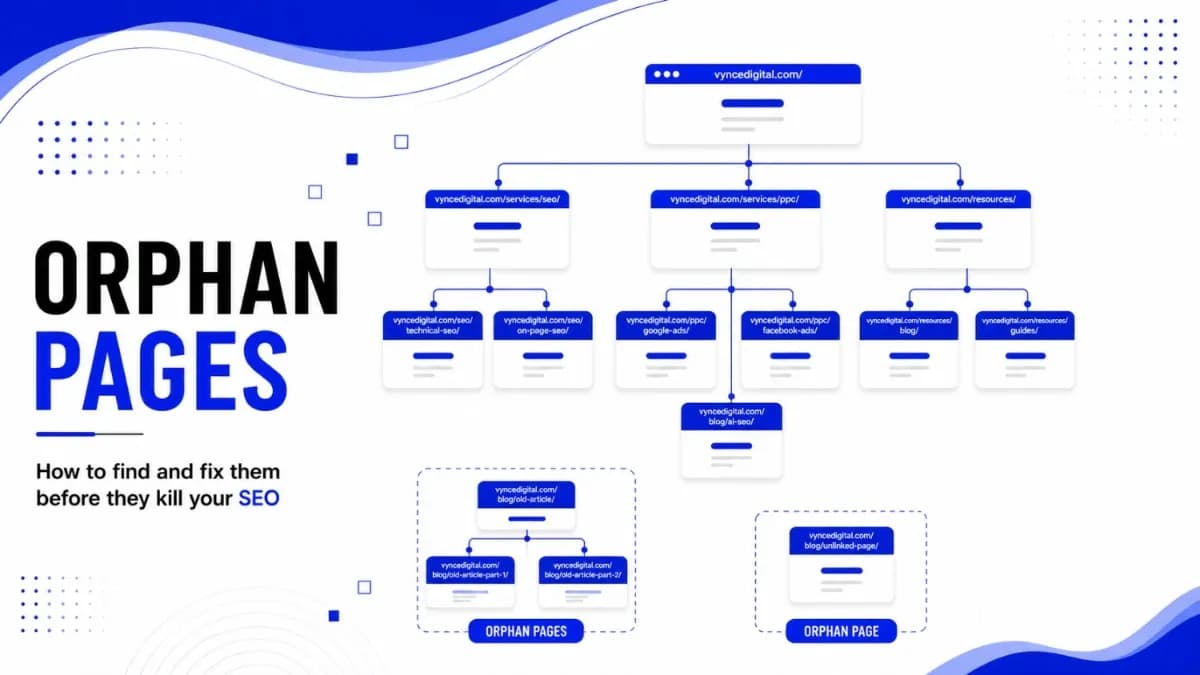
Orphan Pages: How to Find and Fix Them Before They Kill SEO
SEO Specialist · July 31, 2026
Table of Contents
- Key takeaways
- What is an Orphan Page?
- Why Orphan Pages Hurt More Than They Appear to
- How Pages Become Orphaned
- How to Find Orphan Pages: The Two-List Method
- Step 1: Build the complete URL inventory
- Step 2: Crawl the site
- Step 3: Compare and confirm
- How to Fix Orphan Pages: A Decision Framework
- How to Keep Pages From Becoming Orphans
- Frequently Asked Question
- What is an orphan page?
- Are orphan pages bad for SEO?
- Can Google still index an orphan page?
- How do I find orphan pages on my website?
- What is the difference between an orphan page and a dead-end page?
- Should I delete orphan pages?
- How many internal links should a page have?
- Do orphan pages waste crawl budget?
- How often should I audit for orphan pages?
- Do orphan pages matter for AI search?
Key takeaways #
Orphan pages are URLs with no internal links pointing to them, which makes them nearly invisible to search engines that discover content by following links. They waste crawl budget, receive no internal authority, and rarely rank. Find them by comparing a complete URL inventory against a site crawl, then fix each one by relinking, redirecting, refreshing, or retiring it based on its value and relevance.
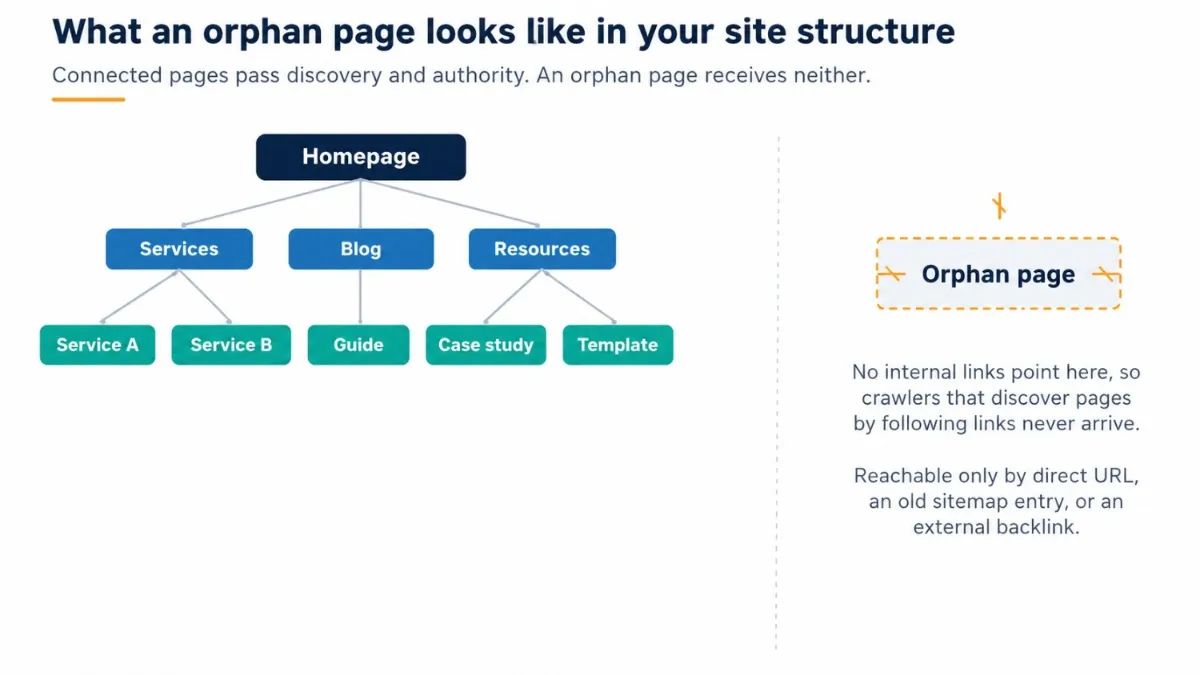
Your site can publish strong content, earn backlinks, and still leak traffic through pages nobody can reach. Orphan pages sit outside your site structure: no menu, category page, or blog post links to them, so visitors who navigate normally never find them, and neither do the crawlers that discover the web by following links.
Most sites accumulate orphans slowly through redesigns, migrations, and routine cleanups, and few teams notice until rankings sag or Search Console fills with indexing warnings. The audit is not complicated, but it has to be deliberate, because the tools most teams rely on are structurally blind to the problem. This guide covers what orphan pages are, why they drain organic performance, how to find every one of them with a two-list comparison, and how to decide, page by page, whether to relink, redirect, refresh, or retire.
What is an Orphan Page? #
An orphan page is a live URL on your website that has zero internal links pointing to it. It may load perfectly, contain useful content, and even sit in your XML sitemap, but nothing inside your site connects to it. Google's own documentation on crawlable links is direct about the consequence: Google primarily discovers new pages by following links from pages it already knows. Cut a page out of the link graph, and you cut it out of the discovery process.
Orphan pages are often confused with dead-end pages, but the two are opposites. A dead-end page has no outgoing links, so crawlers arrive and stop. An orphan page has no incoming links, so crawlers rarely arrive at all. A URL can still reach Google through a sitemap entry or an external backlink, which is why some orphans do get indexed. Being indexed is not the same as being competitive, though: a page with no internal support almost never ranks for anything meaningful.
Why Orphan Pages Hurt More Than They Appear to #
They burn crawl budget on the wrong URLs
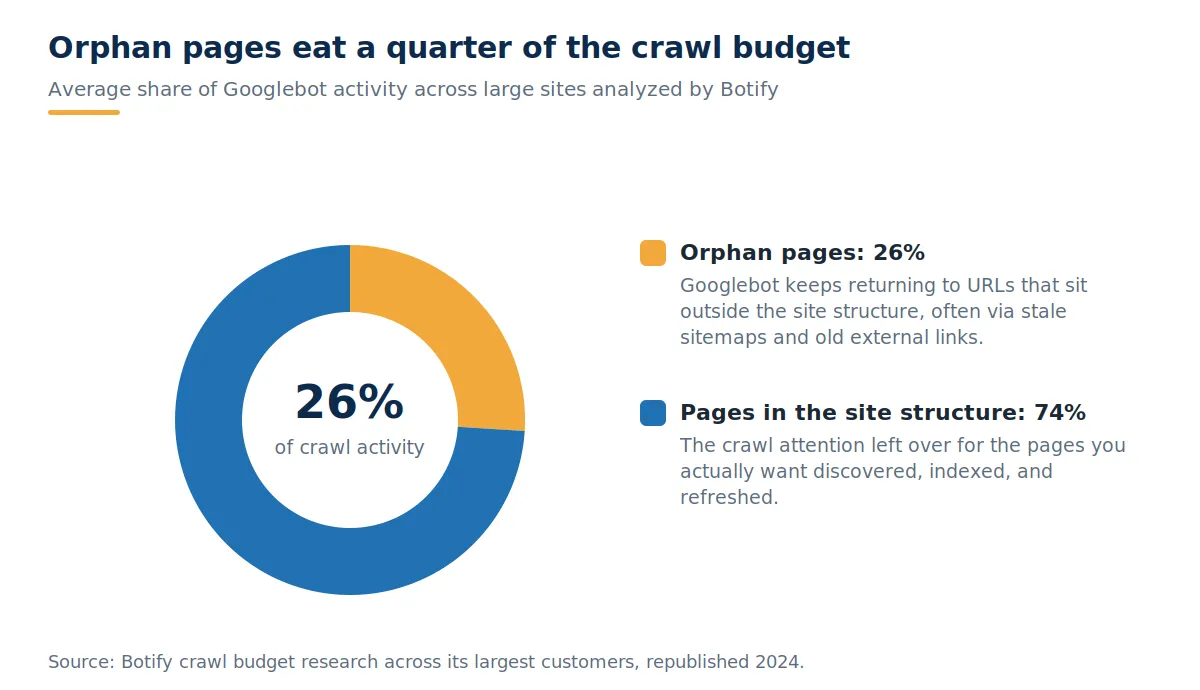
Googlebot does not crawl infinitely. Google's crawl budget documentation explains that each site gets a finite amount of crawl attention shaped by server capacity and demand, and that wasting it on low-value URLs delays discovery of the pages that matter. Orphan pages are a major leak. Botify's crawl budget research across its largest customers, republished in 2024, found that pages outside the site structure consume 26 percent of Google's crawl budget on average. Googlebot keeps revisiting them through stale sitemap entries and old external links while newer, linked pages wait in the queue. Google says crawl budget is mainly a concern for sites above roughly a million pages, but the waste compounds fastest on exactly the sites that generate orphans in bulk: large catalogs, publishers, and marketplaces.
They receive no internal authority
Internal links do more than aid discovery. They distribute authority through your site and tell Google which pages you consider important. An orphan page receives none of that signal. The scale of the problem shows up in Zyppy's 2023 study of 23 million internal links across 1,800 websites: 53 percent of URLs had three or fewer internal links pointing to them, and traffic tended to rise as pages gained internal links, up to a plateau around 40 to 45. The study also found that pages with at least one exact-match internal anchor attracted around five times the search traffic of pages without one, and that anchor text variety correlated with traffic more strongly than raw link counts. An orphan page scores zero on every one of those measures.
They end up in the 96 percent
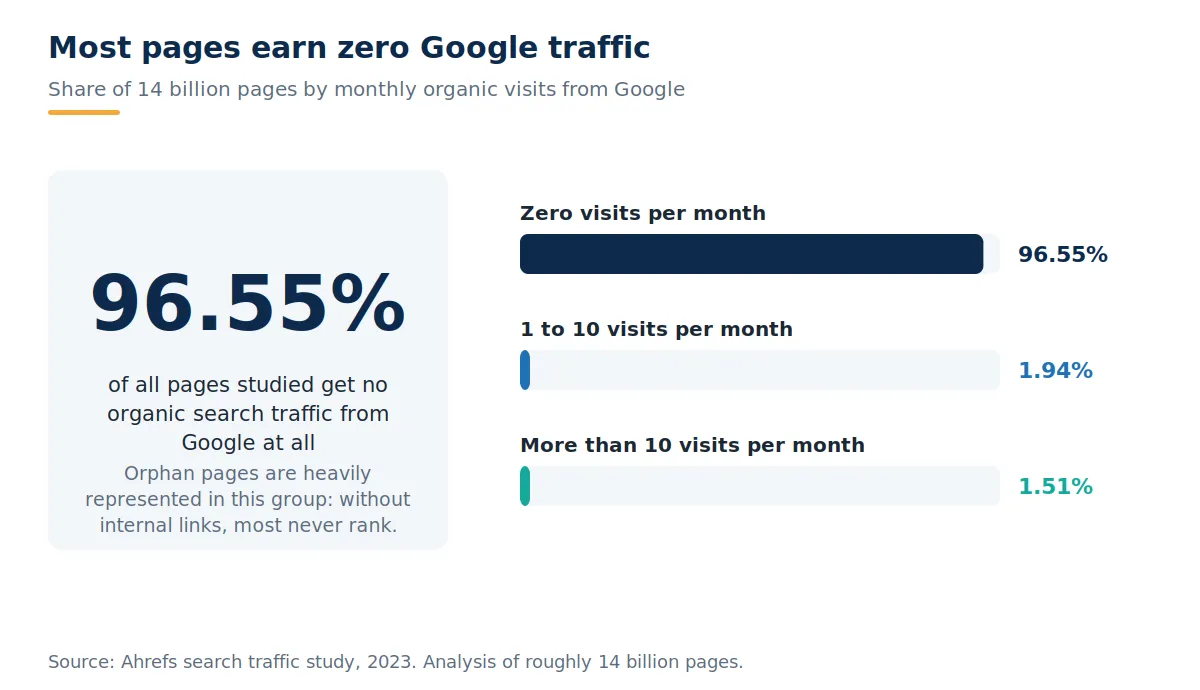
Ahrefs' 2023 search traffic study of roughly 14 billion pages found that 96.55 percent get no organic traffic from Google at all, and only 1.94 percent get between one and ten monthly visits. Weak or missing internal linking is one of the recurring reasons pages land in that silent majority. Orphaning a page is one of the most reliable ways to place it there: no discovery path, no authority, no ranking, no clicks.
They are invisible to AI search too
The stakes no longer stop at the ten blue links. AI assistants and answer engines build their picture of your site through the same link graph that Googlebot uses, and they lean on well-connected, frequently crawled pages when choosing what to cite. A page that nothing links to rarely makes it into an AI answer, no matter how good the content is. If AI visibility is part of your growth plan, cleaning up orphan pages is quiet groundwork for any serious AI SEO effort, because citation starts with discovery.
How Pages Become Orphaned #
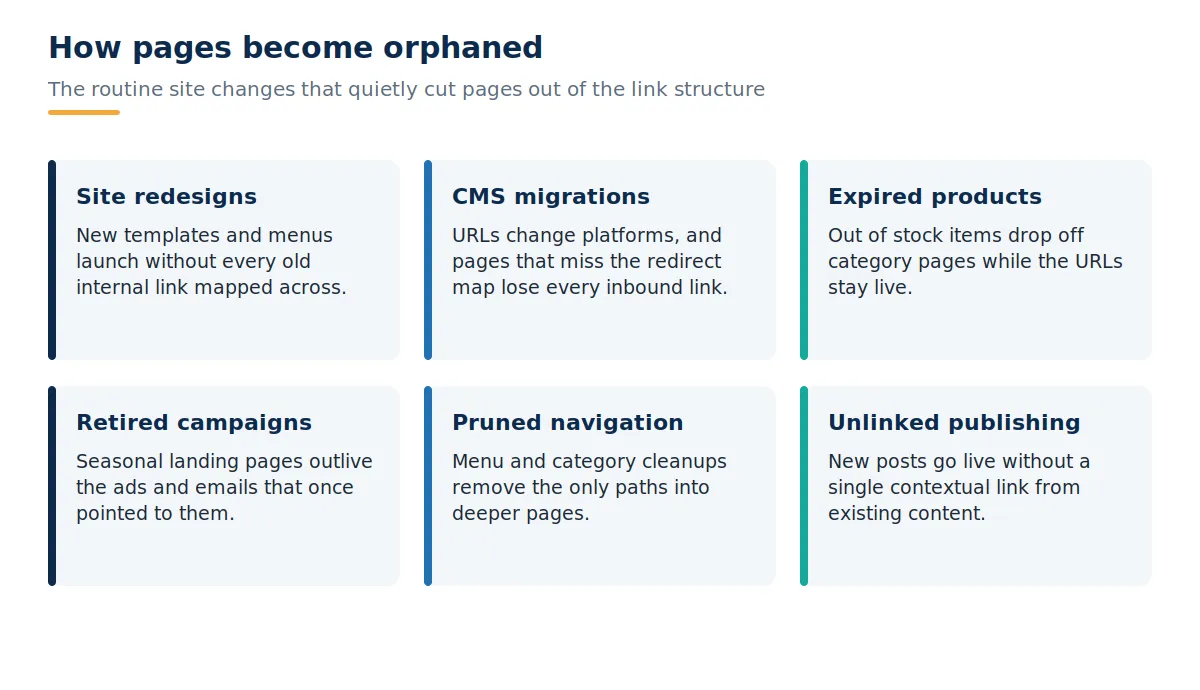
Almost no one creates an orphan page on purpose. They are byproducts of routine site changes. The most common source is a website redesign: new templates and navigation launch, and any page the old menus linked to but the new ones do not is instantly cut adrift. CMS migrations do the same at the URL level, orphaning every page that misses the redirect and link mapping. On ecommerce sites, product lifecycles do it continuously: items go out of stock or get discontinued, drop off category pages, and keep resolving at their old URLs with no path in.
Marketing activity creates its own orphans. Seasonal campaign landing pages outlive the ads and emails that once pointed to them. Navigation cleanups remove the only route into deeper sections. And the most preventable version: new posts published without a single contextual link from existing content, orphaned from day one.
How to Find Orphan Pages: The Two-List Method #
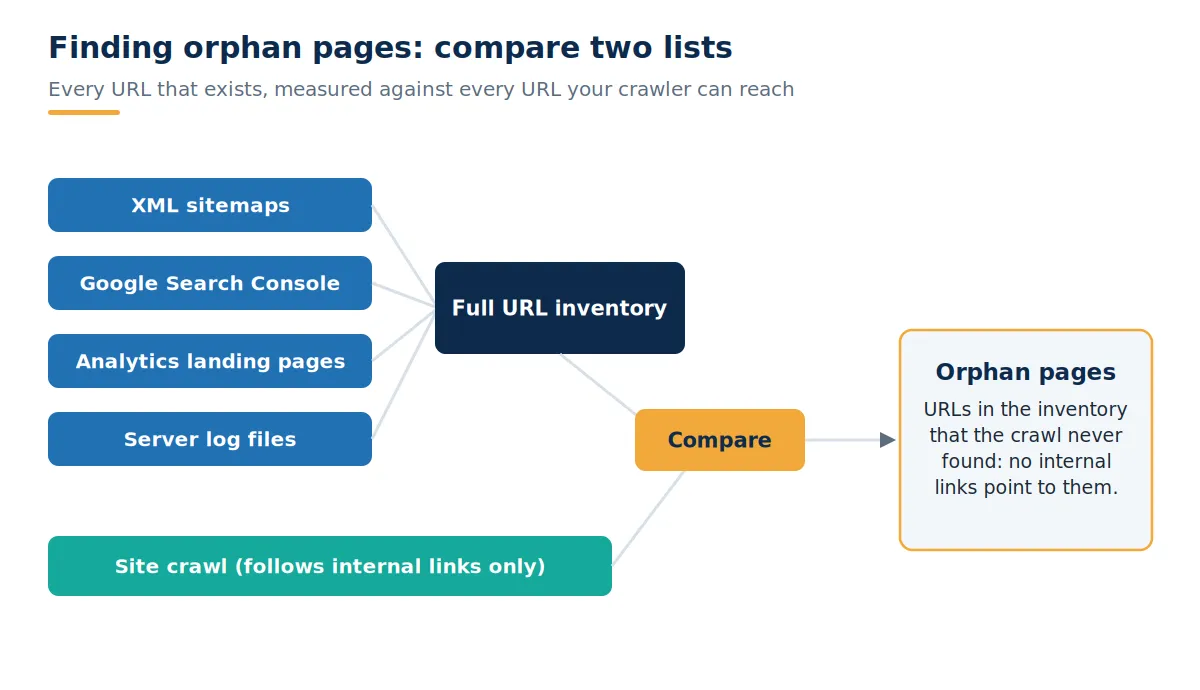
Here is the trap in most orphan page advice: a crawler alone cannot find them. Crawlers discover pages by following internal links, which is precisely what orphan pages lack. Run Screaming Frog on its own, and it will faithfully map every page it can reach, then report nothing about the pages it cannot. Finding orphans means comparing two lists: every URL that exists against every URL your crawler can reach through links. Anything on the first list but not the second is an orphan.
Step 1: Build the complete URL inventory #
XML sitemaps. Pull every URL from every sitemap, including image and news sitemaps and any legacy files still referenced in robots.txt.
Google Search Console. Export URLs from the Performance report and the Pages indexing report. Both surface URLs Google knows about that your navigation may not.
Analytics. Export all landing pages that recorded at least one session over the past 12 months. Pages earning traffic with no internal links are your highest-priority orphans.
Server logs. On larger sites, log files show every URL Googlebot actually requests, including orphans no other source lists.
The CMS itself. A database export of published URLs catches pages that never made it into any sitemap.
Step 2: Crawl the site #
Run a full crawl with Screaming Frog, Sitebulb, or the site audit tools in SEMrush or Ahrefs, starting from the homepage and following internal links only. This produces the second list: your reachable site structure, along with each page's crawl depth and inbound internal link count.
Step 3: Compare and confirm #
Diff the two lists. Screaming Frog's list mode will crawl your inventory directly and report which URLs carry zero inlinks, and both SEMrush and Ahrefs flag orphan sitemap pages automatically once you connect analytics and Search Console. Then confirm each candidate: check that it returns a 200 status, is indexable, and is genuinely missing links rather than linked only through JavaScript your crawler did not render. Pull traffic, conversions, and backlink counts for each confirmed orphan while you are at it, because the fix depends on those numbers. If this is your first pass, folding the orphan check into a broader technical SEO audit usually surfaces the related problems, like redirect chains and stale sitemaps, that created the orphans in the first place.
How to Fix Orphan Pages: A Decision Framework #
Not every orphan deserves rescue. The reflex to add internal links to everything wastes effort on pages that should not exist and dilutes the links you add to pages that should. Score each orphan on two axes instead: value, meaning its traffic, backlinks, and conversion history, and relevance, meaning whether the content still serves your current strategy. The quadrant tells you the fix.
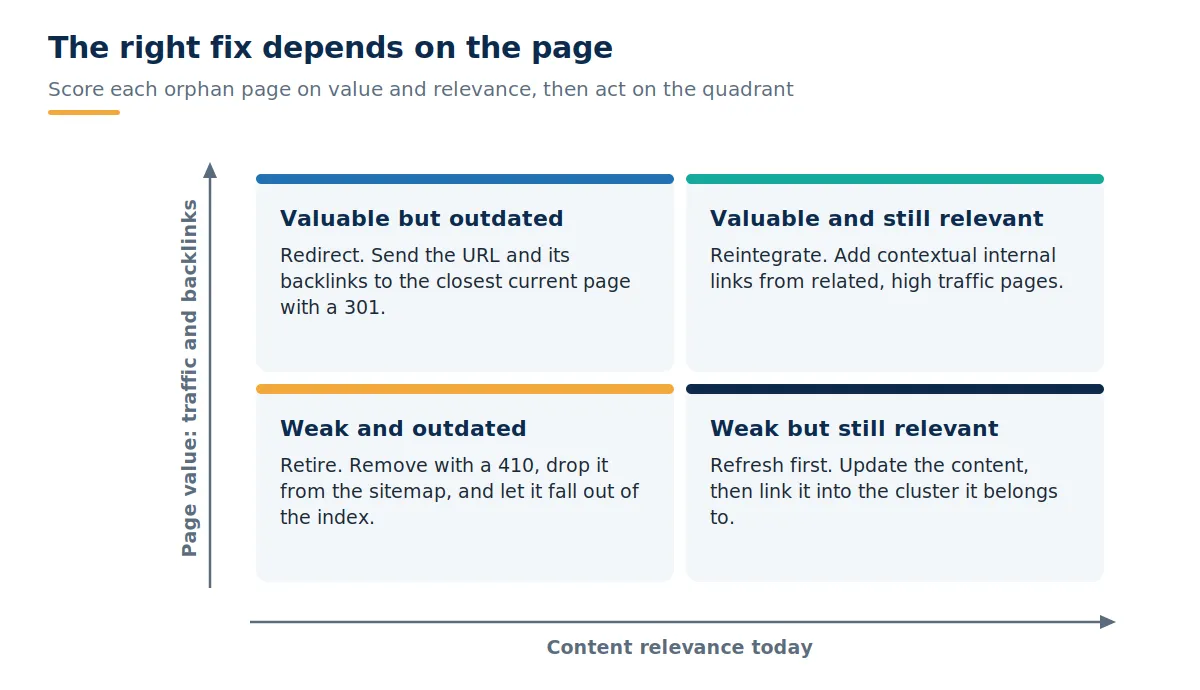
Valuable and relevant: reintegrate. Add three to five contextual links from related pages that already earn traffic, placed in the body copy rather than footers. Vary the anchor text across those links, including at least one exact-match phrase, in line with what the Zyppy data rewards. Then add the page to the menus or category hubs where it logically belongs.
Valuable but outdated: redirect. If the page has backlinks or residual traffic but the content no longer applies, 301 it to the closest current equivalent so the authority keeps working for you.
Weak but relevant: refresh, then link. Thin pages on topics you still care about need updating before promotion. Rework the content to current standards, or fold several weak orphans into one stronger page, then link it into its topic cluster. Solid content writing at this step is what turns a rescued URL into one that actually ranks.
Weak and outdated: retire. Serve a 410, remove the URL from every sitemap, and let it fall out of the index. Deleting dead weight concentrates crawl attention on the pages you kept.
One edge case: intentional orphans. Paid campaign landing pages, gated assets, and thank-you pages are often unlinked on purpose. Leave them out of navigation if you like, but mark them noindex and keep them out of your sitemaps so they stop consuming crawl attention and stop appearing in audits as false positives.
How to Keep Pages From Becoming Orphans #
Orphan pages are a maintenance problem, so the durable fix is process. Add an internal linking requirement to your publishing checklist: no page goes live until at least two or three existing pages link to it with descriptive anchors. Make link and redirect mapping a named deliverable in every redesign and migration scope, not an assumption. Give templated pages lifecycle rules, so discontinued products redirect to their category and expired campaign pages are retired or recycled the moment the campaign ends; the same review is a natural fit for conversion rate optimization work, since unlinked landing pages are usually untested ones too. Then re-run the two-list comparison quarterly, and immediately after any redesign, migration, or large content pruning. Watching the "Discovered, currently not indexed" bucket in Search Console between audits gives you an early signal that pages are slipping out of the structure.
Frequently Asked Question #
What is an orphan page? #
An orphan page is a URL with no internal links pointing to it, which keeps both visitors and search engine crawlers from reaching it through your site structure.
Are orphan pages bad for SEO? #
Yes. They receive no internal authority, get crawled less often, and frequently drop out of the index, so they rarely rank or earn organic traffic.
Can Google still index an orphan page? #
Yes, through an XML sitemap entry or external backlinks. Indexing without internal link support usually produces weak rankings, though.
How do I find orphan pages on my website? #
Build a complete URL inventory from sitemaps, Search Console, analytics, and server logs, then compare it against a site crawl. URLs in the inventory that the crawl never reaches are orphans.
What is the difference between an orphan page and a dead-end page? #
An orphan page has no internal links pointing in. A dead-end page has no links going out. A page can be both at once.
Should I delete orphan pages? #
Only the ones that are both low value and outdated. Valuable orphans should be relinked into the site or redirected so their authority is preserved.
How many internal links should a page have? #
At least a few contextual links from relevant pages. Zyppy's study of 23 million internal links found traffic rising with link count up to roughly 40 to 45 links, with varied anchor text mattering most.
Do orphan pages waste crawl budget? #
Yes. Botify's research across large sites found pages outside the site structure consuming 26 percent of Google's crawl activity on average.
How often should I audit for orphan pages? #
Quarterly for most sites, plus an immediate check after any redesign, migration, or major navigation change.
Do orphan pages matter for AI search? #
Yes. AI assistants discover and weight content through the link graph, so pages without internal links rarely appear in AI answers or citations.
Written by