Why Is My Business Not Showing Up on Google? 10 Fixes

Tuba
October 12, 2026
Table of Contents
- Key Takeaways
- Your Website Is Not in Google's Index
- 2. Your Website Has Not Been Indexed
- 3. Google Cannot Crawl Your Website
- 4. Your Pages Carry a Noindex Tag
- 5. Your Website Is Simply New
- Your Website Is Indexed but Is Not Ranking
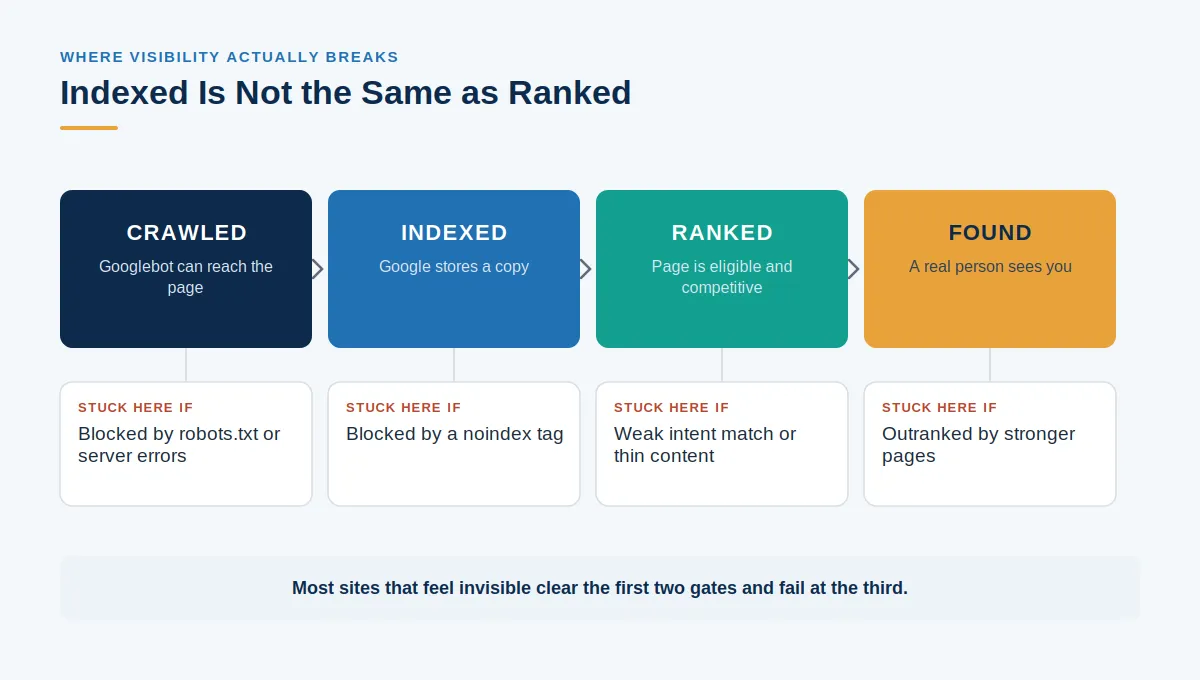
- 6. Indexed Does Not Mean Ranked
- 7. Technical and Content Problems Hold You Back
- Your Business Is Missing From Maps and Local Results
- 8. Your Google Business Profile Is Not Set Up Correctly
- 9. Your Business Is Not Showing on Google Maps
- 10. Your Local SEO Signals Are Weak
- How to Fix It: Quick Action Checklist
- Diagnose Before You Change Anything
- Frequently Asked Questions
Key Takeaways #
'Not showing on Google' covers three problems: not indexed, indexed but not ranking, and missing from Maps.
Three free searches tell you which one you have, in roughly a minute.
Indexing only makes a page eligible to compete. It is not ranking.
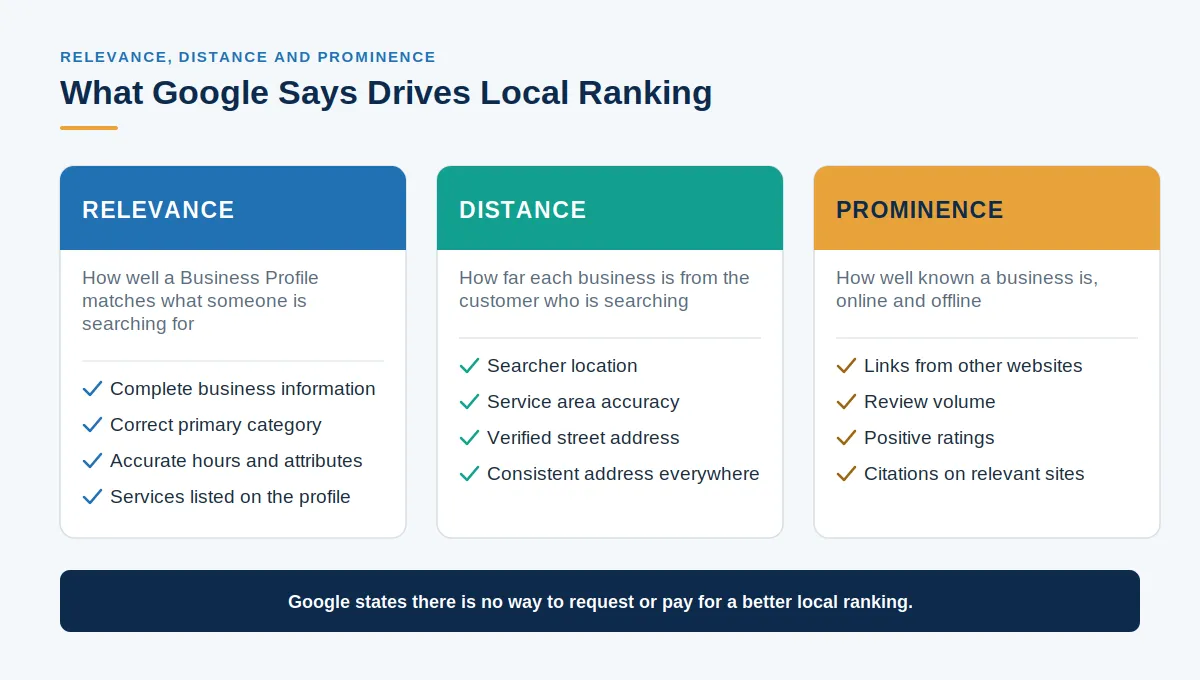
Maps visibility runs on relevance, distance, and prominence, not your website's SEO.
Diagnose first. The fix for one problem does nothing for the other two.
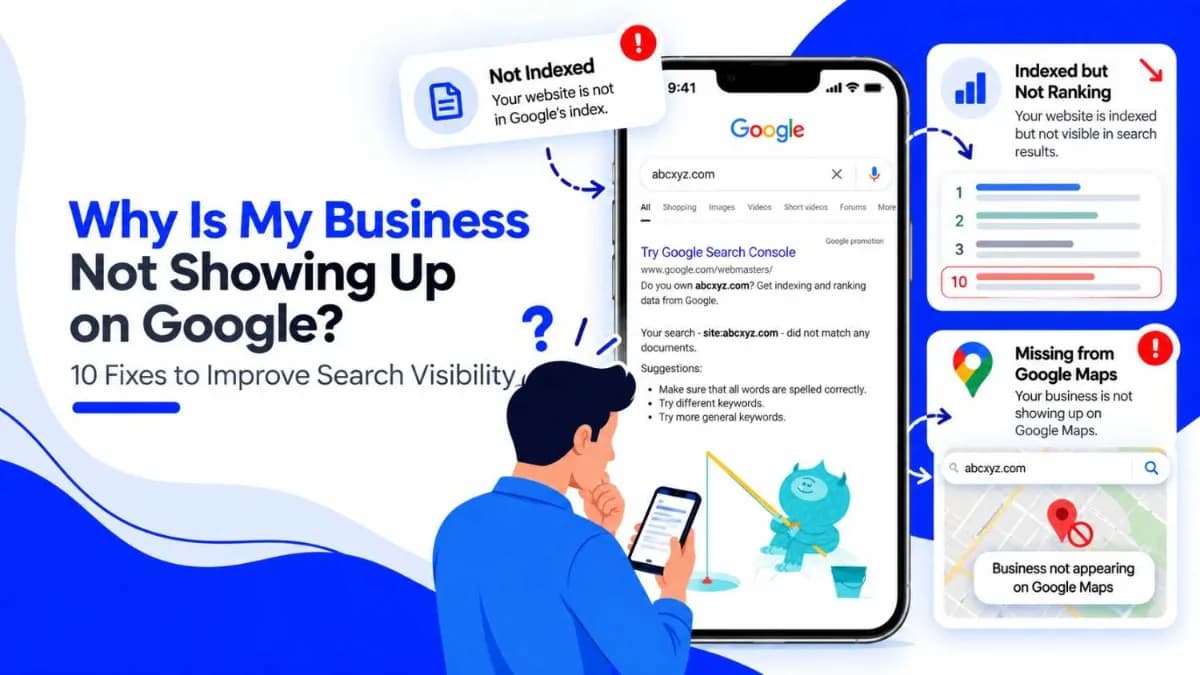
"My business is not showing up on Google" is one of the most common complaints in local search, and it rarely means one thing. Most people say it after searching their business name or a service they sell and not finding themselves. What they find is a symptom, and the cause lies in one of three very different places.
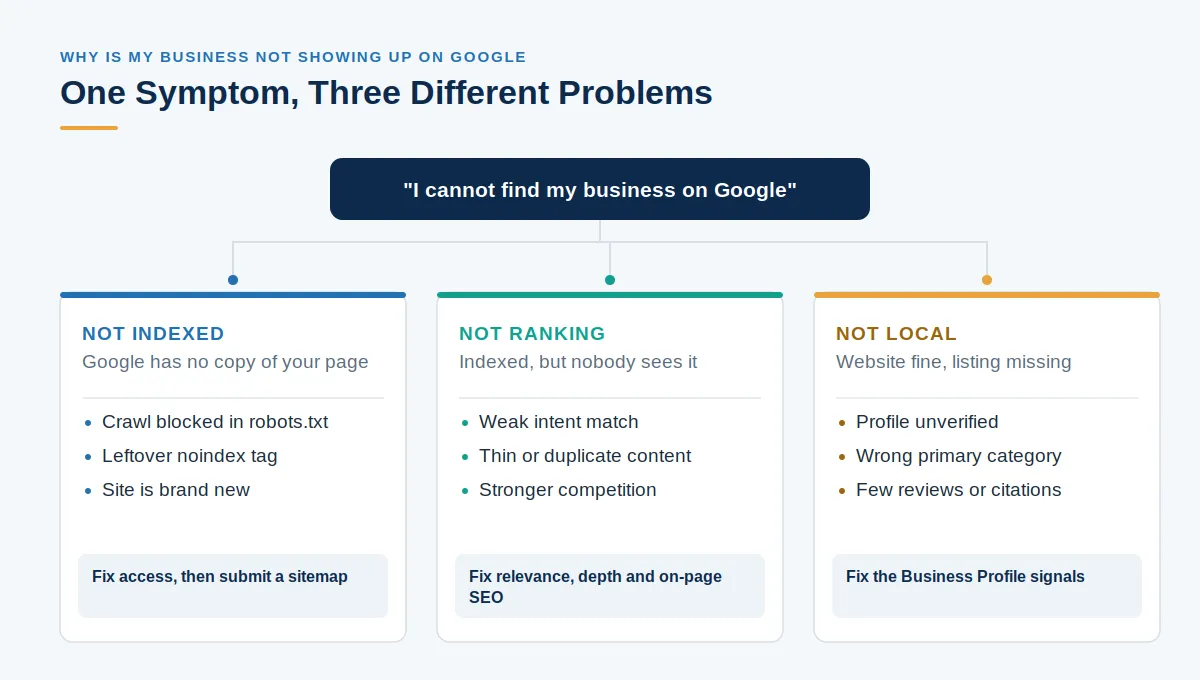
Your website may not be in Google's index at all, meaning Google has no copy of your pages to show. It may be indexed and working normally, but ranking far enough down that nobody scrolls to it. Or your site may be perfectly healthy while the missing piece is your Google Business Profile, the listing behind Google Maps and the local results above the standard ones.
All three look identical from where you are standing: you search, and you are not there. They share almost no fixes, which is why so much time goes into general SEO advice. You can work out which one applies in about a minute, with free tools, before changing anything.
1. First, Identify Where Your Business Is Missing
Three quick searches will tell you what the problem is. None need a paid tool.
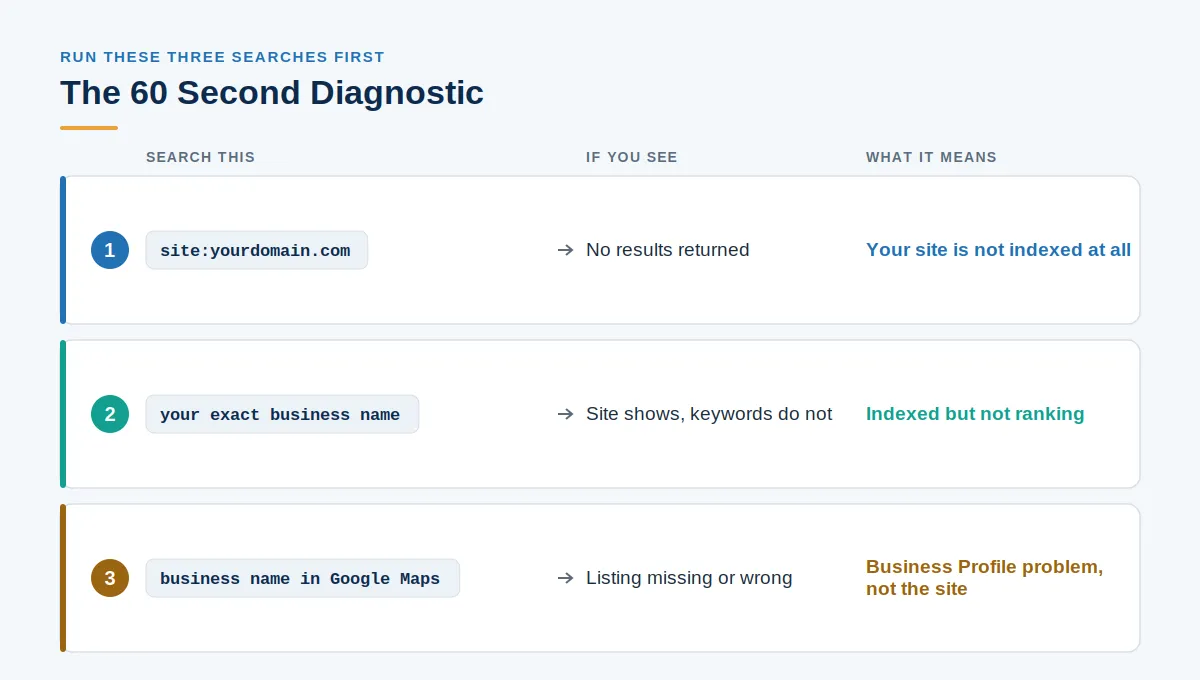
Search site:yourdomain.com. This shows what Google holds for your domain. If nothing comes back, your site is not indexed, and nothing else you do matters until that changes.
Next, search your exact business name. If your site appears but never for the services you sell, you are indexed and not ranking: a content and competition problem, not an access one.
Finally, search your business name in Google Maps. If the listing is missing, duplicated, or wrong, the problem is your Business Profile, not your website.
Your Website Is Not in Google's Index #
2. Your Website Has Not Been Indexed #
Indexing is Google storing a copy of your page so it can appear in results. Until then, the page doesn't appear in search results. Search Console confirms it: open URL Inspection, paste a URL, and Google reports whether the page is indexed.
3. Google Cannot Crawl Your Website #
A Disallow rule in your robots.txt file can block Googlebot from whole sections of a site, and it is easy to leave one behind after development. Server errors and slow response times do the same: a crawler that cannot load your pages cannot index them. Search Console's Page Indexing report names the affected URLs.
4. Your Pages Carry a Noindex Tag #
A noindex tag tells Google to drop the page from results entirely, and it works exactly as instructed. It is commonly left over from a redesign or staging build, added deliberately and never removed. Google also warns that a page blocked in robots.txt cannot be crawled, so the noindex rule is never seen and the page can still surface.
5. Your Website Is Simply New #
New sites are not indexed on demand. Google says crawling can take anywhere from a few days to a few weeks, and that requesting a crawl does not guarantee inclusion. Submit an XML sitemap, link your pages from somewhere, and give it time.
Your Website Is Indexed but Is Not Ranking #
6. Indexed Does Not Mean Ranked #
Being in the index only makes you eligible to compete. Ranking depends on whether your page matches the intent behind the query, answers it better than the pages above you, and how strong the competition is. A page targeting a keyword it does not genuinely address will sit on page five. Thin pages usually need a content-writing team to rewrite them, not more keywords.
7. Technical and Content Problems Hold You Back #
Duplicate pages, broken URLs, weak internal linking, and a poor mobile experience all suppress otherwise decent pages. These are technical SEO issues, and mobile problems are often fixed at the site build level. Traffic that arrives and bounces is a separate discipline, closer to improving conversions.
Your Business Is Missing From Maps and Local Results #
8. Your Google Business Profile Is Not Set Up Correctly #
You can't manage or trust an unverified profile. Google requires verification before you can edit your business information and take ownership of it. Incomplete details, a suspension under review, or the wrong primary category can keep you hidden. That category carries real weight: it is the clearest signal Google has about what you do.
9. Your Business Is Not Showing on Google Maps #
Google names three factors behind local ranking: relevance, distance, and prominence. Relevance comes from complete business information. Distance is proximity to the searcher, which you cannot change. Prominence reflects how well known you are, which Google ties to links and reviews. Since distance is fixed, you focus on relevance and prominence through steps like reputation management.
10. Your Local SEO Signals Are Weak #
Without service and location pages, local keywords, consistent name, address, and phone details, and citations, Google has little to connect you to a place. Conflicting details across directories are a common, often overlooked cause. That same consistency now feeds AI search visibility and whether you get cited inside AI-generated answers.
How to Fix It: Quick Action Checklist #
Problem | What to do |
|---|---|
Not indexed | Check Search Console and request indexing |
Crawling blocked | Fix robots.txt rules and server errors |
Noindex tag | Remove the unintended noindex |
New website | Submit a sitemap and build visibility |
Indexed, not ranking | Improve relevance, content depth, and on-page SEO |
Business Profile issue | Complete and verify the profile |
Maps issue | Strengthen local signals, categories and reviews |
Diagnose Before You Change Anything #
The three problems look identical from outside and share almost no fixes. Run the three searches, confirm in Search Console and your Business Profile, and you will know which one you have before spending anything. Random changes made first usually cost more time than they save. If you would rather have the diagnosis done for you, a structured audit will surface it quickly.
Frequently Asked Questions #
Why isn't my business page showing on Google?
Either the page is not indexed, it is indexed but ranking too low to see, or the issue is with your Google Business Profile rather than the page itself. Run a site: search to tell indexing problems apart from ranking problems.
How do I get my business website to show up on Google?
Verify the site is crawlable, remove any unintended noindex tags, submit an XML sitemap in Google Search Console, and publish pages that clearly answer what your customers search for.
Why isn't my business showing up in Google Search?
The most common causes are a site that was never indexed, a crawl block in robots.txt, a leftover noindex tag from development, or content that is indexed but not competitive enough to rank.
Why is my website not showing up on Google Search?
Check indexing first with URL Inspection in Search Console. If Google confirms the page is indexed, you have a ranking problem, which is about relevance, content quality, and competition rather than access.
Why is my business not showing up on Google Maps?
Maps visibility depends on relevance, distance, and prominence. An incomplete profile, the wrong primary category, inconsistent business details, or too few reviews will all limit how often you appear.
Why is my Google Business Profile not showing up?
The profile may be unverified, suspended, pending review, or duplicated. You must verify it before you can manage it, so check its status in your Business Profile dashboard.
Why is my business not showing on Google after verification?
Verification confirms ownership; it does not guarantee placement. After verifying, competition, proximity to the searcher, and weak local signals such as few reviews or inconsistent citations still determine whether you appear.
How long does it take for a new website to show up on Google?
Google states that crawling can take anywhere from a few days to a few weeks, and requesting a crawl does not guarantee inclusion. Competitive rankings normally take considerably longer than first indexing.
How can I check if Google has indexed my website?
Search site:yourdomain.com for a quick indication, then confirm in Google Search Console using URL Inspection and the Page Indexing report, which reports indexing status per URL.
Why is my website indexed but not appearing in Google search results?
Indexing makes a page eligible to rank, nothing more. If it is indexed but invisible, the page is being outranked on intent match, content quality, on-page SEO, or authority for the keywords you are targeting.