ChatGPT Business Hub: Claim, Verify and Track Mentions

Digital Marketing SpecialistPublished November 13, 2026Last reviewed November 13, 2026
Reviewed by Shahid Ali
Table of Contents
- Key Takeaways
- Businesses in ChatGPT: What OpenAI's New Business Hub Means for Your Brand
- What Is Businesses in ChatGPT?
- How to Claim and Verify Your Business
- Business Information and Product Feeds
- Business Insights: Mentions, Clicks and Discovery Topics
- Business Agents and Sponsored Business Agents
- ChatGPT Business Hub vs Google Business Profile
- What It Means for Local SEO, GEO and AI Search Visibility
- How to Prepare: Practical Steps
- Frequently Asked Questions
- Is ChatGPT Business Hub free?
- Will claiming my business make ChatGPT recommend it more?
- Can businesses outside the US use Business Hub?
- Can I see what customers asked ChatGPT about my business?
- Does ChatGPT Business Hub replace Google Business Profile?
Key Takeaways #
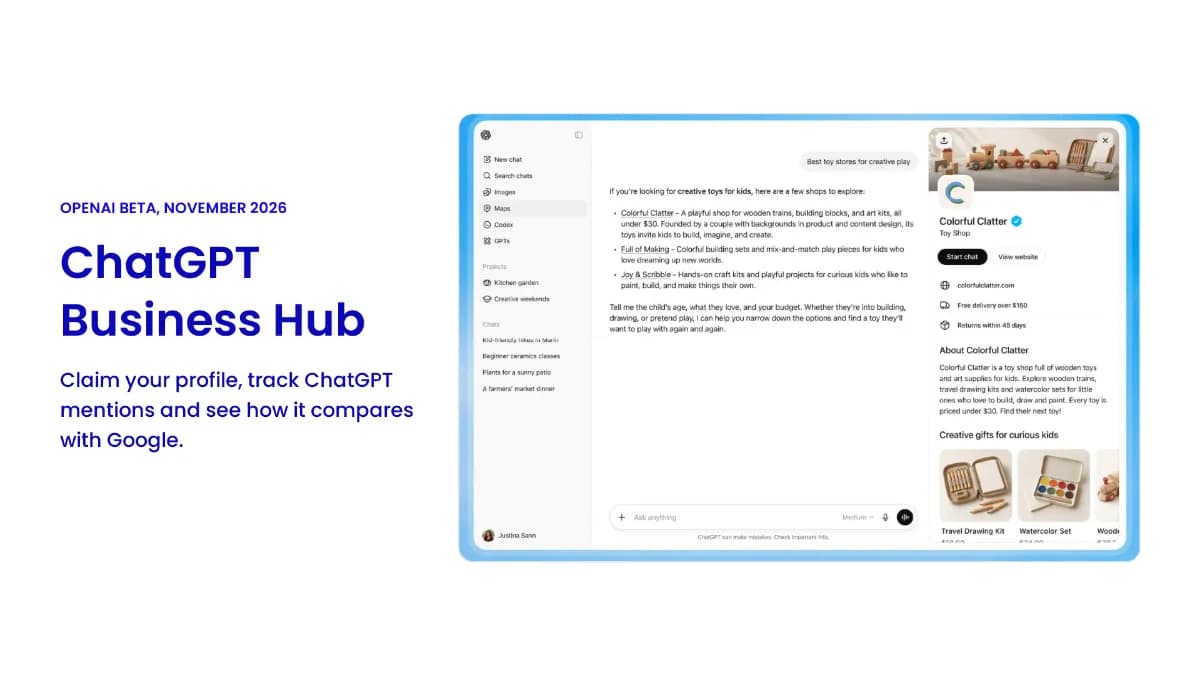
OpenAI launched Businesses in ChatGPT in beta on November 10, 2026, with Business Hub for managing your profile.
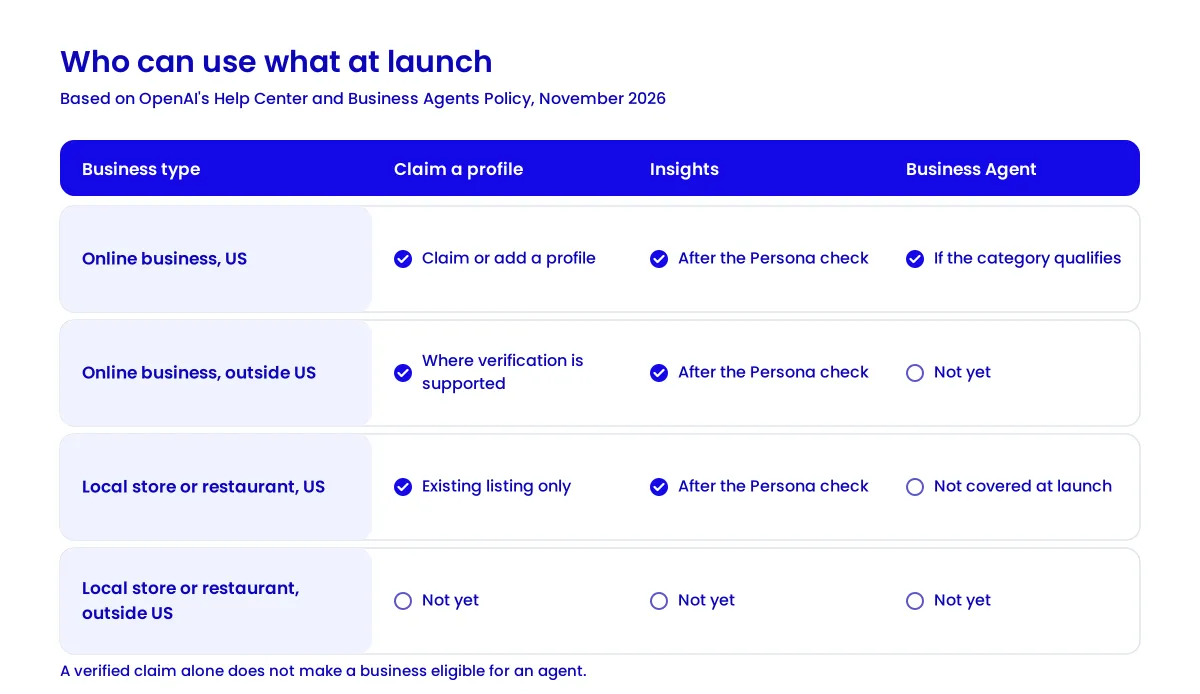
Claiming is open wherever ChatGPT is available. Business Agents are limited to eligible US ecommerce and online service businesses.
Insights show 28 days of mentions, website clicks, and discovery topics, but never your customers' chats.
Claiming won't make ChatGPT recommend you more often.
It works alongside Google Business Profile, not instead of it.
Businesses in ChatGPT: What OpenAI's New Business Hub Means for Your Brand #
Until now, you could only ask ChatGPT about your business and hope its answer was right. On November 10, 2026, OpenAI introduced Businesses in ChatGPT, a beta that gives businesses a new way to reach the 1.2 billion people who use ChatGPT each week. Through the new ChatGPT Business Hub, you can claim your profile, correct your details, and see how often ChatGPT cites your website. Here's what launched and what it means for you.
What Is Businesses in ChatGPT? #
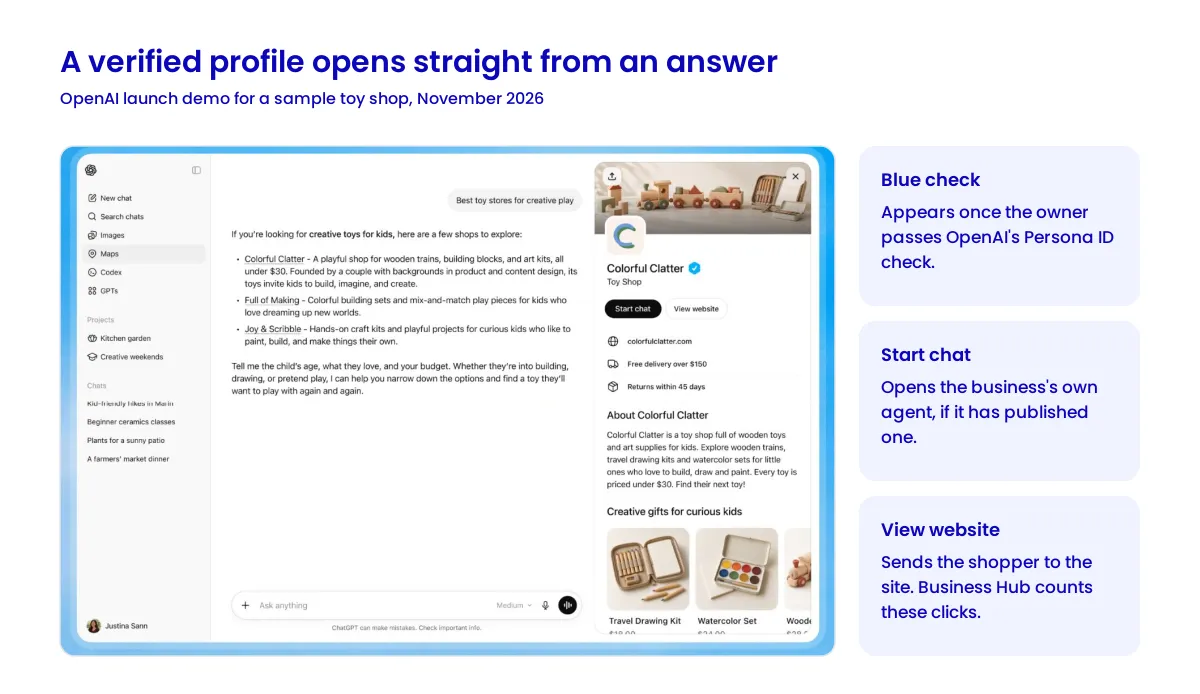
The program has two products. Business Hub is where you claim your business, manage its information, and view insights. Business Agents are branded assistants that answer customer questions inside ChatGPT. People can open a profile from an answer and, if there's an agent, chat with it. Don't confuse the program with ChatGPT Business, the paid plan for teams.
How to Claim and Verify Your Business #
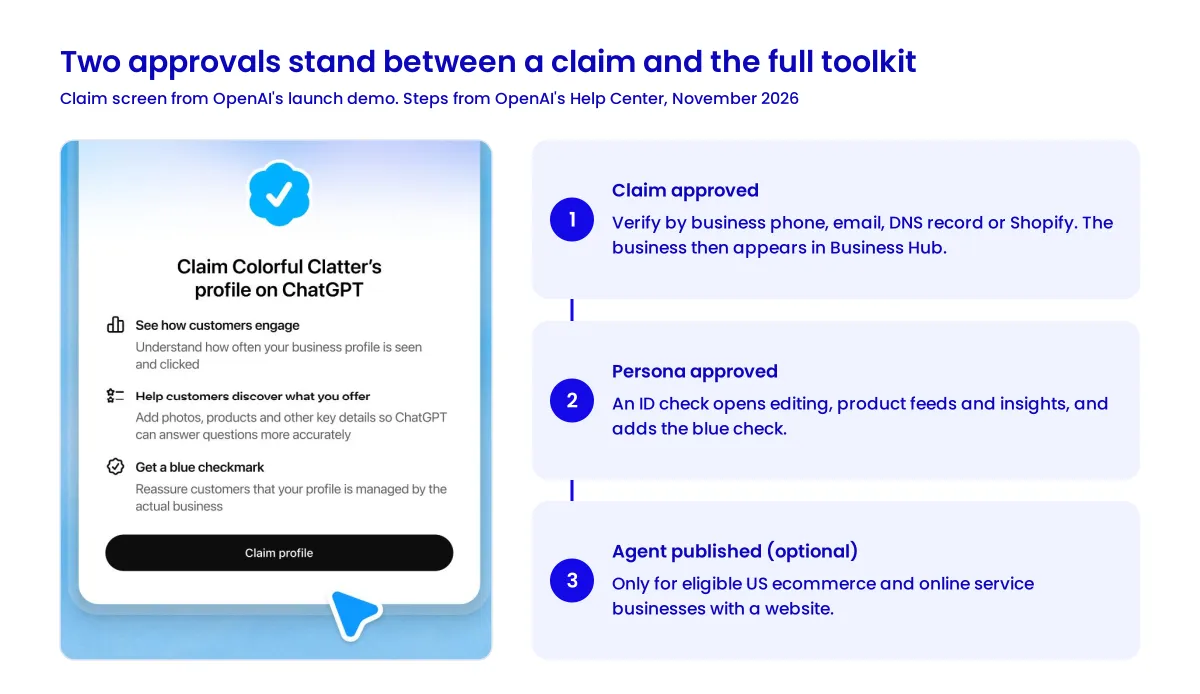
Per OpenAI's setup guide, open Business Hub from the ChatGPT sidebar, search for your business, and select its listing. Then verify by business phone, business email, a DNS record or Shopify. OpenAI reviews the claim and emails its decision.
Claim approval only gets you in. A separate Persona identity check, which may ask for a government ID, is required before you can edit details, add feeds, view insights or build an agent. It also adds the blue check.
Worth knowing first:
A new profile made through Persona goes live as soon as it's approved, and OpenAI Support can't unpublish it for you.
Local stores and restaurants can currently claim only an existing US listing.
Claiming a parent brand doesn't claim its locations.
Business Information and Product Feeds #
After both approvals, you can update your website, description, category, logo, and policies. OpenAI reviews each change, and ChatGPT may still use other sources.
Sellers can connect a Shopify feed or upload a CSV built to OpenAI's product feed spec, which has nine required fields, including price and stock status. A feed won't guarantee recommendations. Eligible Shopify products already reach ChatGPT through Shopify Catalog, so Shopify SEO and clean product data now pay off twice.
Business Insights: Mentions, Clicks and Discovery Topics #
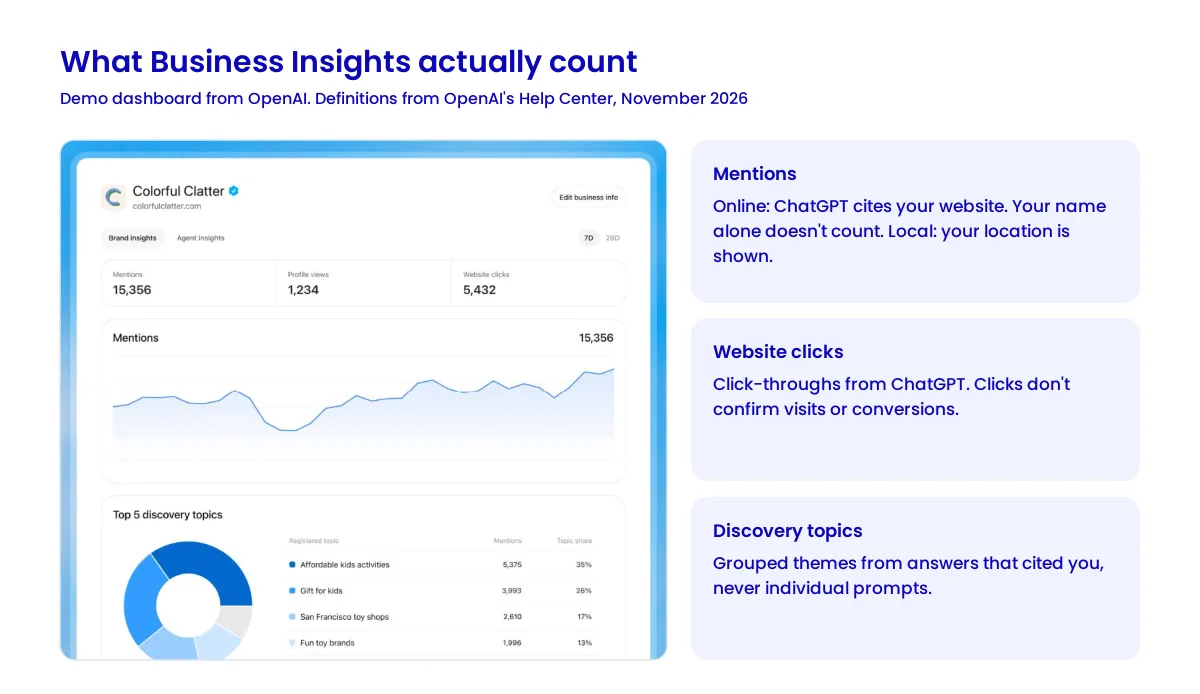
Insights cover the past 28 days:
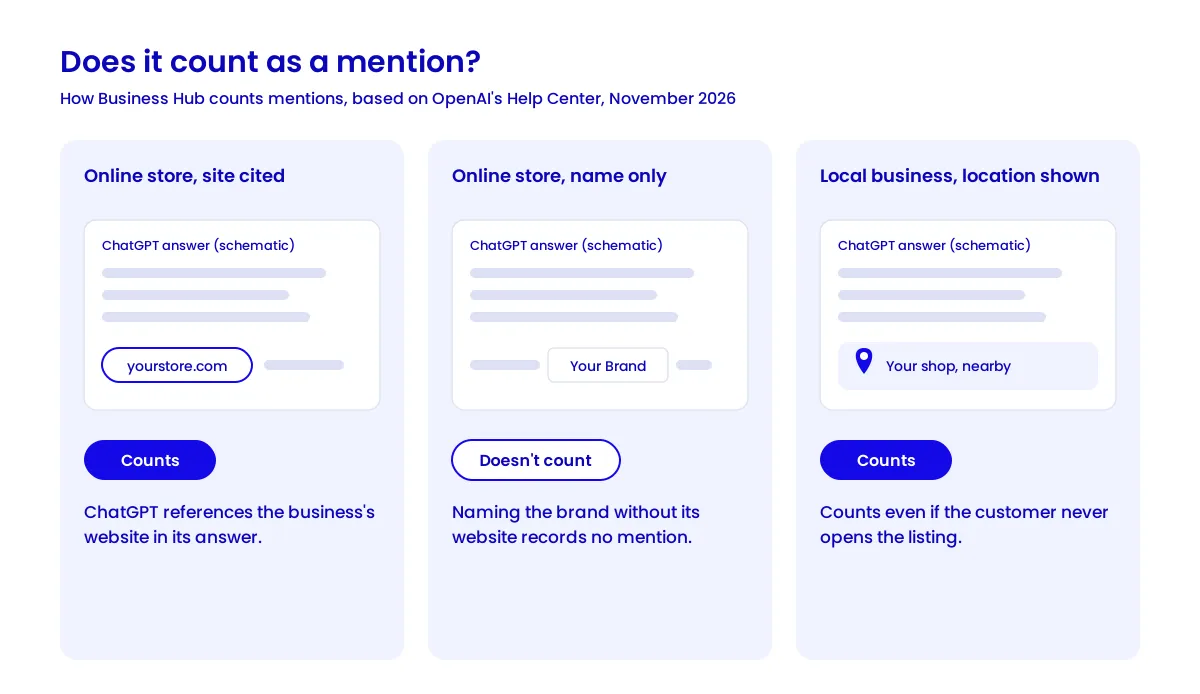
Mentions. For online businesses, these count only when ChatGPT references your website, not just your name. For local businesses, they count when ChatGPT shows a result for that location.
Website clicks. Click-throughs to your site, though a Hub tooltip notes that clicks don't confirm visits or conversions.
Discovery topics. Grouped themes from answers that cited you, not individual prompts.
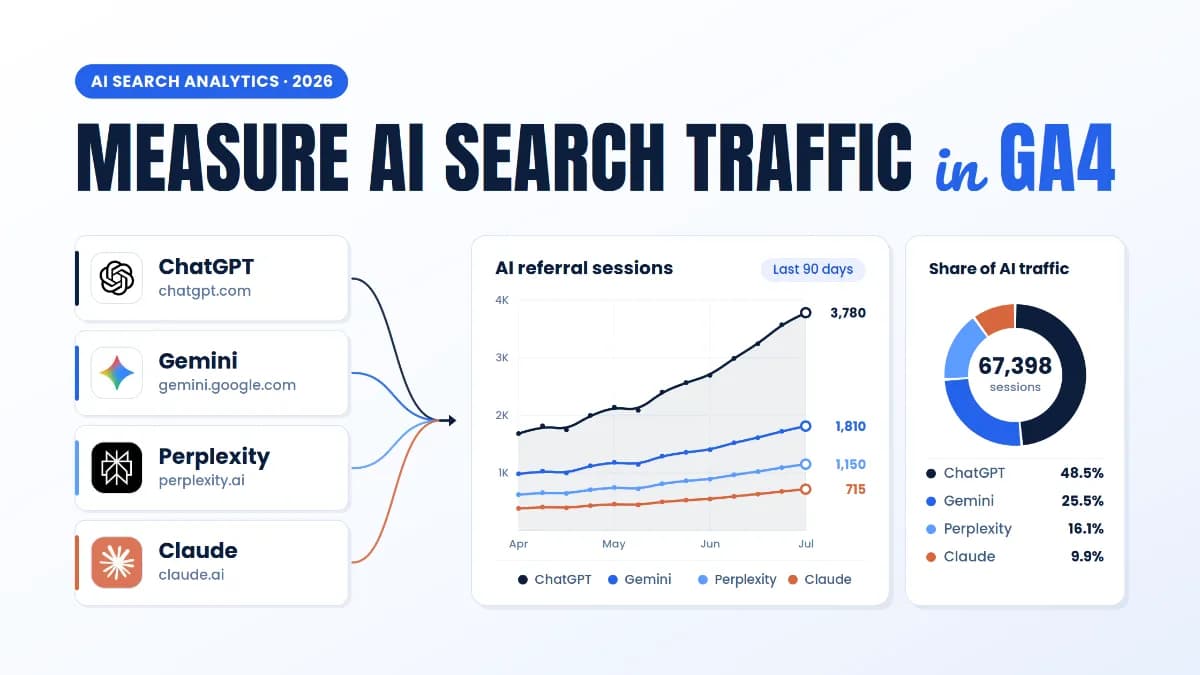
So if ChatGPT names your skincare brand without linking your site, no mention is recorded. Since ChatGPT adds utm_source=chatgpt.com to referral links, you can track ChatGPT referrals in GA4 and compare them with the Hub's clicks.
Not sure how ChatGPT describes your business today? See how your brand shows up in ChatGPT answers before you claim your profile. Get a free ChatGPT visibility assessment from Vynce Digital.
Business Agents and Sponsored Business Agents #
Getting into the Hub doesn't mean you can build an agent. Agents are only for US ecommerce and online service businesses with a website that meet the industry rules in the Business Agents Policy.
You write instructions, preview the agent with real customer questions, then publish. Its chat is labeled and separate from ChatGPT's own answers. At launch, agents explain products and link to your site, but can't complete purchases or bookings.
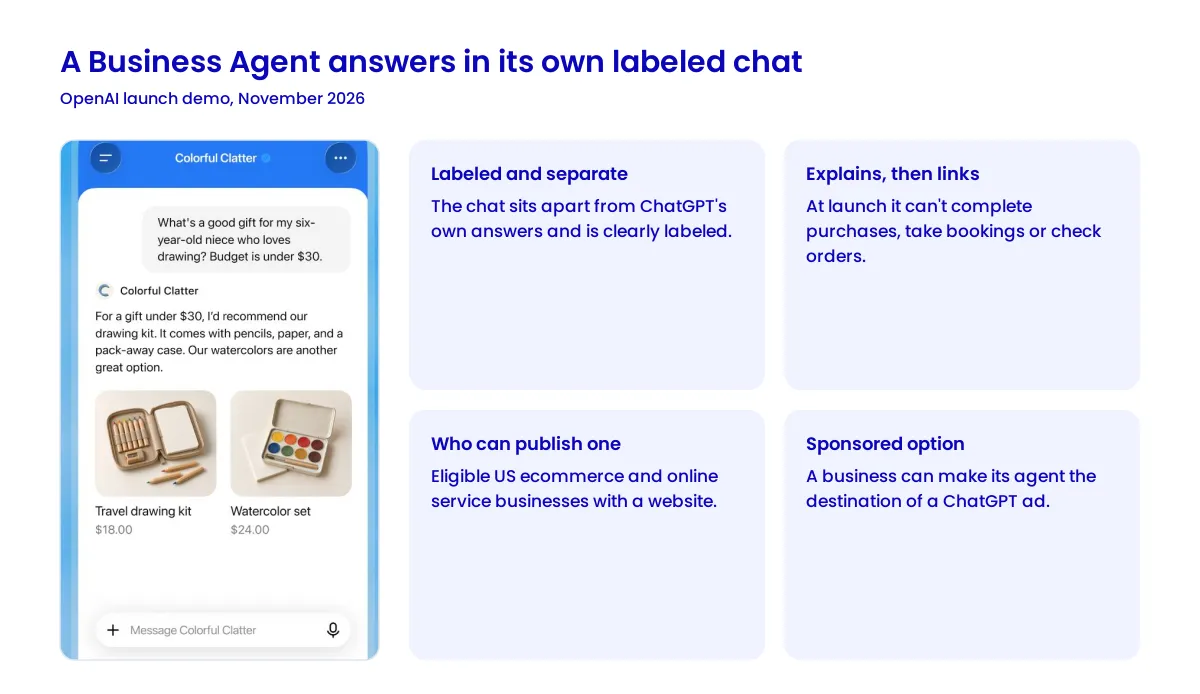
Businesses can also sponsor their agent as the destination for ChatGPT Ads. Paid placements are labeled, and OpenAI says ads don't change ChatGPT's own answers.
ChatGPT Business Hub vs Google Business Profile #
Feature | ChatGPT Business Hub | Google Business Profile |
|---|---|---|
Eligibility | Open to online-only businesses | Requires in-person customer contact |
Verification | Phone, email, DNS, or Shopify, plus Persona | Google assigns methods |
Information | Details, policies, product feeds | Hours, photos, products, services |
Discovery | ChatGPT answers | Google Search and Maps |
Reviews | No review tools at launch | |
Analytics | Mentions, clicks, discovery topics | |
Customer chat | Business Agents (US) | |
Advertising | Sponsored Business Agents | Google Ads |
The biggest difference is who gets in. Google excludes online-only businesses, so a brand that never qualified for a Google listing can now claim a verified profile in ChatGPT. A local clinic should still treat Google as its main profile. Reviews still live on Google and other sites, so online reputation management stays part of the job.
What It Means for Local SEO, GEO and AI Search Visibility #
Confirmed: businesses now get first-party data on how often ChatGPT cites their site and sends clicks. Claiming itself doesn't change visibility.
Possible, not confirmed: accurate profile data may reduce wrong answers about your prices. ChatGPT also uses other sources, so consistent details across your site and listings, a core part of local SEO, still matter. And since a mention needs a link to your site, generative engine optimization now has a number you can track inside ChatGPT. OpenAI plans to open it to more markets but hasn't said when.
How to Prepare: Practical Steps #
Claim with the right account. Add agencies later with their own accounts.
Choose a verification method you control, such as DNS or Shopify.
Match your records. Persona checks your business name, address, and registration or tax number.
Prepare details first, since new profiles publish on approval.
Keep feed prices and stock levels up to date.
Set a baseline for 28-day mentions and clicks, then compare with GA4 monthly.
Test your agent with common customer questions before publishing, if you're eligible.
Not eligible yet? Keep your website and listings accurate while access expands.
Frequently Asked Questions #
Is ChatGPT Business Hub free? #
OpenAI told Digiday that claiming a profile and publishing a Business Agent are free at launch, as VentureBeat reported. Ads are a separate paid product.
Will claiming my business make ChatGPT recommend it more? #
No. OpenAI says claiming doesn't promise more visibility, and you can't control what ChatGPT recommends.
Can businesses outside the US use Business Hub? #
Yes, if your business qualifies, ChatGPT is available where you are, and OpenAI supports verification there. Business Agents are US-only for now.
Can I see what customers asked ChatGPT about my business? #
No. OpenAI doesn't share prompts, chats, or agent conversations with businesses.
Does ChatGPT Business Hub replace Google Business Profile? #
No. Google Business Profile covers Search and Maps, while Business Hub covers ChatGPT only. Local businesses should manage both.
Written by
Digital Marketing Specialist at Vynce Digital
Tuba Mushtaq is a Digital Marketing Specialist at Vynce Digital who writes about AI search, technical SEO, paid search and conversion rate optimization.
More from Tuba