

Crawl Budget Waste: How to Audit It on Large Sites

Tuba
August 3, 2026
Table of Contents
- Key takeaways
- What Crawl Budget Waste Actually Means
- Why the Arithmetic Changed in 2026
- Six Places Large Sites Lose Crawl Budget
- What Counts Against Your Budget, and What Does Not
- A Five-Stage Audit You Can Run This Quarter
- Sequencing the Fixes
- How to Tell the Audit Worked
- Where This Leaves You
- Frequently Asked Questions
Key takeaways #
Crawl budget waste is the share of crawler requests your site spends on URLs that will never earn a search impression. It becomes a real problem past roughly a million pages, or ten thousand pages that change daily. Google's July 2026 rewrite confirmed that crawl capacity is one shared pool across every Google crawler, which makes waste more costly than it used to be. A useful audit joins Search Console crawl stats to thirty days of server logs, classifies every request, and clears the cheap problems before the structural ones.
Most websites never need to think about this. Google's guidance is blunt about it: if your pages are crawled the same day they are published, keeping your sitemap current and checking the Page Indexing report is enough. The advice changes at scale. Google flags three situations that qualify a site as large: more than a million unique pages with content changing weekly, more than ten thousand pages with content changing daily, and any site where a large share of URLs sit in the Discovered, currently not indexed bucket.
At that size, crawl budget waste stops being theoretical. It is the reason a new product page takes eleven days to appear while a sorted, filtered, session-tagged copy of a category page gets fetched four times a week. The crawler is not idle. It is busy in the wrong place.
What Crawl Budget Waste Actually Means #
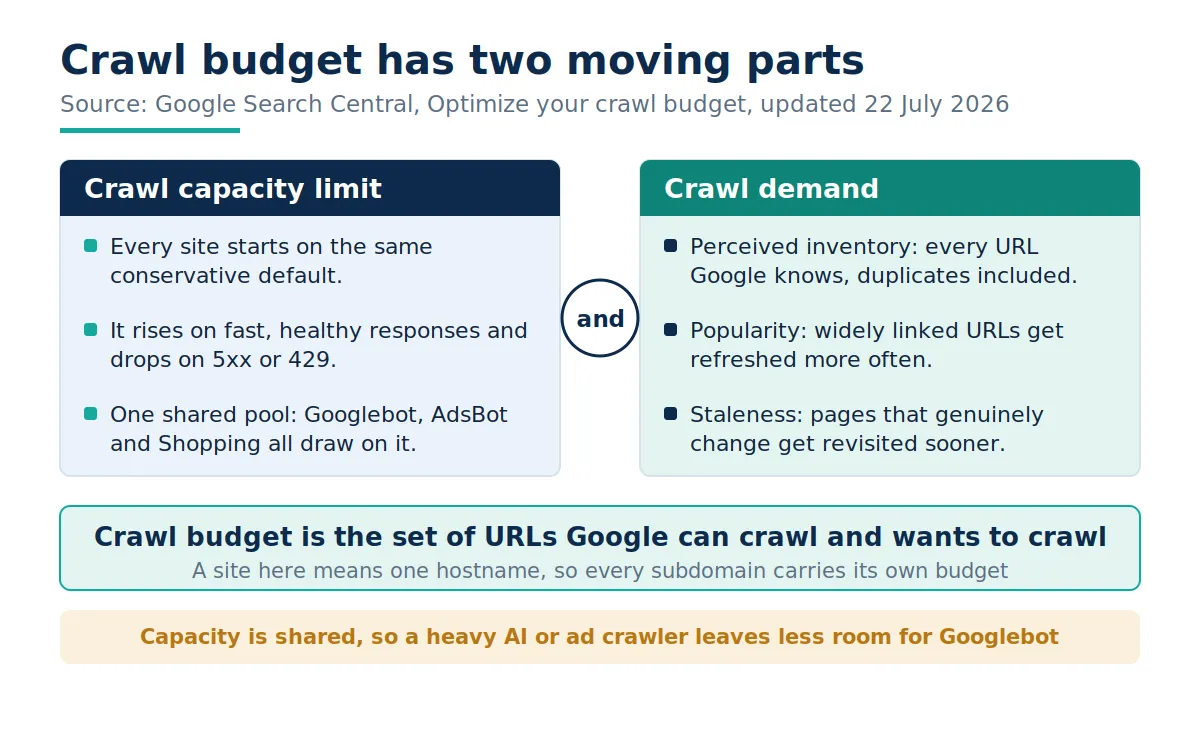
Crawl budget waste is not a penalty and not a score. It is an allocation problem. Google's crawl budget documentation, rewritten on 22 July 2026, splits the budget into two parts. The crawl capacity limit is how much time your server will hold connections open for Google without degrading. Crawl demand is how much Google wants to fetch, based on your perceived inventory, your popularity, and how often your pages genuinely change. The budget is what survives both: the set of URLs Google can crawl and wants to crawl.
Two details in that update matter for large sites. A site is defined as a single hostname, so shop.example.com and www.example.com carry separate budgets, which is worth knowing before anyone proposes a subdomain migration. And every site starts on the same conservative default capacity, earning more only by staying fast and healthy. You cannot request a larger budget. You can stop wasting the one you have, or give Google better reasons to want more.
It also helps to separate two Search Console labels that look alike. Discovered, currently not indexed means Google knows the URL exists but has not yet spent a request on it, which is the signature of a budget constraint. Crawled, currently not indexed means the request was spent and the page was judged not worth keeping, which is a quality or duplication problem instead. Only the first is a crawl budget symptom, and confusing the two sends teams tuning servers when the real issue is thin content.
Why the Arithmetic Changed in 2026 #
Three shifts since the start of the year have made waste more expensive than it was.
The pool is shared. The July 2026 rewrite states that while each crawler has its own demand, the capacity limit is shared across all of them. Googlebot, AdsBot, and the Shopping crawler draw on one allowance. High demand from one reduces what is available to the others, so a large merchant feed or an aggressive ad crawl now measurably reduces what is left for search.
The indexing cutoff moved. Google updated its Googlebot documentation on 3 February 2026 to state that when crawling for Search, Googlebot takes the first 2MB of a supported file type and the first 64MB of a PDF, measured on uncompressed data. Once the cutoff is reached, the fetch stops and only the downloaded part goes forward for indexing. Most templates sit far below that. Sites that inline large JSON state, generated markup, or entire component payloads can cross it, and everything past the line is simply not considered.
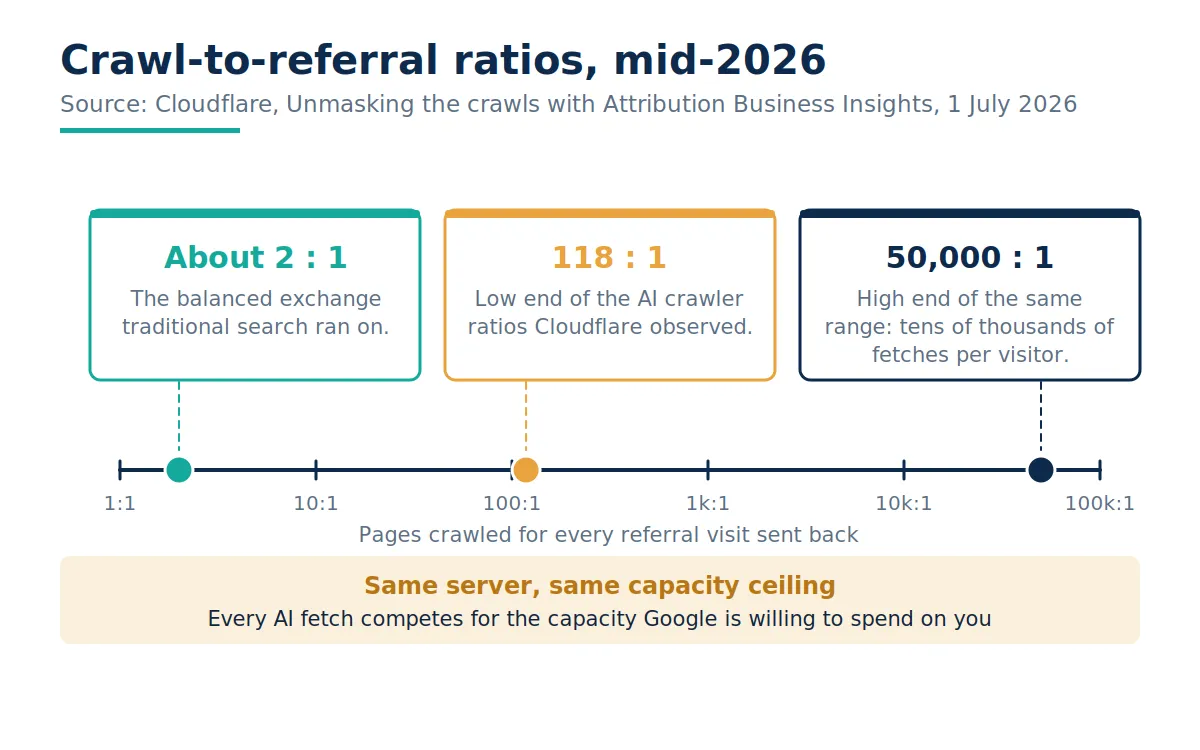
Non-search crawlers arrived at your origin. Cloudflare's July 2026 crawler analysis reports crawl-to-referral ratios running from 118 pages crawled per referral visit at the low end to close to 50,000 at the high end. Its August 2025 breakdown found that training accounted for nearly 80 percent of AI crawler traffic, which is crawling that returns no visitors at all. Those requests do not spend Google's budget directly. They spend the response times and error rates Google reads when it decides how much capacity you have earned.
None of this means blocking every automated agent. Being readable to answer engines is now part of AI search visibility and of any serious generative engine optimization program. It does mean that crawler load is a capacity planning question, not just a robots.txt question.
Six Places Large Sites Lose Crawl Budget #
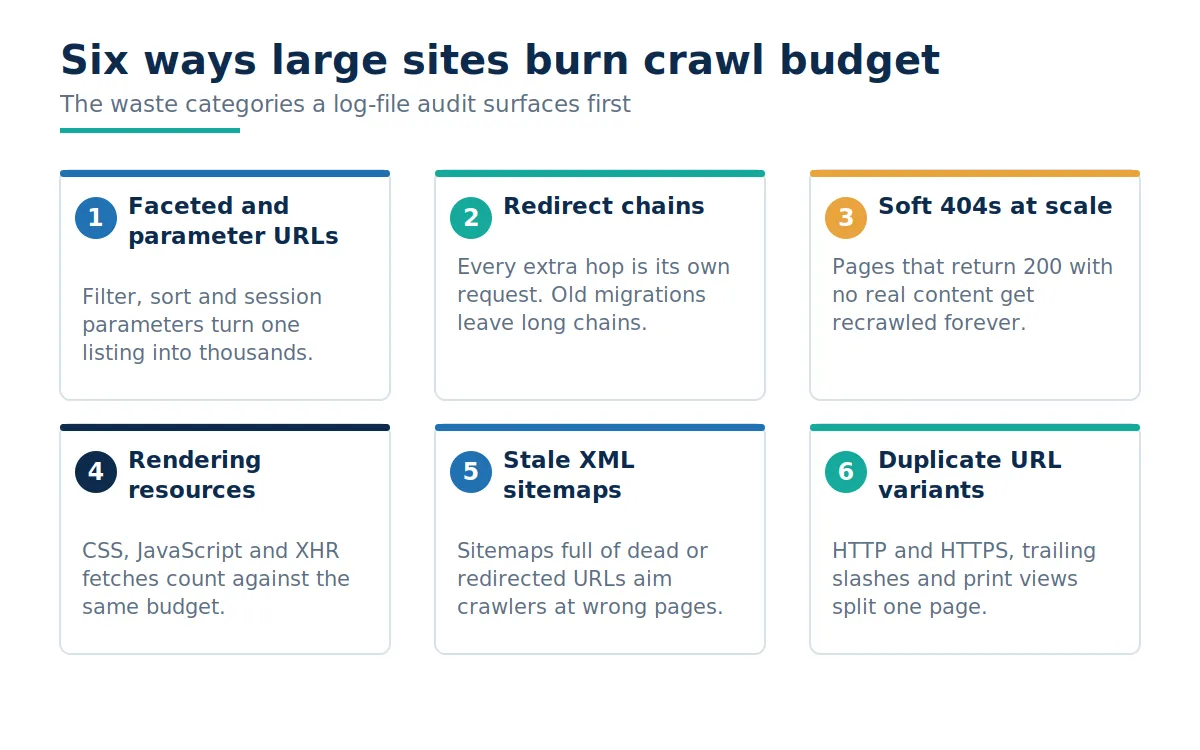
Waste concentrates in a small number of patterns. A log-file audit almost always surfaces them in roughly this order.
Faceted and parameter URLs. The single largest source on any catalog. A few dozen filters, a sort control, and a session parameter turn one category page into tens of thousands of near-identical URLs. This is why crawl waste and ecommerce marketing performance are so tightly linked: the URLs eating the budget are usually the ones nobody chose to create.
Redirect chains. Every hop is a separate request. Two migrations and a protocol change later, a single internal link can cost four fetches before anything indexable is reached.
Soft 404s. Pages that return 200 with no meaningful content keep getting recrawled indefinitely, because nothing in the response tells Google to stop.
Rendering resources. CSS, JavaScript, and background fetches are crawled too. A render-heavy template taxes every URL on the site, which makes this as much a website build question as an SEO one.
Stale XML sitemaps. A sitemap full of dead, redirected, or noindexed URLs is an instruction to spend budget in the wrong place. Google reads sitemaps regularly and takes them at face value.
Duplicate URL variants. Trailing slashes, uppercase paths, print views, and tracking suffixes split one page into several. The 2025 Web Almanac, published in January 2026, found canonical tags on 68 percent of desktop pages and invalid HTML inside the head element on 10.1 percent, which is enough to push a canonical tag into the body where it stops working.
What makes these patterns expensive is that they compound. A faceted URL that redirects to another faceted URL that resolves to a soft 404 costs three requests and returns nothing usable. On a catalog of any size, those combinations are not edge cases; they are the default behavior of the template. That is why counting waste by category beats counting broken URLs: one underlying rule generates thousands of them at once, and fixing the rule retires the entire cluster.
What Counts Against Your Budget, and What Does Not #
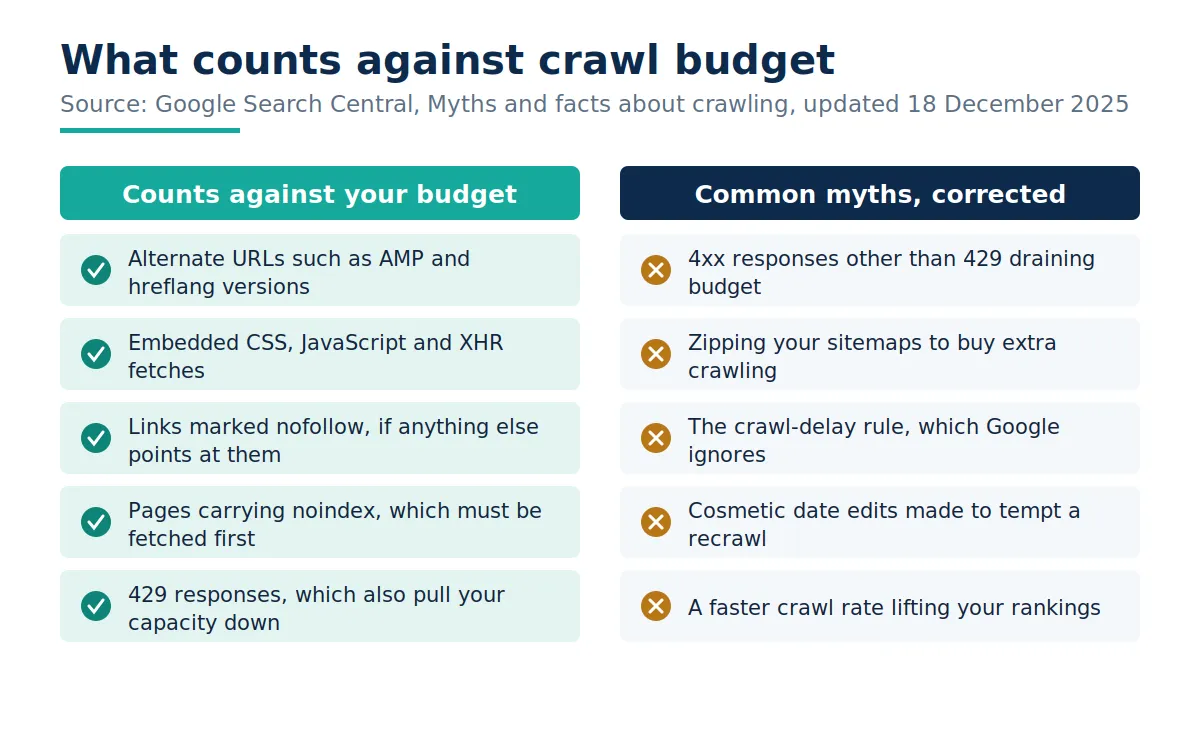
Some of the most repeated advice in this area is wrong, and following it costs engineering time that could go somewhere useful. Google published a myths and facts page for crawling, last updated on 18 December 2025, that settles several of these.
Pages returning 4xx status codes, with the exception of 429, do not waste crawl budget. Google attempted the fetch and received a status code with no content. Alternate URLs such as AMP and hreflang versions do count, as do embedded resources including CSS, JavaScript, and background data fetches. The non-standard crawl-delay rule is not processed by Google's crawlers at all. Compressing your sitemaps buys you nothing, because the file still has to be fetched. And crawling is not a ranking signal: a page has to be crawled to rank, but crawling it more often will not lift it.
Two practical corollaries follow. Using noindex to free budget only half works, because Google has to fetch the page to see the tag, although removing URLs from the index does let crawlers concentrate elsewhere over time. And robots.txt is for content you never want crawled, not a lever for temporarily redirecting budget somewhere else.
A Five-Stage Audit You Can Run This Quarter #
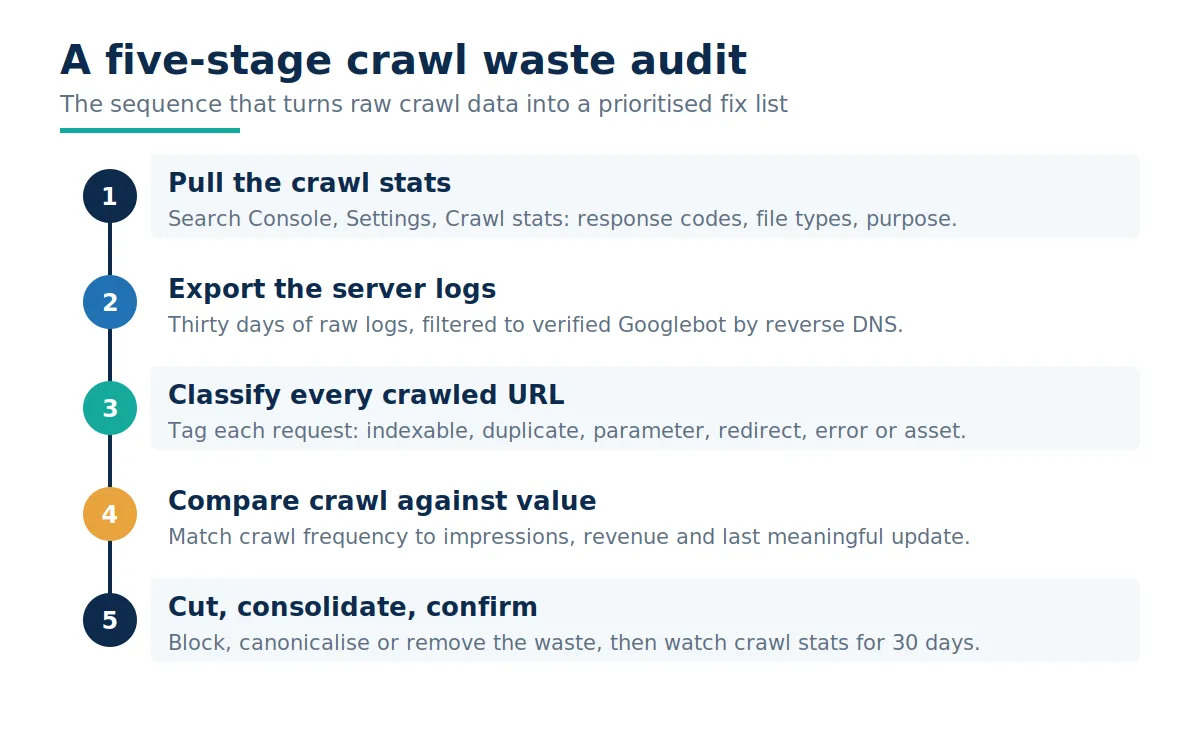
Stage one: start with crawl stats #
Open the Crawl stats report in Search Console under Settings. Three breakdowns do most of the work: crawl response, which shows the share of requests returning 200, 301, 404 and 5xx; crawl file type, which shows how much of your budget goes to HTML against images, CSS and JavaScript; and crawl purpose, which splits discovery from refresh. A site with a healthy structure spends most of its budget refreshing pages it already knows. A site drowning in generated URLs spends it on discovery that never resolves into indexed pages.
Stage two: pull thirty days of server logs #
Crawl stats are sampled and aggregated. Logs are the ground truth, and they are the only place you can see the other crawlers. Filter to verified Googlebot using reverse DNS rather than trusting the user agent string, which is widely spoofed. Thirty days is enough to smooth out publishing spikes and deployment noise.
Stage three: classify every crawled URL #
Tag each request as indexable, duplicate, parameter, redirect, error, or asset. This is the step most audits skip, and it is the one that produces the number you can take to a product manager: the percentage of Googlebot requests that hit something you would never want ranked. The technical SEO work that follows is only as good as this classification, so it is worth doing properly rather than sampling.
Stage four: set crawl against value #
Join crawl frequency to impressions, revenue, and last meaningful update. You are looking for two shapes. High crawl with no impressions is a waste. Low crawl on pages that earn money is a discovery or internal linking problem, and that second shape is often the more valuable finding. The 2025 Web Almanac put the median desktop page at 43 internal links, rising to 174 at the ninetieth percentile, which is a reminder of how unevenly link equity and crawl paths are distributed inside a single site.
Stage five: cut, consolidate, confirm #
Block what should never be crawled, consolidate what is duplicated, and return 404 or 410 for what is genuinely gone. Google treats a 404 as a strong signal not to try again, whereas a robots.txt block keeps the URL in the crawl queue for far longer. Then wait. Crawl stats move slowly, and thirty days is the minimum honest window.
Sequencing the Fixes #
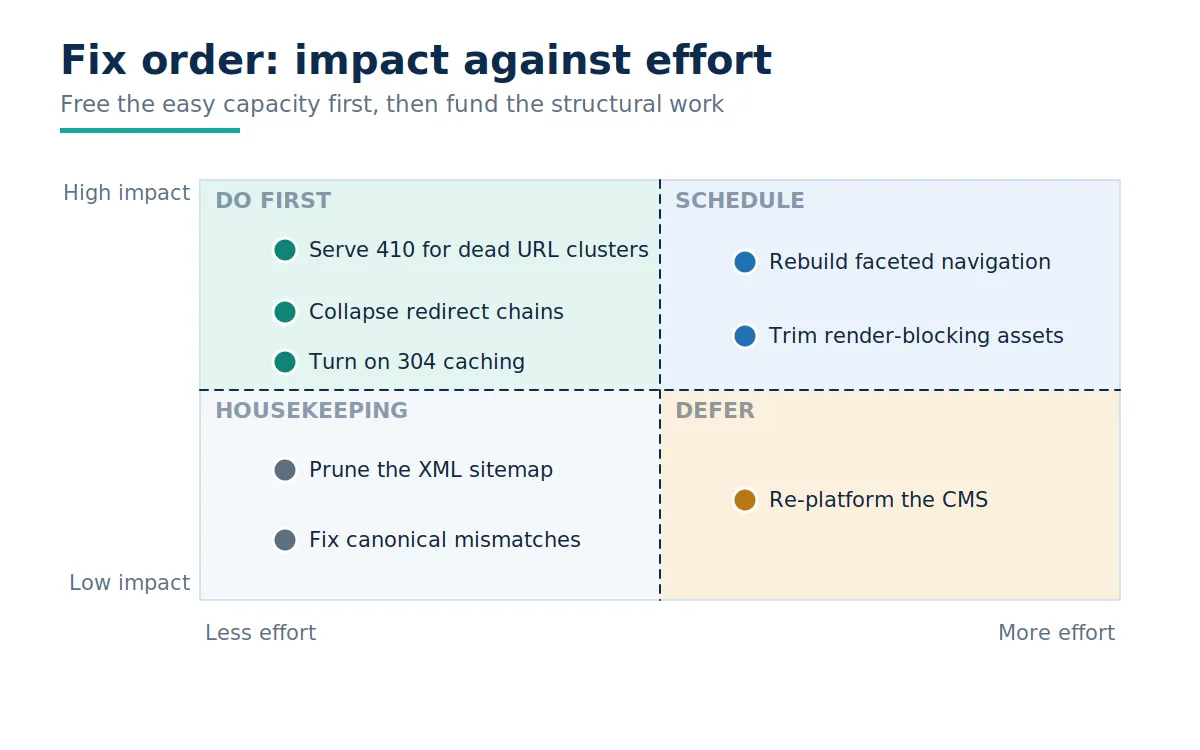
The findings list will be long. The sequence matters more than the list, because capacity freed early pays for the expensive work later.
Start with the changes that are cheap and release capacity immediately: collapsing redirect chains, returning 410 for dead URL clusters, and supporting 304 Not Modified responses so unchanged pages cost almost nothing to recheck. Follow with housekeeping that improves signal quality without much engineering: pruning the sitemap to live, canonical, indexable URLs and fixing canonical mismatches. The Web Almanac found that 77 percent of robots.txt files rely only on the wildcard user agent, so most sites have room to be more deliberate about which crawlers get what.
Schedule the structural work rather than attempting it in the same sprint. Rebuilding faceted navigation so that filter combinations are crawlable only where they have search demand is a genuine project. So is trimming render-blocking assets from a template used across millions of URLs. Both are worth doing, and neither is a quick win.
One addition sits outside the matrix. IndexNow lets you notify participating engines the moment a URL is added, updated, or removed, which reduces the exploratory crawling those engines would otherwise spend finding the change. Google does not participate, so it does not solve the Googlebot side, but on a large catalog it takes real load off the origin.
How to Tell the Audit Worked #
Four measurements, checked at thirty and ninety days. The share of Googlebot requests returning 200 on indexable URLs should rise. Average response time in crawl stats should fall or hold steady. The Discovered, currently not indexed count should stop growing, then shrink. And the gap between publication and first crawl for genuinely new pages should narrow, which is the metric a commercial stakeholder actually feels.
One extra reading is worth taking. In the crawl purpose breakdown, watch the ratio of discovery requests to refresh requests. A site with a settled URL inventory should skew heavily towards refresh, because Google already knows what exists and is mostly checking for changes. A persistent tilt towards discovery months after your last launch means something is still generating URLs faster than Google can retire them, and no amount of server tuning will fix that.
What will not move is rankings, at least not directly. Crawling is a precondition, not a signal. What changes is how quickly your best work becomes eligible to compete, which is why crawl efficiency belongs in the same conversation as editorial planning and conversion rate optimization rather than in a separate technical backlog nobody reads.
Where This Leaves You #
Crawl budget waste is one of the few technical problems where the diagnosis is harder than the fix. Once you can say that a specific percentage of crawler requests lands on URLs you would never want indexed, the argument for engineering time makes itself. The data is available today in Search Console, and it gets considerably sharper the moment you add server logs to it.
Run the classification once, fix the cheap problems, and measure again in thirty days. If crawl waste turns out to be structural rather than incidental, that is still a useful answer, because it tells you the work belongs on a roadmap rather than in a sprint. If you want a second pair of eyes on the log analysis before you take it to your engineering team, that is a conversation worth having early.
Frequently Asked Questions #
What is crawl budget waste?
It is the share of crawler requests spent on URLs that will never earn a search impression, such as parameter duplicates, redirect hops, and soft 404s.
Does my site need to worry about crawl budget?
Only if you have more than a million pages changing weekly, more than ten thousand changing daily, or a growing Discovered, currently not indexed count.
Do 404 pages waste crawl budget?
No. Google states that 4xx responses other than 429 do not waste crawl budget, because the fetch returned a status code and no content.
Does noindex free up crawl budget?
Only indirectly. Google still has to fetch the page to see the tag, though removing URLs from the index lets crawlers concentrate elsewhere over time.
Do CSS and JavaScript files count against crawl budget?
Yes. Embedded resources and background data fetches are crawled and counted, which is why render-heavy templates are expensive at scale.
Does Google obey the crawl-delay directive?
No. The non-standard crawl-delay rule in robots.txt is not processed by Google's crawlers. Use the crawl rate settings or fix server response times instead.
Is crawling a ranking factor?
No. A page must be crawled to appear in results, but crawling it more often does not improve its position.
How much HTML does Googlebot read per page?
When crawling for Search, it takes the first 2MB of a supported file type (measured uncompressed), and the first 64MB of a PDF.
Do AI crawlers use my Google crawl budget?
Not directly, but they consume server capacity, and slower responses or more errors lower the capacity limit Google is willing to use.
How long before crawl budget fixes show results?
Give it thirty days for crawl stats to settle and ninety before judging indexation change. Crawl behavior adjusts gradually.