
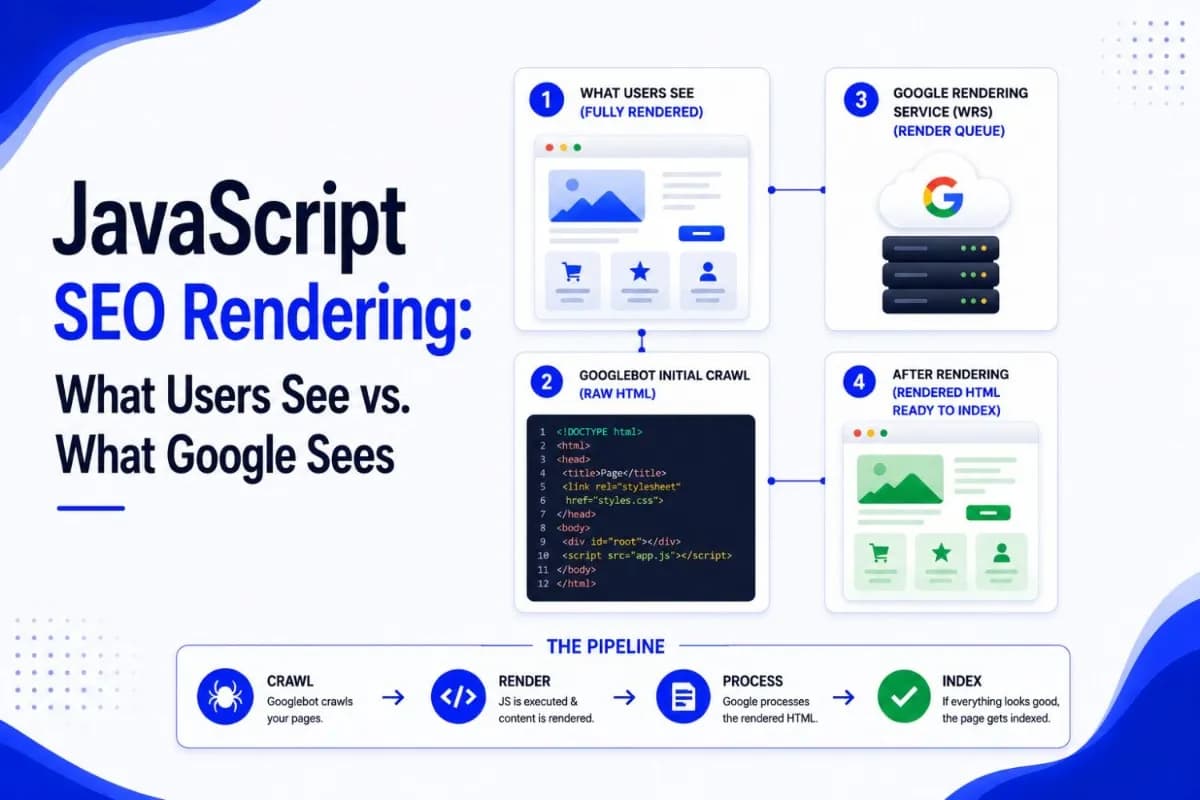
JavaScript SEO Rendering: What Google Actually Sees

Tuba
August 7, 2026
Table of Contents
- Key takeaways
- JavaScript Rendering Explained: Why Google Sees Something Different Than Your Users
- The Gap Between What Users See and What Google Fetches
- How Google Processes JavaScript: Crawl, Render, Index
- The Render Queue in Real Numbers
- Why a Perfect Render Rate is not the Whole Story
- Choosing a Rendering Strategy
- Six Failure Points That Keep Rendered Content Out of the Index
- How to Test What Google Actually Sees
- The 2026 Stakes: Every Answer Engine Reads Your HTML First
- What to Do With All of This
- Frequently Asked Questions
Key takeaways #
Google can render JavaScript, and it renders nearly every page it crawls. The real risk isn't whether rendering happens, but when it happens and what your initial HTML says before it does. Sites that ship critical content, links, and meta signals in the first server response get indexed faster, more reliably, and by every crawler, including the AI crawlers that never run JavaScript at all.
JavaScript Rendering Explained: Why Google Sees Something Different Than Your Users #
Open your site in any browser, and everything looks fine. The headline loads, the product grid fills in, the pricing table appears. But the page your visitors see and the document your server actually sends are often two different things. If your site relies on JavaScript to build its content, the first version Google downloads may be little more than an empty div and a script tag.
Understanding that gap is the whole game in JavaScript SEO: what exists before scripts run, what exists after, and how Google moves a page from one state to the other. This guide walks through Google's crawl, render, and index pipeline, the measured numbers behind the render queue, and the decisions that determine whether your content stays visible to search engines and AI assistants alike.
The Gap Between What Users See and What Google Fetches #
Modern sites lean heavily on JavaScript. The 2024 Web Almanac from HTTP Archive (November 2024) puts the median JavaScript payload at 558 KB on mobile and 613 KB on desktop, a 14 percent increase in a single year. Frameworks such as React, Vue, and Angular made that growth possible by moving page construction into the browser: the server sends a thin HTML shell, the browser downloads the scripts, executes them, and assembles the page on the spot.
Human visitors never notice, because browsers do this work in milliseconds. A crawler that reads only the initial server response notices immediately. Where your customer sees a finished pricing page, that first fetch contains a title, a script reference, and an empty container waiting to be filled. Everything that matters for search- the copy, the product details, the internal links- arrives only after the JavaScript runs.
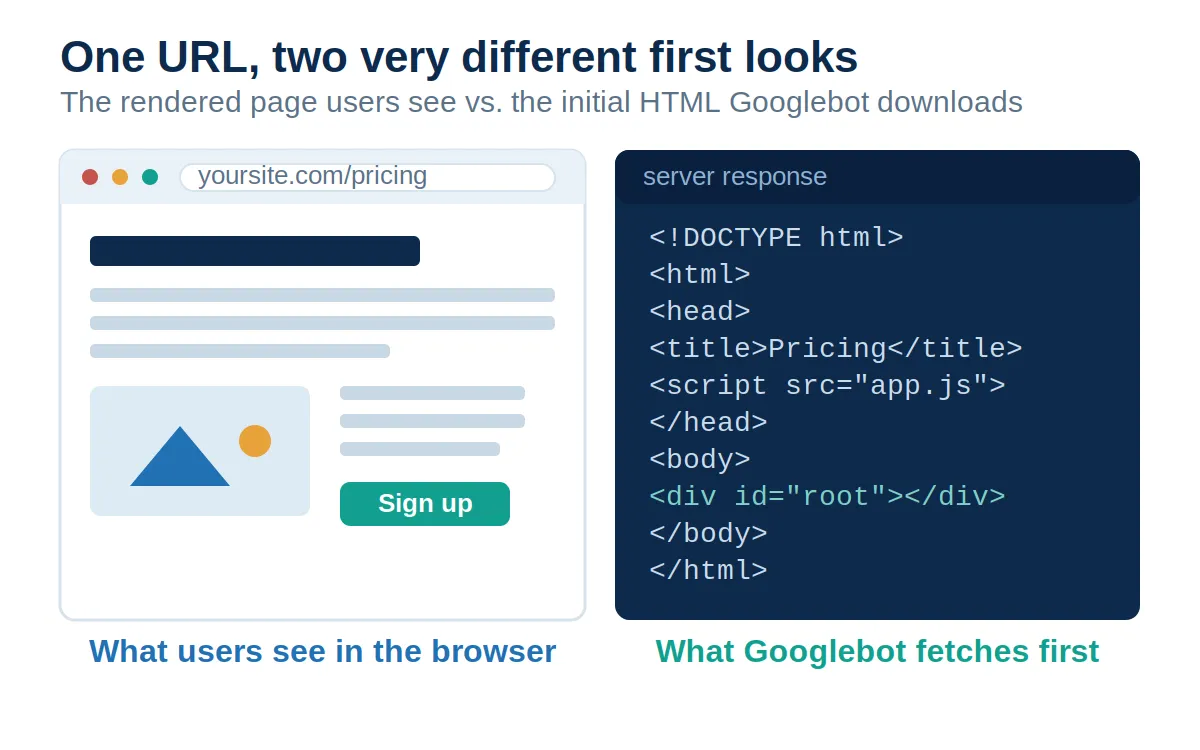
That distinction matters twice. Once for Google, which can close the gap by rendering the page itself. And once for everything else that reads your site without a full browser, which cannot.
How Google Processes JavaScript: Crawl, Render, Index #
Google's JavaScript SEO documentation (last updated March 2026) describes three phases: crawling, rendering, and indexing. Googlebot pulls a URL from the crawl queue, checks robots.txt, fetches the page, and parses the raw HTML for links, which go straight back into the crawl queue. Every page that returns a 200 status code is then queued for rendering, whether it contains JavaScript or not.
Rendering happens in a headless Chromium browser that Google has kept evergreen since May 2019, meaning it runs a current version of Chrome and supports modern JavaScript features. Once resources allow, the renderer executes the page's scripts, and the finished HTML flows back into processing, where Google indexes the content and extracts any links that only appeared after rendering.
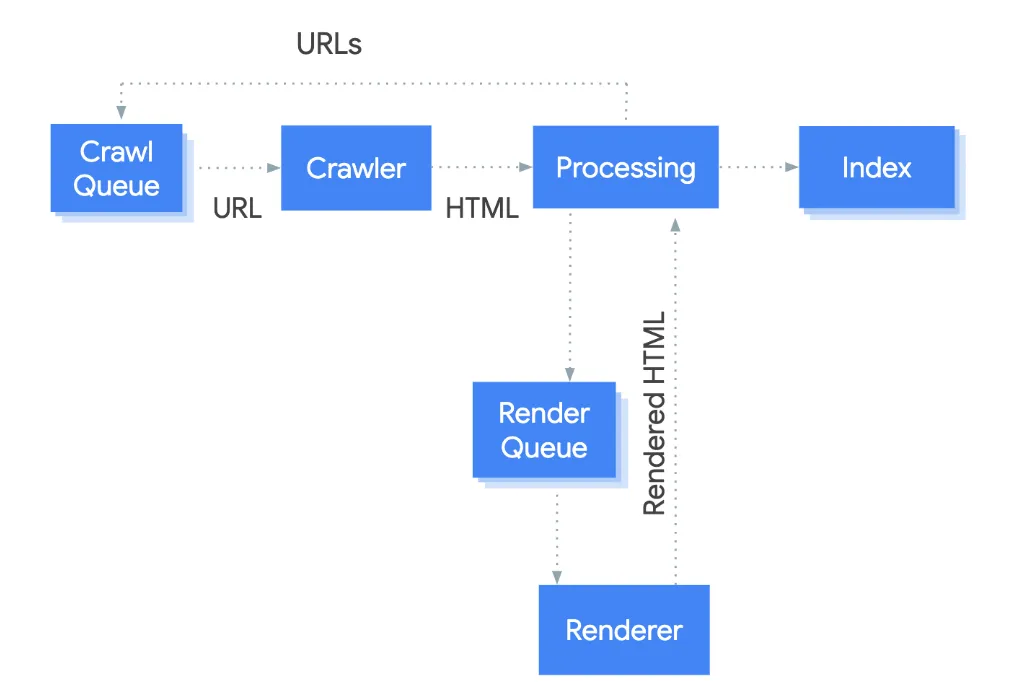
Two details in that pipeline deserve special attention. First, a noindex tag in the initial HTML cancels rendering outright, so using JavaScript to remove a noindex later does not work; the script never gets the chance to run. Second, rendering is deferred. Google's documentation says a page may sit in the render queue for a few seconds but can wait longer, which raises the obvious question: how much longer?
The Render Queue in Real Numbers #
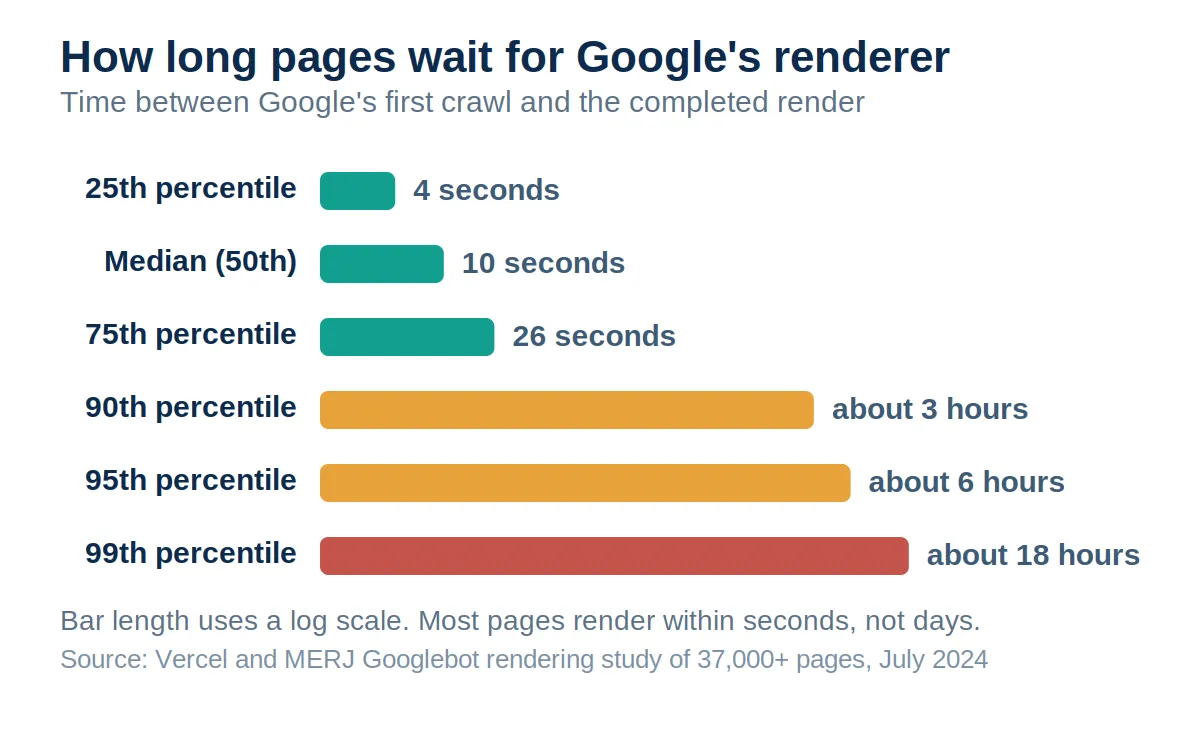
The best public answer comes from a joint study by Vercel and MERJ published in July 2024, which analyzed more than 100,000 Googlebot fetches and matched over 37,000 of them to completed renders. The headline finding: excluding error pages and non-indexable URLs, Google fully rendered 100 percent of the HTML pages it crawled, including pages with complex client-side JavaScript.
The timing data retired an old fear. The median page waited just 10 seconds between crawl and completed render, and a quarter of pages rendered within 4 seconds. The long tail existed but stayed rare: the 90th percentile waited about 3 hours and the 99th percentile about 18 hours. The multi-week second wave of indexing that older SEO guides warned about did not appear anywhere in the data.
One pattern is worth flagging for marketers: URLs with query strings rendered noticeably slower, with a median of 13 seconds and a 75th percentile of 31 minutes in the same dataset. If your campaign pages or filtered views depend on parameters that do not change the content, that overhead buys you nothing.
Why a Perfect Render Rate is not the Whole Story #
If Google renders everything, it is tempting to conclude that rendering no longer matters. Three realities argue otherwise.
Rendering can still fail on your side. The render succeeds only when the renderer can reach every file that builds the page. Scripts blocked in robots.txt, fragile error handling, and timeouts all produce a partial page, and Google indexes whatever survived. On large sites, the cost compounds: Google's crawl budget documentation notes that rendering is resource-intensive, and sites above roughly 10,000 frequently changing pages can see crawl efficiency suffer when every page demands a full render.
Links wait for the render. Links present in the initial HTML enter the crawl queue immediately. Links that only exist after JavaScript runs wait for the renderer, which slows discovery across deep architectures. Server-rendered pages keep every internal link visible from the first fetch.
Google is no longer the only reader that counts. Vercel and MERJ's follow-up AI crawler study (December 2024) found that GPTBot, ClaudeBot, and PerplexityBot fetch JavaScript files but never execute them. Only Gemini, which runs on Googlebot's infrastructure, and AppleBot render pages fully. Content that exists only after a client-side render is simply absent from the assistants shaping buying decisions, which is why AI search optimization and generative engine optimization both start with the same requirement: put the substance of the page in the initial HTML.
Choosing a Rendering Strategy #
Rendering strategy sounds like an engineering topic, but it is decided at the same table as web design, platform, and budget, and it quietly sets the ceiling on your organic performance. Four approaches cover almost every site.
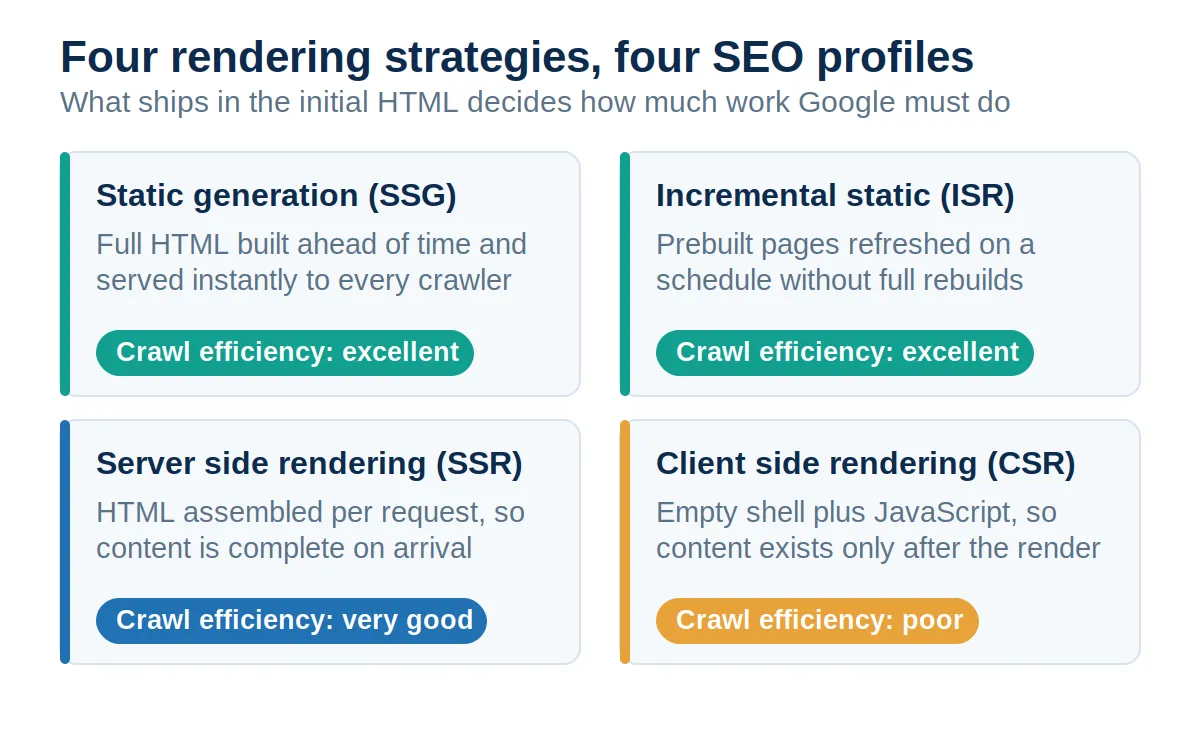
Static generation (SSG) builds the full HTML ahead of time and serves it instantly, which makes it the strongest option for content that changes rarely: blogs, guides, service pages. Incremental static regeneration (ISR) keeps those prebuilt pages fresh on a schedule without full rebuilds. Server-side rendering (SSR) assembles HTML per request, ideal for content that changes constantly, such as inventory or personalization. Client-side rendering (CSR) ships the empty shell and does everything in the browser, which is fine for logged-in application screens and risky for anything you want discovered.
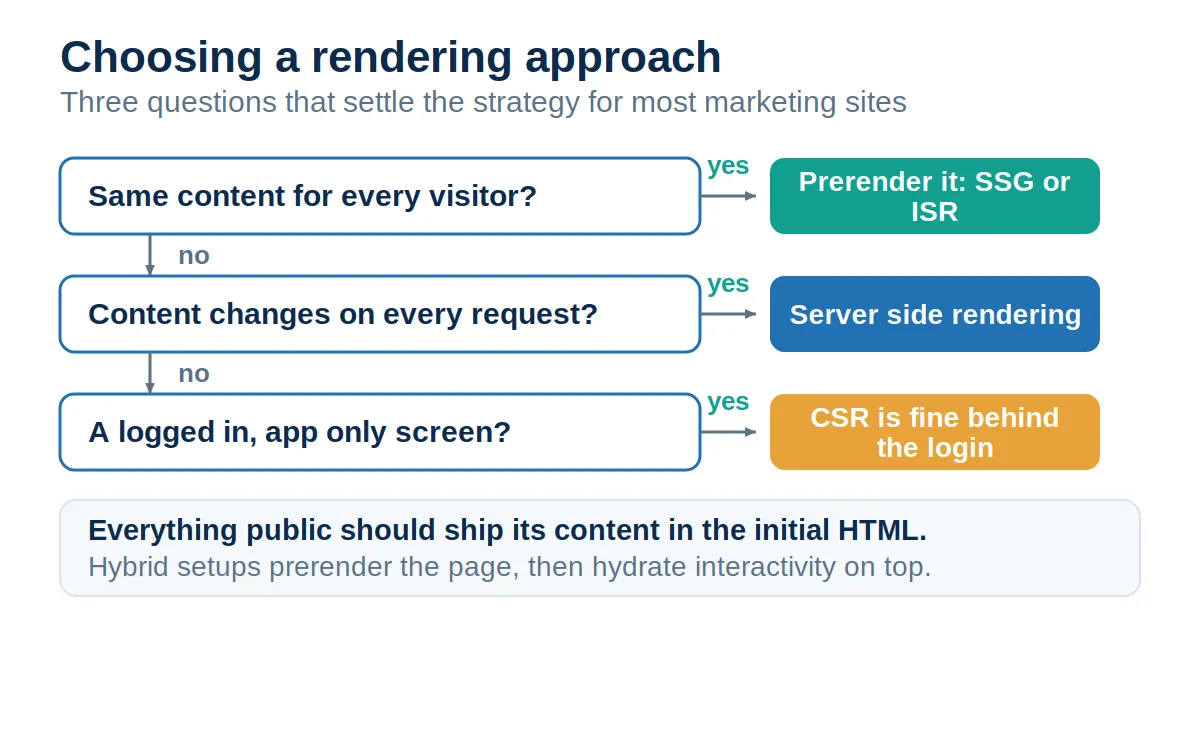
The decision is easiest to make early, which is why it belongs in web design and build conversations rather than post-launch fixes. There is also a commercial bonus: prerendered pages are consistently faster, and speed pays twice. Google's page experience signals reward it through Core Web Vitals, and Deloitte's Milliseconds Make Millions report (2020) linked every 100 millisecond improvement in load time to conversion lifts of up to 8 percent, the kind of gain a conversion rate optimization program works hard for.
Six Failure Points That Keep Rendered Content Out of the Index #
When JavaScript sites lose visibility, the cause is rarely exotic. The same six problems account for most of the damage we see in technical audits.
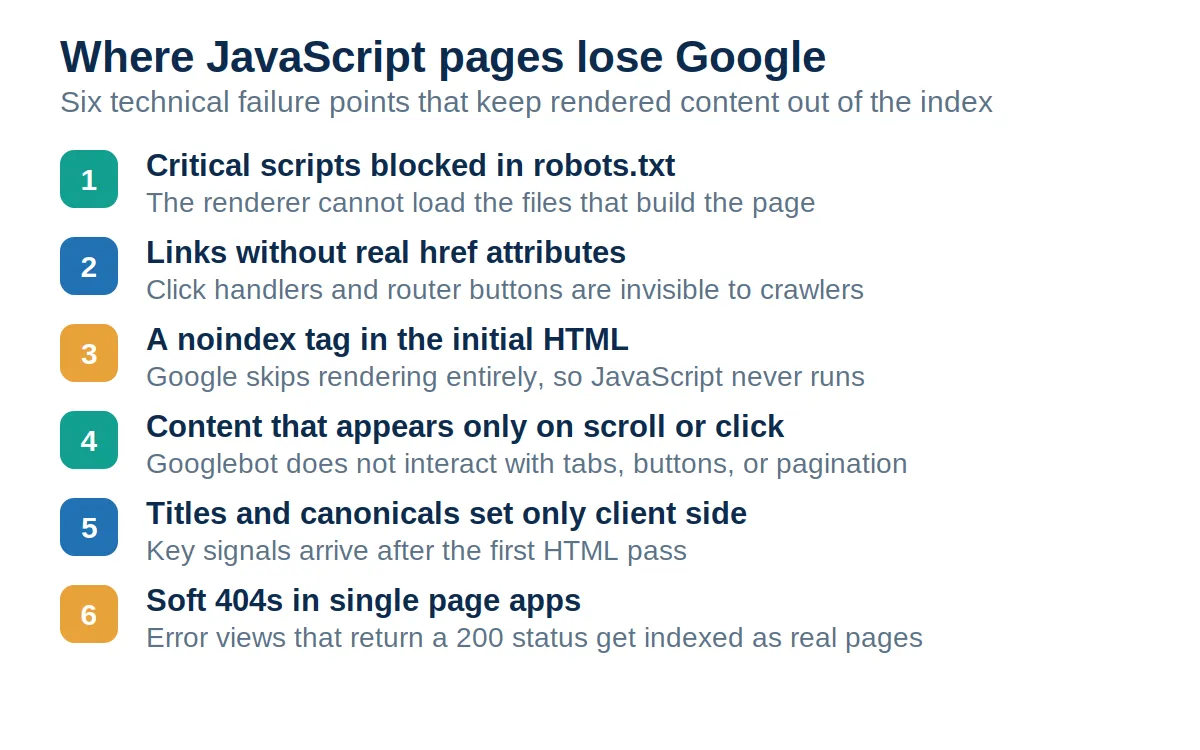
1. Critical scripts blocked in robots.txt. If the renderer cannot fetch app.js, it cannot build the page. Audit your robots.txt against the resources the page actually loads.
2. Links without real href attributes. Google only follows anchor elements with an href, per its crawlable links guidelines. Buttons with click handlers and router links that never touch the DOM as anchors leave whole sections undiscovered.
3. A noindex tag in the initial HTML. It cancels rendering before your scripts run. Staging flags that leak into production are a classic source.
4. Content that appears only on scroll or click. Googlebot does not click tabs, expand accordions, or scroll to trigger loaders. Google's lazy loading guidance recommends patterns like IntersectionObserver and paginated URLs so content loads without interaction. This hits ecommerce marketing hardest, where infinite scroll product grids can hide most of a category from the index.
5. Titles and canonicals set only client side. They usually get picked up at render time, but they arrive late and fragile. This signals that this important information belongs in the server response.
6. Soft 404s in single-page apps. Client-side routers happily return a 200 status for pages that do not exist. Redirect missing content to a real 404, or inject a noindex on the error view.
How to Test What Google Actually Sees #
You never have to guess. The URL Inspection tool in Search Console shows the exact rendered HTML Google stored for any indexed page, along with console errors and resources it could not load. The Rich Results Test performs a live render when you need to check a fix before Google recrawls.
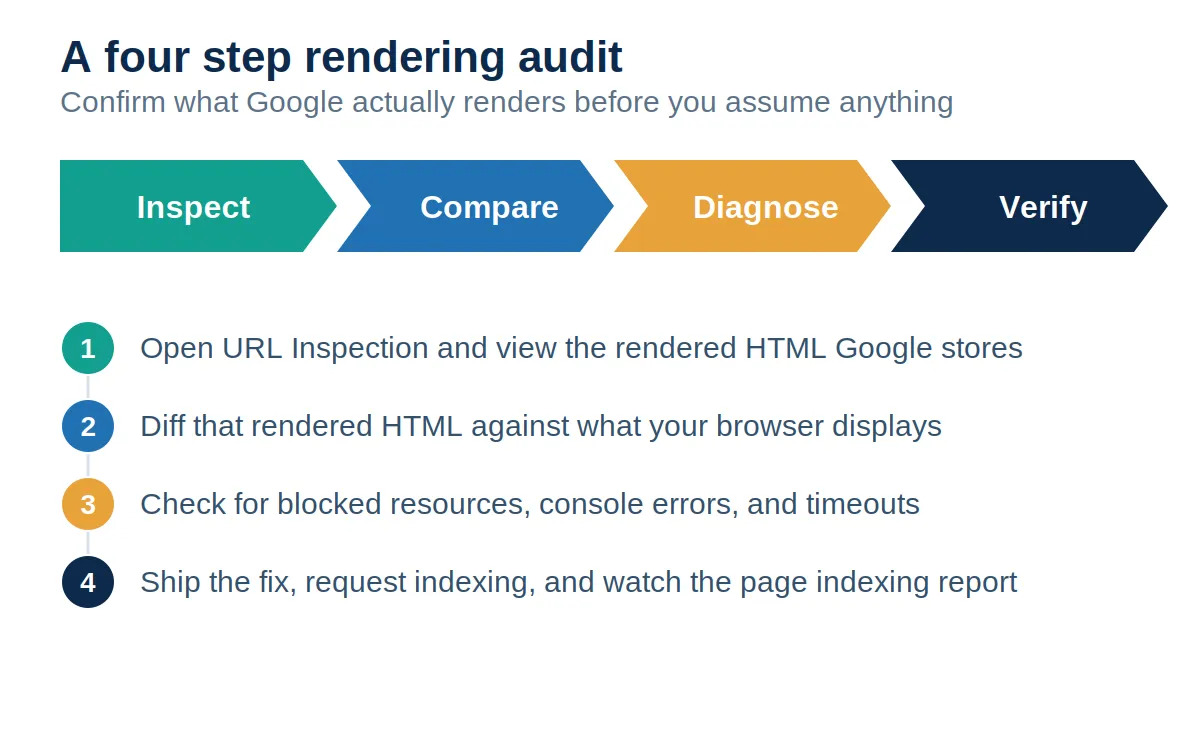
The workflow is a loop, not a one-time check. Inspect the rendered HTML, then compare it against what your browser displays; any content present in one and missing from the other is your problem statement. Diagnose the cause with the blocked resource and console reports, apply the fix, request indexing, and watch the page indexing report until the numbers move. Google maintains a dedicated troubleshooting guide for search-related JavaScript problems that maps most symptoms you will find to their causes.
The 2026 Stakes: Every Answer Engine Reads Your HTML First #
The rendering conversation used to end with Google. It no longer does. AI Overviews and AI Mode inherit Googlebot's full rendering pipeline, but the assistant crawlers gathering training data and live citations do not, and neither do most of the smaller bots that feed answer engines. For a growing share of the queries that influence your buyers, the initial HTML response is the only version of your site that machines ever read.
That shifts rendering from a technical preference to a distribution decision. Content teams can produce the best guide in the category, but if the words only exist after a client-side render, a meaningful slice of the machines quoting answers to your prospects will never see them. Pairing server-rendered delivery with content production built for citation, clear claims, dated statistics, and structured data in the initial response is what visibility looks like this year.
What to Do With All of This #
Google sees something different from your users only for as long as your architecture makes it so. The pipeline is public, the queue is measured, and the failure points are known. Render your critical content on the server or at build time, keep every link a real anchor, keep noindex out of pages you want found, and verify with the URL Inspection tool instead of assuming. Sites that treat the initial HTML as the product, not the loading screen, get indexed faster by Google and stay visible to every crawler that follows.
Frequently Asked Questions #
What is JavaScript SEO rendering? #
It is the process where Google executes a page's JavaScript in a headless Chromium browser to see the final content, then indexes that rendered HTML instead of the raw server response.
Can Google render JavaScript? #
Yes. A 2024 study by Vercel and MERJ found Google fully rendered 100% of eligible pages with a 200 status code, including complex client-side applications.
How long does Google's render queue take? #
The median delay between crawl and completed render is about 10 seconds, though the slowest 1 percent of pages waited around 18 hours in the same 2024 dataset.
Does client-side rendering hurt SEO? #
It adds risk rather than a penalty. Content that only exists after JavaScript runs depends on a successful render, loads slower for users, and stays invisible to AI crawlers.
Do AI crawlers like GPTBot render JavaScript? #
No. Vercel's December 2024 crawler research found that GPTBot, ClaudeBot, and PerplexityBot fetch JavaScript files but never execute them, so client-side content is invisible to them.
How do I see what Googlebot sees on my page? #
Use the URL Inspection tool in Search Console, open View crawled page, and read the rendered HTML tab. Anything missing there is missing from Google's view of the page.
Is dynamic rendering still a recommended solution? #
No. Google now describes serving prerendered pages only to bots as a workaround, not a long-term strategy, and recommends server-side rendering or static generation instead.
Can JavaScript remove a noindex tag so the page gets indexed? #
No. If noindex appears in the initial HTML response, Google skips rendering entirely, so the script that would remove the tag never runs.
Does server-side rendering guarantee my pages get indexed? #
No. It removes the rendering dependency and speeds up discovery, but indexing still depends on content quality, internal linking, and crawlability.
What is the fastest fix for a JavaScript-heavy site? #
Ship critical content, titles, canonicals, and navigation links in the initial HTML through server-side rendering or prerendering, and keep every link a real anchor tag with an href.