Google AI Max Reporting: Who Controls Your PPC Campaign?

Tuba
September 29, 2026
Table of Contents
- Key takeaways
- When Google Chooses the Search, Ad and Landing Page: Who's Really Controlling Your PPC Campaign?
- What changed in September 2026
- Three decisions, one toggle
- What Google's Numbers Say, and What Each One Measures
- What Independent Tests Found
- Google AI Max Reporting: Where Each Decision Shows Up
- What Advertisers Still Control
- What Advertisers are Delegating
- A Working Routine for the Delegated Campaign
- Frequently asked questions
Key takeaways #
Three decisions moved. With AI Max on, Google picks the search your ad enters, the headline and description shown, and the page the click lands on. Your keywords, ads, and final URLs are inputs, not instructions.
It is now the default. New Search campaigns have AI Max on at creation; legacy broad match and automatically created asset campaigns have been auto-upgrading since September 2026, and Dynamic Search Ads follow in February 2027.
Google AI Max reporting lives in four places today. Search terms report (AI Max match type, Source column, ad combinations view), keywords report (two AI Max total rows), asset reports (Added by: Google AI), and landing pages report (Selected by). Google announced a unified journey view on 23 September 2026, but it is not yet dated.
Quote the baseline with the number. Google's 14%, 27% and 7% lifts measure different things; the 7% compares two AI Max configurations, not AI Max against keywords.
Judge lift at the account level. In the only sizeable independent study, 54% of "new" campaign-level queries were already captured elsewhere in the account, leaving roughly 3% account-wide uplift.
You still control the pool, not the pick. Bids, negatives, URL and brand lists, locations of interest, text guidelines, AI Brief, disclaimers, and per-feature switches all narrow what Google chooses from. None of them choose.
When Google Chooses the Search, Ad and Landing Page: Who's Really Controlling Your PPC Campaign? #
Open a Search campaign created in Google Ads this month, and three switches are already on. One decides which searches your ad shows up for. One writes headlines and descriptions to fit each search. One picks the page on your site the click lands on. The keyword you typed, the responsive search ad you wrote, and the final URL you pasted are now inputs to a system that makes the final call at auction time. Google calls that system AI Max for Search; it moved out of beta in April 2026, and since September it has been switching itself on across legacy campaigns that never asked for it.
This post is about the paper trail. Google AI Max reporting is where the three decisions become visible, and it is the clearest map of where control has moved. We cover each feature, the published numbers and their baselines, the exact reports and columns to read, and the levers you still hold, for anyone running or buying PPC management who wants to know what they are still deciding.
What changed in September 2026 #
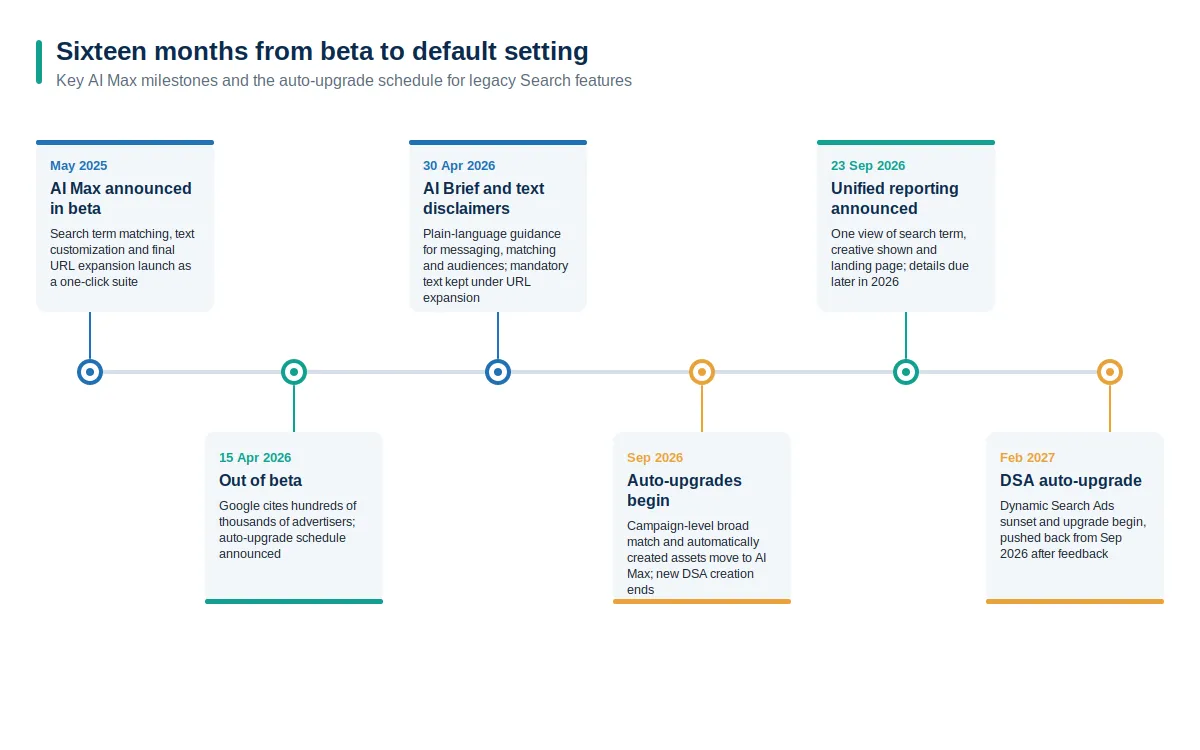
AI Max launched in beta in May 2025 as a one-click suite of three features for Search campaigns. On 15 April 2026, Google announced it was leaving beta, citing hundreds of thousands of advertisers already using it, and set out an automatic upgrade schedule for three legacy features: Dynamic Search Ads, automatically created assets, and the campaign-level broad match setting.
The schedule then split. In a June 2026 update to the same post, Google pushed the Dynamic Search Ads sunset and auto-upgrade to February 2027 after advertisers asked for more time. Campaigns using automatically created assets or the campaign-level broad match setting stayed on the original timeline and began upgrading in September 2026, with new DSA creation ending in Google Ads, Editor and the API in the same window. The upgrade mirrors your legacy setup: broad match campaigns get search term matching switched on, automatically created asset campaigns get search term matching plus text customization, and DSA campaigns will eventually get all three features with their URL controls carried over.
If you are not sure whether an account has been upgraded, Google's setup guide notes that AI Max settings can be added as columns or used as filters in the campaign list view, and the upgrade post says notifications go out in the account before the transition. Ten minutes with those columns will tell you which campaigns are now running with search term matching, text customization, or final URL expansion that nobody switched on.
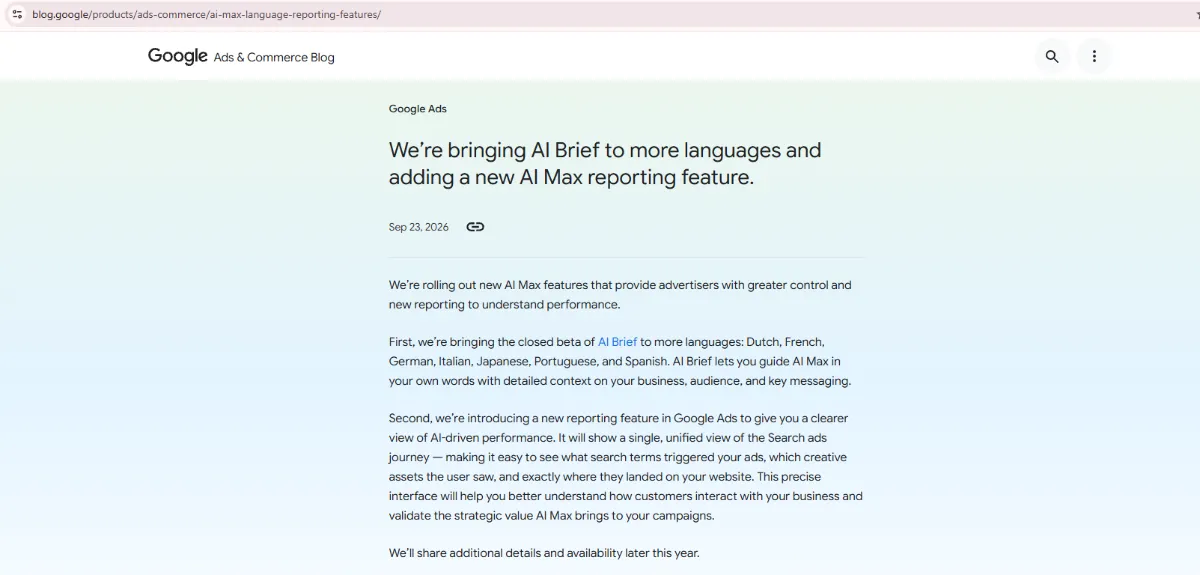
Then, on 23 September 2026, Google announced a new reporting feature: a single, unified view of the Search ads journey showing what search terms triggered the ad, which creative assets the user saw, and exactly where they landed. Google did not date availability; it said it would share details later in the year. The timing is not accidental. Once Google is making three decisions per impression, it needs one report that shows all three, or advertisers cannot tell what they bought.
Three decisions, one toggle #
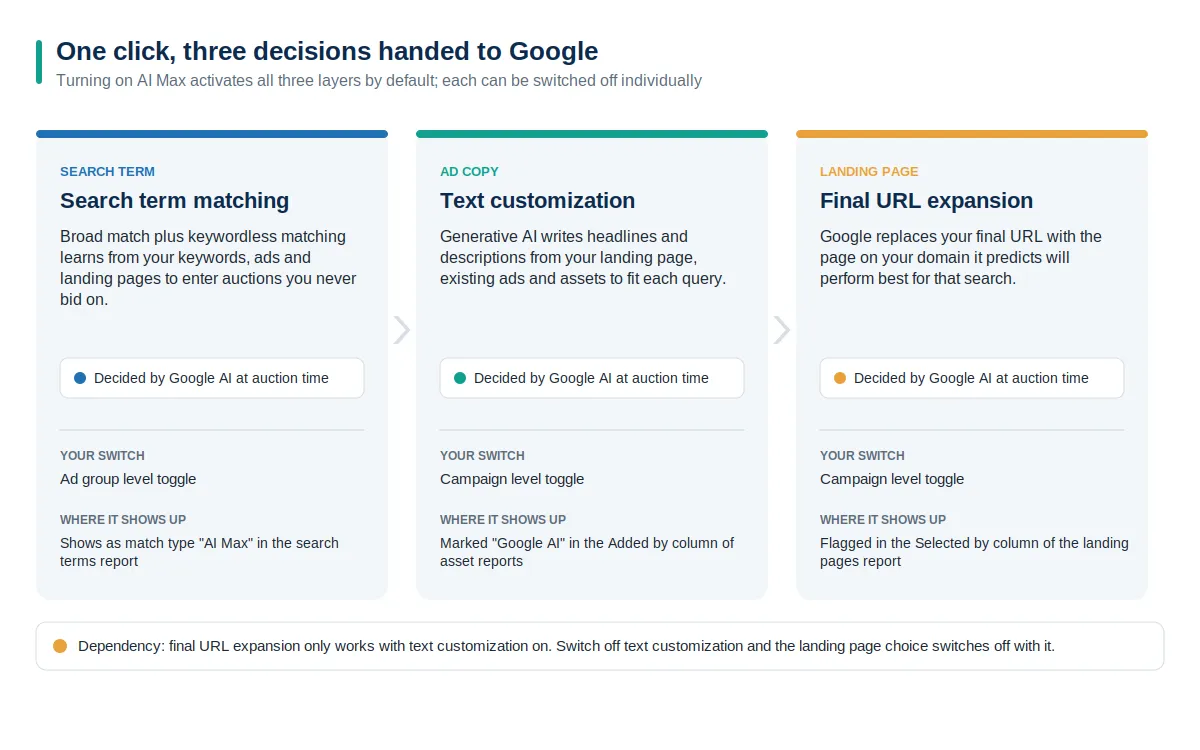
Google's own documentation on how AI Max works splits the suite into two panels: search term matching and asset optimization, which contains text customization and final URL expansion. Turning on AI Max turns on all three. You can switch each off individually, with one dependency covered below. New Search campaigns have AI Max selected by default at creation.
Decision | Keyword-era Search campaign | Search campaign with AI Max on |
|---|---|---|
Which searches the ad enters | Your keyword list and match types | Keywords plus broad match expansion and keywordless matches learned from ads and pages |
Which copy is shown | Your responsive search ad assets, with pins honored | Your assets plus Google-written assets per query; pins set aside when the URL changes |
Which page gets the click | The final URL on the ad | Any query-relevant page on your domain within the ad group's theme, unless excluded |
Where you see the outcome | Search terms and keyword reports | Four reports with AI Max columns and rows; unified journey view announced |
Search term matching: which auction you enter #
Search term matching combines broad match with what Google calls keywordless technology. It learns from your keywords, ad assets, and landing pages, then enters your ad into searches none of your keywords would have matched. Keyword prioritization works as it does elsewhere in Search, so an exact match keyword still wins over an AI Max match for the same query. One change affects upgraded accounts: when the campaign-level broad match setting is retired, broad keywords no longer get treated as exact match in prioritization. Google's fix is to add exact match copies of the keywords you care most about.
The rationale is old. Google has said since 2013 that 15 percent of daily searches are new, and no keyword list can cover them. That is true. It is also the argument for handing the decision over.
Text customization: which ad they see #
Text customization is the feature formerly called automatically created assets. It uses generative AI to write headlines and descriptions from your landing page copy, existing ads, and assets, so the ad served for a query about colorful midi dresses doesn't read like the ad you wrote for a red midi dress. The assets it writes are real assets in your account: they appear in asset reports marked "Google AI" in the Added by column, and you can remove any one of them.
Final URL expansion: which page they land on #
Final URL expansion is the decision advertisers find hardest to give up. With it on, Google may replace the final URL in your ad with a different page on your domain that it predicts will perform better for that specific search, restricted to pages that are query-relevant and themed to the ad group. It requires text customization so the copy can be rewritten to match the new page; switch off text customization and URL expansion goes with it. Two side effects matter. Pinned responsive search ad assets aren't honored when you choose a different URL. And if your tracking template doesn't use a standard {lpurl} pattern, the expanded page can 404, which Google's documentation covers under troubleshooting for exactly that reason. Anyone doing serious landing page conversion work needs to know which pages are eligible before this switch goes on.
What Google's Numbers Say, and What Each One Measures #
Google has published three headline figures and two advertiser case studies for AI Max. They are useful, but they measure different things against different baselines, and people routinely quote them as if they were one number.
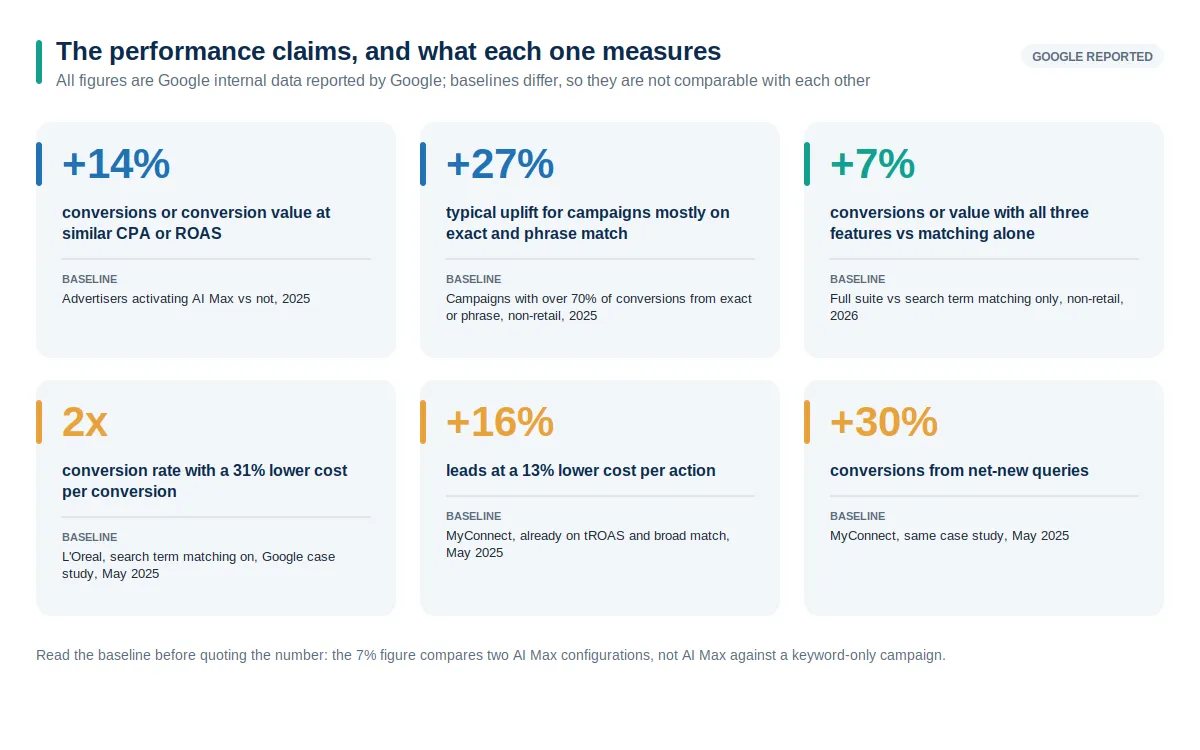
The 14 percent and 27 percent figures come from the May 2025 launch and compare advertisers who activated AI Max with those who did not; the 27 percent is restricted to non-retail campaigns and shows that more than 70 percent of conversions came from exact or phrase match. The 7 percent figure from April 2026 is narrower still: it compares the full feature suite with search term matching alone, again for non-retail advertisers, so it says nothing about AI Max versus a keyword-only campaign. The L'Oréal and MyConnect results are single-advertiser case studies from the launch post. MyConnect's 30 percent increase in conversions from net-new queries is the most interesting of the set, because net-new queries are the only thing search term matching can deliver that your keywords could not.
Google's April 2026 anniversary post also called AI Max its fastest-growing AI-powered Search ads product, on internal data for July to September 2025. Adoption is not results, and the product was on by default for new campaigns in that period.
What Independent Tests Found #
The most cited third-party study appeared in Search Engine Land in March 2026: 23 tests across 16 mature advertiser accounts over nine months. Its findings are more useful than any single lift number because they explain the shape of the result.
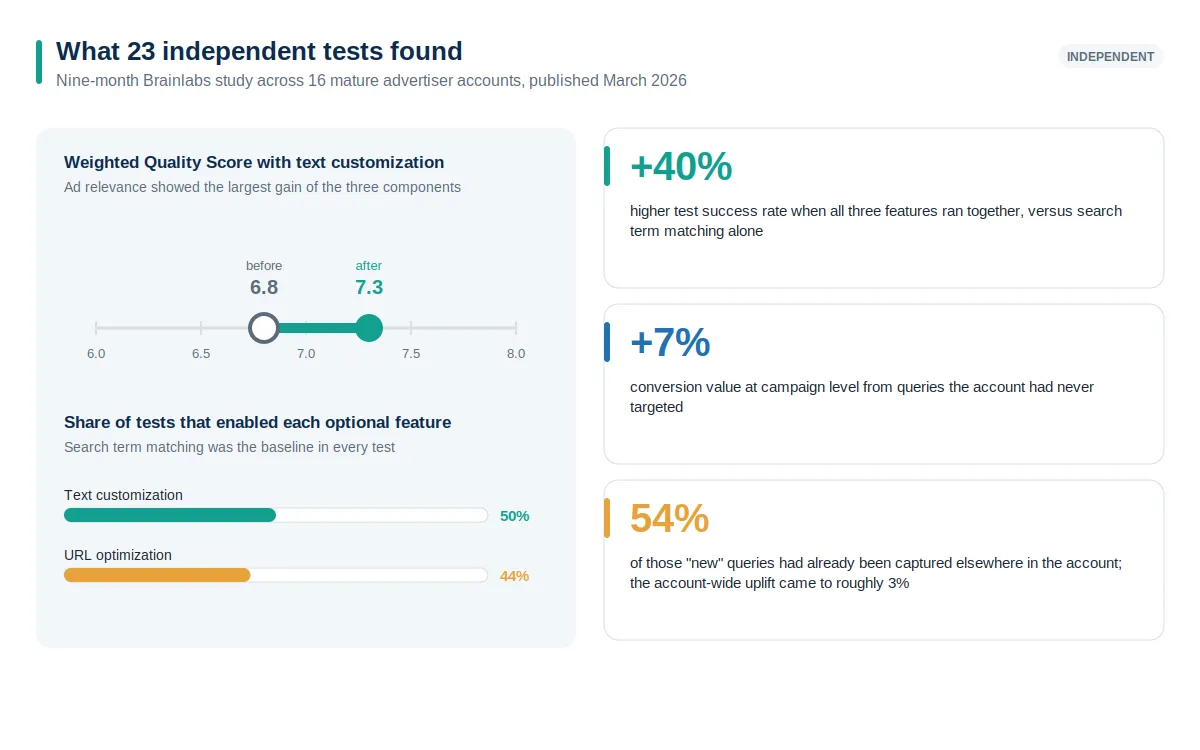
Three things stand out. Tests that ran all three features had a 40 percent higher success rate than tests that used search term matching alone, yet only half the tests enabled text customization and 44 percent enabled URL optimization, partly for compliance reasons. Text customization lifted weighted Quality Score from 6.8 to 7.3, with ad relevance improving most. And the incrementality question had a sobering answer: at campaign level, AI Max produced about 7 percent more conversion value from queries the campaign had never targeted, but 54 percent of those queries had already been captured elsewhere in the account, leaving roughly 3 percent account-wide uplift.
Carry that last finding into every AI Max review. The campaign-level report flatters the feature; only the account-level view shows whether Google found new demand or moved existing demand between your campaigns, the same discipline that separates real organic search growth from cannibalization between your own pages.
Google AI Max Reporting: Where Each Decision Shows Up #
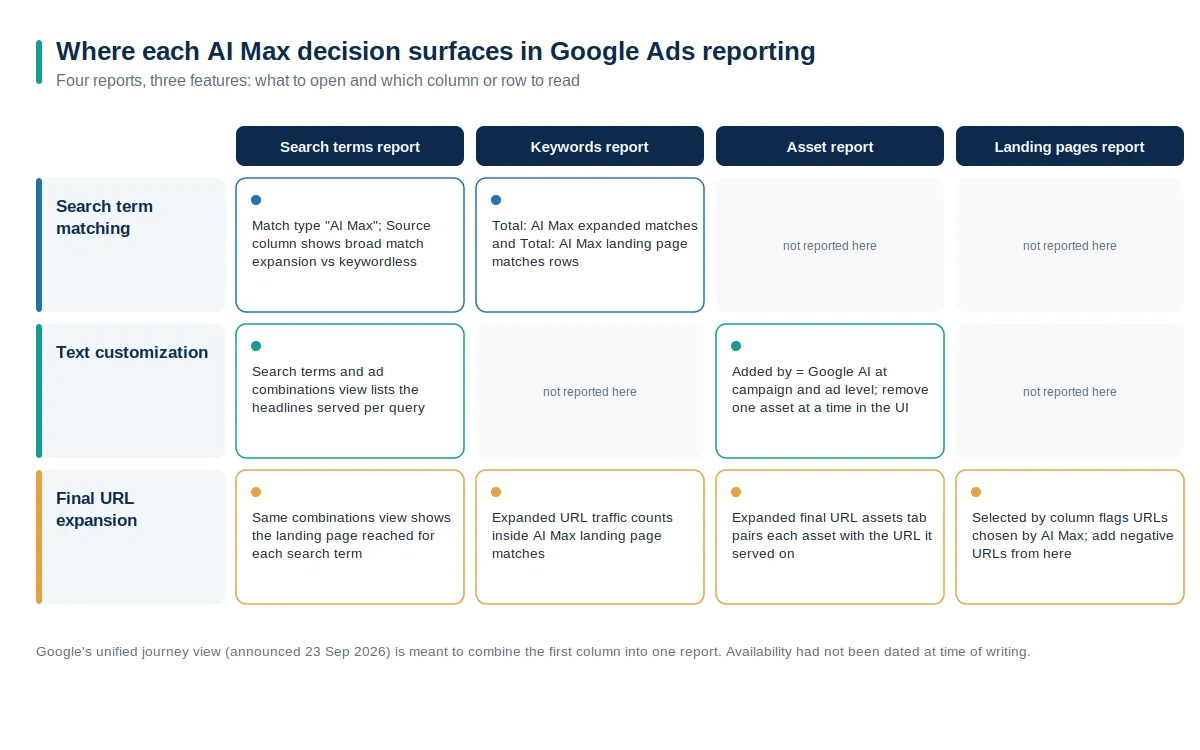
Google's reporting guide for AI Max spreads the evidence across four reports. Until the unified view arrives, use this map. One ground rule from the same guide: wait at least two weeks after enabling AI Max before making changes such as adding negatives, so the system has time to ramp up.
Search terms report #
Add the Source column and filter Match type for "AI Max". The match type tells you the query came from AI Max rather than a keyword; the Source column tells you whether it was broad match expansion of a keyword or a keywordless match from your assets and landing pages. Then switch the dropdown above the table to "Search terms and ad combinations", formerly "Search terms and landing pages from AI Max". This view is the closest thing to the promised unified report that exists today: for each search term, it lists the headlines served and the landing page reached. Tick a row to add it as a negative keyword or negative URL. Google warns that the match type filter undercounts AI Max because it ignores the "Other search terms" bucket.
Keywords report #
Scroll to the bottom. Two aggregate rows appear in AI Max campaigns: "Total: AI Max expanded matches", which is traffic from broad match expansion of the keywords you added, and "Total: AI Max landing page matches", which is traffic that matched because of your landing pages or assets, outside your keywords entirely. Traffic to pages chosen by final URL expansion also counts in the second row. These two rows are the fastest way to answer the first question a client will ask: how much of this campaign is still running on my keywords?
Asset reports #
At campaign level, the asset report's Associations and Performance tabs show every asset with an Added by column; Google-written headlines and descriptions carry the value "Google AI". The "Expanded final URL assets" tab pairs each asset, yours or Google's, with the expanded URL it served on, where you can check whether a generated headline matched the page it pointed to. The ad-level report shows the same flag inside a single responsive search ad, so you can compare your assets with Google's on the same KPIs. The interface lets you remove one asset at a time; bulk removal requires the Google Ads API or Editor. The system can add assets in bulk. You cannot remove them in bulk without leaving the interface.
Landing pages report #
The landing pages report lists both advertiser-provided URLs and pages chosen by final URL expansion, with a Selected by column that flags which is which. This report answers the question that worries e-commerce advertisers most: Is Google sending paid traffic to a blog post, a category page with no stock, or a support article? You can add exclusions directly from this report, and the same URL exclusions also appear under the campaign's AI Max settings as a list of URLs or as rules.
The unified journey view #
The September 2026 announcement promises to fold the search term, the creative shown and the landing page into one interface, framed by Google as a way to "validate the strategic value AI Max brings". Read that as a tell: the report exists because advertisers could not see what they were paying for, and Google wants the value visible before the DSA cohort upgrades in February 2027. When it arrives, reconcile it against the ad combinations view and the keyword report rows above to see whether it is a new lens or a repackaging.
What Advertisers Still Control #
Google's answer to the control question is that AI Max comes with new controls that give you the precision you previously used keywords for. The list is real, and it is longer than most advertisers realize.
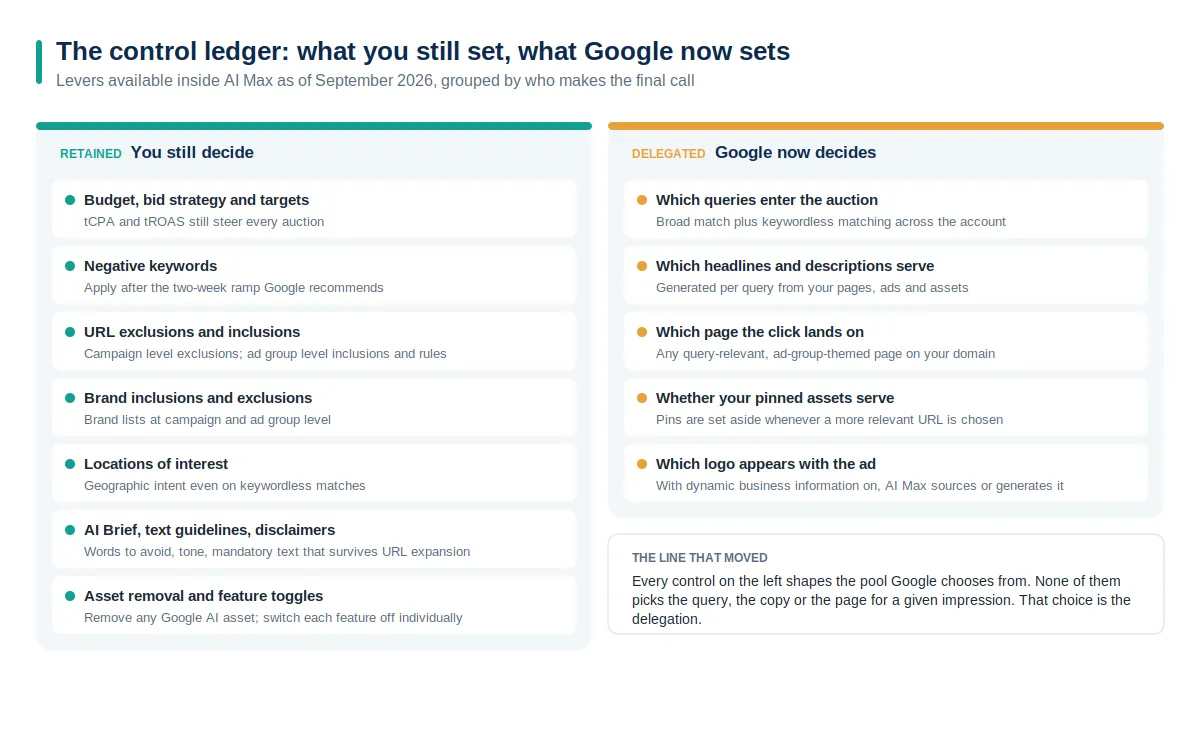
Budget and bidding. Target CPA and target ROAS still constrain every auction, and Google's setup guide says the AI Max features require conversion-based Smart Bidding to work effectively. AI Max does not decide how much you pay for a result; it decides which results are on the table.
Negative keywords and negative URLs. You can add both from the search terms report. Google asks you to use them sparingly and only after the two-week ramp, but nothing stops you.
URL exclusions and inclusions. Campaign-level exclusions, as a list or as rules, keep pages out of final URL expansion. Ad-group-level inclusions restrict expansion to the pages you name, and with expansion off, they become the only dynamic landing pages Google will use. Legacy DSA rules based on page title or page content become read-only after upgrade.
Brand inclusions and exclusions. Brand lists at campaign level, with inclusions also available per ad group, decide which brand searches your ad can and cannot appear on. This control stops keywordless matching from quietly bidding on a competitor's name.
Locations of interest. An ad-group-level control, only in AI Max, that reads geographic intent from the query even on keywordless matches.
Words. Text guidelines let you ban terms and set tone for generated copy. AI Brief, rolling out in English since April 2026 and in seven more languages since September, takes messaging, matching, and audience guidance in plain sentences and shows previews before you commit. Text disclaimers guarantee mandatory wording stays in the ad even when the URL expands, which regulated advertisers couldn't do before April 2026.
The switches themselves. Each feature can be turned off. Every Google-written asset can be removed. Google's one-click AI Max experiments let you test the suite against the same campaign without it before committing.
Every item on that list shapes the pool Google chooses from. None of them chooses. That distinction is the whole story.
What Advertisers are Delegating #
The delegated list is shorter but heavier. For any given impression, Google now decides whether your ad enters the auction at all, which headline and description combination the searcher sees, and which page on your site receives the click. In a DSA-upgraded campaign, it also generates the minimum static assets for the responsive search ads that replace your dynamic ads, and with dynamic business information enabled at account level, it will source or generate a brand logo to show alongside them.
Three smaller delegations follow. Pinned assets stop being honored whenever Google picks a different URL, so a compliance headline pinned to position one can vanish from the exact impressions where the page changed; text disclaimers exist to fix that. Keyword prioritization shifts in upgraded broad match campaigns unless you add exact match copies. And attribution between campaigns becomes Google's to arbitrate: the 54 percent overlap in the independent study was invisible in any campaign-level report.
None of this is hidden. It is documented, toggleable, and, as of this month, increasingly reported. But the direction of travel is one way: features arrive on by default, legacy settings migrate into the suite rather than staying beside it, and reporting is added after delegation, not before. An advertiser who does nothing in 2026 ends with all three decisions delegated, which is what the auto-upgrade schedule is designed to achieve.
A Working Routine for the Delegated Campaign #
Delegation is not the problem. Unexamined delegation is. The routine below fits a fortnightly review and uses only the reports above.
Read the two keyword report rows first. If AI Max landing page matches is growing faster than AI Max expanded matches, Google is finding demand through your pages and assets rather than your keywords. Decide whether that is what you want before you look at anything else.
Open the ad combinations view and sort by cost. Look at the top twenty rows as a searcher would: does the headline answer the query, and does the page deliver on the headline? Add negatives and negative URLs for the rows where either answer is no.
Filter assets by Added by = Google AI and compare KPIs. The study above found generated assets improved return on ad spend on average. Yours may not. Remove the ones that underperform your own copy and feed the winners back into the page copy they were drawn from.
Check the Selected by column against your site map. If Google keeps choosing pages you would never have bid to, either the exclusions are missing, or the site architecture is signaling the wrong things about those pages.
Judge lift at account level. Compare total account conversions and cost before and after, not the AI Max campaign on its own, and use Google's experiments for anything that needs a clean read.
Search now interprets intent on both sides of the auction: AI Overviews and AI Mode on the organic side, AI Max on the paid side. The advertisers doing well treat their pages, assets, and business information as the inputs the machine reads, the same work that AI search optimization demands of organic content. If you would like a second pair of eyes on what your AI Max reports are saying, we are happy to take a look.
Frequently asked questions #
What is Google AI Max reporting? #
It is the set of Google Ads reports and columns that expose what AI Max decided on your behalf. The search terms report gains an "AI Max" match type, a Source column, and a "Search terms and ad combinations" view; the keywords report gains two aggregate rows for AI Max traffic; asset reports mark Google-written copy as "Google AI" in the Added by column; and the landing pages report gains a Selected by column for pages chosen through final URL expansion.
Is AI Max a new campaign type? #
No. Google describes it as an optimization layer inside existing Search campaigns. Your campaign IDs, ad groups, keywords, and budgets stay where they are; AI Max adds search term matching, text customization, and final URL expansion on top.
Which campaigns are being upgraded to AI Max automatically? #
Search campaigns using the campaign-level broad match setting or automatically created assets started upgrading in September 2026. Dynamic Search Ads were originally on the same schedule, but Google pushed their sunset and auto-upgrade to February 2027 after advertiser feedback.
Can I turn off final URL expansion but keep the AI-written ad copy? #
Yes. Text customization and final URL expansion are separate campaign-level checkboxes under Asset optimization. The reverse isn't possible: final URL expansion requires text customization, so turning off text customization also turns off URL expansion.
Why does the search terms report show low AI Max numbers when I filter by match type? #
Google notes that the match type filter excludes "Other search terms", the bucket of low-volume queries it does not itemize, so a filtered view undercounts AI Max traffic. Use the aggregate rows at the bottom of the keywords report for the full contribution.
How long should I wait before adding negative keywords to an AI Max campaign? #
Google's reporting guidance says to wait at least two weeks after enabling AI Max on a new or existing campaign before making changes such as negatives, so the system has time to ramp up and learn.
Can I remove the headlines Google writes? #
Yes. In the campaign-level or ad-level asset report, you can remove any asset marked "Google AI" from its status icon one at a time. Bulk removal is only available through the Google Ads API or Google Ads Editor.
Do pinned headlines still work with AI Max? #
Not when final URL expansion or URL inclusions are on. Google's documentation states that pinned responsive search ad assets aren't used when it chooses a more relevant URL, because they may not match the searcher's intent. To keep pins, turn both of those features off.
What is the new unified AI Max reporting view? #
On 23 September 2026, Google announced a reporting feature that will show a single, unified view of the Search ads journey: the search term that triggered the ad, the creative assets the user saw, and the page they landed on. Google said it would share more details and availability later in 2026.
Does AI Max work without Smart Bidding? #
Google's setup documentation says search term matching, final URL expansion, and text customization require conversion-based Smart Bidding strategies to work effectively, and that AI Max will not be effective in campaigns limited by budget.